


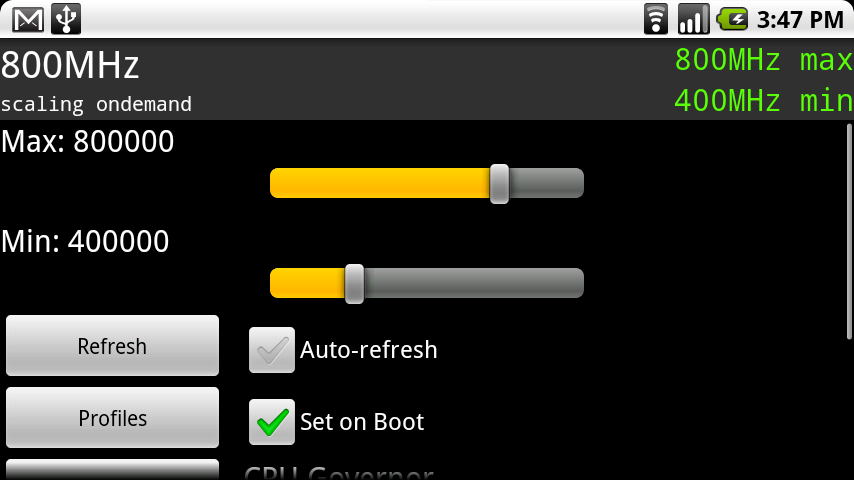
If you have gone through the process of installing one of the new CyanogeMod ROMs, then chances are that you are unable to overclock it past 600Mhz. Don’t panic! We can fix you! What we’ll have to do is install a new overclock-able kernel which is super simple.
*Warning* – The process we are about to layout is extremely risky. If you choose to do this, we are not liable should you brick your phone or cause any sort of permanent damage. If you do harm to your phone, please do not email us asking for help as you have already been warned and accept all risk involved. Cheers!
*Note 1* – Overclocking can only be performed on a rooted Droid. Rooting can be completed by following this post.
1. Open ROM Manager hit the Options key and choose “Developer Mode” and “OK”.
2. Then “Download ROM” and “CyanogenMod”.
3. You should now be able to choose “bekit Kernels” from the list. (See Note 2)
4. You are prompted with options for various kernels, choose one. Click “OK”.
5. Allow the kernel to download and when prompted, do NOT choose “wipe data”. Backup if you want.
6. Phone will boot into recovery and install your new kernel. (See Note 3)
7. Once it boots back up, return to SetCPU and you should now be able to overclock.
8. Done!
*Note 2* – For all kernel support, follow this thread at the Cyanogen forums. We’ll also put a light description on kernels below.
*Note 3* – If you phone freezes at the M logo, it does not like the kernel you chose. Perform a battery pull, reboot into recovery and restore one of your nandroid backups. Go back into ROM Manager and choose another kernel.
And now a little background on these bekit kernels:
- New CyanogenMod ROMs all come with the stock kernel meaning you need to choose a new one to be able to overclock.
- Bekit Kernels are all “low voltage” unless it says otherwise. This means they put less strain on your Droid and should also enhance battery life. Higher voltage kernels should probably be left to super advanced users and the low ones to the rest of us.
- These kernels come in either 5 or 7 slot. This means you have either 5 or 7 different speeds to choose from on that particular kernel. For example, on a 5 slot it could be overclocked to “250/400/550/800/1000” and on a 7 slot it could be “125/250/400/500/550/600/800”.
- When you are prompted to pick a kernel, the MHz or GHz listed is the highest that kernel will go. For example, if you choose “5 Slot 1.1 Ghz 0.8.1” your max overclock speed would be 1.1 Ghz.
- “0.8.1” is simply the version number that is currently available. This really means nothing when choosing.
Drop your questions in the comments and we’ll be sure to get to as many as possible!
Huge cheers to TOM!






I cannot find any kernels that work my with CM10 Bionic
I don’t see ANY ‘bebit kernels’ on the download list. All I can see on the CM7 rom list is 7.0.0 and 7.0.2, but nothing with the word ‘bebit’ on it. I’ve gone through ALL of the ROMs on the download list, and have not seen anything with ‘bebit’ on it.
I’m obviously doing this wrong, but I don’t know just what it is that I’m doing wrong.
This post is from over a year ago. I looked and don’t see them either. Perhaps something has changed since then…
K, when I go to download the CyanogenMod mod, there’s no option to choose any bekit kernal.
None of the Pekit kernels are working. P3 works fine; but it won’t allow Google Goggles to work. Is there a fix for this?
Please help I followed the instructions and selected cyanogen 6.0 , then selected the adw launcher, after the install and reboot I get a cyanogen icon in the middle of the screen with a trailing sprite circling it over and over and over. I've let it run for 20 minutes before deciding that its stuck in an endless loop. Not sure what to do next.
Look at this thread:
http://1000umbrellas.com/2010/05/04/how-to-overclock-the-motorola-droid/comment-page-1#comment-336
It works perfect.
I can;t find the opinions button in Rom Manager
I can;t find the opinions button in Rom Manager
when u guys set how fast u want it, do u set ur tab on Performance. Ondemand, Powersaver, Etc….??
Anyone having issues overclocking and running froyo… check it.
http://p3designs.info/kernels/
I Think something is going on with my rom manager. I cannot flash clockworkmod recovery. It says Unable to contact server. please make sure that you have a stable internet connection. My connection is fine and tried it on and off of wi-fi. Any suggestions? I have spent all day doing this just to overclock my phone and tether it and now I fell half ripped off for my time.
do you have enough free space on your SD card?
how can i install bekit kernel for my stock rooted android 2.1 droid??
I installed the 2.2 version, then installed the 1 GHz kernel. Everything seems to be working properly, except when I go into SetCPU, I cannot overclock; 600 MHz is the highest option. This is my first time rooting, and my first time doing any of this sort of thing… I would really appreciate a little help if possible. I am not sure if perhaps I am missing something that will allow me to OC the proc past the default. Anyone have any ideas?
Thanks!
me too… I've tried a bunch and none work. Whats the deal? Surprised no one has offered any help either. I wonder if its forgotten about with all the Froyo excitement.
I have a question, I have tried to overclock at 5 slot 1.2, 1.1, 1.0…None of them are liked by my droid…Any suggestions?
Lives2fish@gmail.com
Thanks
me too… I've tried a bunch and none work. Whats the deal? Surprised no one has offered any help either. I wonder if its forgotten about with all the Froyo excitement.
Try the p3droid kernel they worked for my stock 2.1 rooted.
This worked for me as well.
I have tried most of the bekit kernals and am still unable to overclock above 600 they all seem to run ok but setcpu will not let me go any higher than 600.
Droid with cyangomod 5.0.6.1
rooted
can anyone help me with this. Thanks
I have tried most of the bekit kernals and am still unable to overclock above 600 they all seem to run ok but setcpu will not let me go any higher than 600.
Droid with cyangomod 5.0.6.1
rooted
can anyone help me with this. Thanks
Kellex I am running the Jrummy rom from your video guide on how to install custom rom from SPRecovery (official 2.1 rooted)…. I got Set CPU from the market, Maximum it lets me go to is 550.. How do i overclock? I have rom manager… okay but i dont see any options.. when i run rom manager it only gives the options to flash clockwork mod etc.. HELP
Ok step 1. Open ROM manager…. check….
Hit the Options Key…. (where the heck is this at?!) I see no Options key!
same problem here . . . ?
These instructions are for ROM Manager (Premium) – well worth the $3.99
Did you ever find an answer to this question…how hot is too hot?
I thought I could overclock without installing a custom rom? I've rooted using SPRecovery, bought SetCPU and it won't allow me to go past 550mhz. So I checked out what you said about using cynogen rom if you can't overclock and rom manager to get a new kernal….but isn't that installing a custom rom?
None of the Bekit Kernals seem to work for overclocking. They all freeze at the “M” logo and I have to reboot into recovery and restore everytime. Is there something that is not working like it should. I can get all the way to this point each time so I believe all the other preliminary work was done correctly. Help!!!!
can i get this on video pls.??
i just rooted and want to overclock
but i dont understand…
i hope somebody still reads this post. ive tried to install 3 kernels, and each one has froze on the m. accidentally did 8 mhz standard volt first then did 8hz then 1ghz both low volt. im gettng scared doing all these nandroid restores. need some help if anybody knows.
Look at this thread:
http://1000umbrellas.com/2010/05/04/how-to-overclock-the-motorola-droid/comment-page-1#comment-336
It works perfect.
Do you only need this for Set CPU? I'm using a free overclock widget. Is that worth it? I think it's working. It says it is.
Ok, this may not be the exact right spot to ask this…but I'll try. I'm on CM 5.0.6.1. Any ideas on which kernel i should flash…P3 or bekit's……and which one? 800? 1000? Also, when i do flash a new kernal…should i wipe data and cache? I think kellex said to wipe before i installed the new kernal for cm 5057. Thanks!
I found an app in the android market called overclock widget and it is allowing me to overclock to way past 600 though I'm running the CyanMod 5.0.5.7, is this app really working or is it going to mess up my droid? And I am using the stock kernel that came with it, 2.6.29-omap1-bekit-0.8.0-5x1200LV bekriebel@ubuntu #1
Yeah – it sounds like it's working. You've got the 5-slot 1.2Ghz low-voltage kernel
I'm running UD 5.0 ROM on Chevy's 7 slot medium voltage 1.0 GHZ Kernal and I'm over clocked at 800 MHZ, but my battery temp is pretty constant at 42 degrees C. Should I be using the 7 slot low voltage kernal?
Kellex, when u overclock ur phone & u set ur profiles. do u check the “set to boot” button?
I do. Just make sure your phone is running exactly the way you want it before selecting that option.
Thanks again Kellex. Awsome site!! learning alot here. 🙂
how do u get the temp down?
I intsalled the 7 slot 1ghz. I opened up the SetCPU and it still brings me 2 the SetCPU for Root Users. I scrolled 2 the bottom and it doesn't have the Auto Detect button, it has a Custom Frequencies button. it reads,” Reads setcpu.txt on SD fat or ext. Sorts speeds in kHz, separated by comma, from lowest to highest.but, the very top button says Autodetect Speeds Recommended. what should I do? or did I do something wrong? plz plz help.
I got the SetCPU working…. lol
please help. when i install a kernel from bebits and then open setcpu it will say “could not read custom config. reverting to defaults…” ive tried a couple different ones. still cant overclock
I got a question 4 u Kellex. I installed the Titanium Backup 2 back up my apps, I want 2 install CyanogenMod. I opened the Titanium backup app and it says”Sorry,I could not acquire root privileges. This app will not work! Please verify that your ROM is rooted and includes Busybox, and try again. I check in my app drawer and I have the Superuser permission ninja there. What's going on?
I got it 2 work…lol
8.2 dosen't seem to work. now im stuck at 550
Im rooted and runing cyanogen 5.0.5.7 but the bekit kernals is still greyed out in rom manager? what am i doing wrong?
figured it out
I think I'll have 2 get another kernel. The question that I have is, I tried 2 do a nandroid backup a few weeks after I got my droid and I couldn't get it 2 work 4 me, so I waited. I manually installed the 2.1 update from this forum and installed the ROM Manager and flashed 2 ClockworkMod Recovery. after doing that, I was looking round in ROM Manager and accidentally performed a backup. Here's my question..lol If I get a new kernel and it get stuck on the Moto Logo, is the backup that I did good 2 get me going again or do I have 2 do a nandroid backup? if so how do I do that w/ what I got or do I have 2 god back 2 the 2.0.1 and do it there? Can u help Kellex or anybody that might have the info.
Hi Droideons I have watched this site for a while and love it. It's very imformative. Best one out there tks. I am running CY 5.0.5.4 w/800ok and love it very fast and responding well. Don't like the idea of f-ing w/kernels.Can u tell me what new cy update has to offer me other cooling better.I seem to run cool just fine 84f max on temp mon.Anyway I love my Droid take it to bed with me it does everything. Have shelved my ipod,zune,mp3,don't even get on my laptop as much any more.Tks Rich
Hey im running Cyanogen with the new update everything works great but my batteries life is worst than ever any suggestions????
A little HELP!… I installed the new Cyanogen fixed the overclocking.. however the new Cyanogen killed my Market download capability. I used ROM Manager to run a fix permissions / rebooted.. still can't download from the Market!
after chosing your rom remember to check google apps 😉
Pretty sure I did that the first time… did it again just to make sure still getting – “process com.android.vending has stopped unexpectedly” – has any one else seen this issue, any other possible fixes?
Thanks
Tom S
Did a complete recovery to Cyanogen / wiped phone – now Market is working again (just sucks I have to set up everything again.
woops looks like you are two steps ahead of me ;-}
well tom i guess i should ask if you did a wipe befor installing the new cyanogen rom which you have to do and if you did you should install the new baseband and wipe allso then run wifi for 30-60min to see if that helps
well tom i guess i should ask if you did a wipe befor installing the new cyanogen rom which you have to do and if you did you should install the new baseband and wipe allso then run wifi for 30-60min to see if that helps
hey kellex i got one for ya, do you know if the new cyanogen rom comes with jit enabled or do i have to manually installed it like his older stuff?
jit is a no go tried to install but phone went to hell oh well problem with kernel i imagine 🙁
Kinda off topic but does anyone have any Metamorph theme files for 2.1 ROMS???
is there a kernel u can use for the CyanogenMod? 5.0.5.7 newest version?
folllow the instructions. The bekit kernals are for 5.0.5.x, considering you have 5.0.5.7 you would fall under the 5.0.5.x group <3
i am a little off key but if anyone wants the 2.1 download go to system upate on their droid and its their for download this is for the not to smart ones like myself…
anybody know, where are these kernals downloading to? i think i may need to clear that out.
nm, found it
I had great luck w/ this method. I ended up settling on a 7 slot with a max of 1Ghz. Thanks again Kellex and Tom for flushing out the issues.
Is the kernel for cyanogen 5.0.5 (2.6.29) an under voltage kernel? For me, staying at 5.0.5 for the docked shortcuts is more important than 5 rows in the app drawer.
Also, is it safe to have updated the radio, but not go up to 5.0.5.7 and stay at 5.0.5.5??
Thanks!
Yes, the radio update has NOTHING to do with the OS. I updated that once I saw it. No problems. It has to do with the network.
Kellex i need your help! I just recived my update for 2.1,and it will not download!!!!plenty of battery,any clues?
Are you rooted?
Not rooted,i was able to get on the 5th try,thanks for responding.
Does anyone know when the ultimate droid new version will come out
It was out and then pulled. Might be back tomorrow.
Ok thanks becuz i started to get worried when i chose it. Thanks
And i have not updated to the offical 2.1 so will this effect how i download the new black droid? Or do i just have to dowload it like regular?
The problem was…It was having Boot Loops
Updated earlier today and installed the bekit 5 slot 1Ghz kernal, worked perfectly on my Droid. Until I rebooted and ended up in a force close loop with the launcher, now I'm back to 5.0.5.4 until they get the bugs worked out, lol
So wait… I post this 5 times, in comments,and kellex gets all the praise because he can make a big post?
BTW I don't blame Kellex for being cautious and making a bit of a stronger warning. Not only because overclocking can fry your device, but also because you are using modified Kernals. Screwing with Kernals can screw your device, because you are changing the most base part of the operating system. Like with everything we do with modifying the device, it is dangerous…
BTW This new Cyanogen works great at 600mHz. Haven't tried at 550, but its smooth as silk at 800
I was hoping to try and stay as close to stock as possible for now and was wanting to overclock mine without having to flash a different rom on there.. I dont know, I guess I little part of me likes to stay with the original, and make my own customizations 😉
phone didn't like kernal, stuck at m logo, hold x for recovery, right?
Yeah hold X and Power to get to recovery. Just try a different kernel than the one you previously tried.
for some reason, phone would not go to recovery, the strangest thing, so after doing about 6 battery pulls, and starting the bootloader (only starting it, not doing anything there), then powering off, it started back up.
(The real technique was crying like an emo, and cutting, while sacrificing an iphone to the droid god)
Eithor way, anytime i reboot, i'm still stuck in this same freeze. I'm not seeing the phone get into recovery, or installing the different kernels, is there an actual animation for this or does it work in the background behind the M logo?
and while I'm on the subject, anybody know of a good link for usefulness of the bootloader, i feel i may need it soon.
Dumb question from a root toddler… when you say restore using one of our nandroid backups, is the nandroid backup what is created when you use ROM Manager to Backup when I install a new version of Cyanogen?
Yes, that makes a nandroid backup
I saw the option in Recovery, but wasn't sure that it was the same as doing it from ROM Manager.
Perfect! Thank you!
I am still not able to overclock. I tried a bunch of different 1 and 1.1 ghz kernals. SetCPU won't let me set it faster then 550 mhz. I check and see that the kernal is installed too.
Did you select auto-detect? And if so, try rolling the slider to the far left and then back towards the right.. It might need to be reset..
I haven't gone through this process to get to 2.1 rooted just yet, but I was curious if the overclocking works on a simple rooted 2.1.. If not can you do some kind of update without going to cyanogen? just curious, thank you 🙂
And even though I have only slept for about an hour in the last 2 days, I think I might undertake going back to 2.0.1 and then updating via the rooted method. 😀
its a piece of cake just becarful verizon will try to sneak 2.1 back on your phone as soon as it reboots just ignore and than delete it off your sd card to buy you some time to download droidmod updater :-}
I tried to upload the new Cyanogen, did the radio update and it didn't work so I went ahead and went back to stock while I was messing with it and now I can't upload any apps and when I try to flash clockwork so I can download my backup Droidmod from the sd it says it can't find a connection….any ideas?????? I swear any help and I will never try and go back to stock again.
can you boot into recovery manually and apply the restore that way??? that should for just fine then go back and try and reinstall
I can reboot manullay (power/x) but I can not apply anything from SD card, the only option I can think of is to return to factory settings???? Is this a bad thing?
alright, I notice that when I first downloaded the ROM and I was okay, at least I'm at 600 and the app drawer is cool 5 in a row cool. Until I saw the post then I was like oooh yeah, give me my 1ghz. 600 is cool but 1ghz is even cooler, thanks Droid-Life. Peace.
Everytime I come up with a question about something not working the way I thought it would, I just wait an hour or two and you always have the answer! Thanks for all the help on this site!
BTW, I'm still nervous about switching out the kernel, but I'll research the thread on the Cyanogen Forums and figure it out. I liked whatever kernel was used a few versions ago in Cyanogen…
dont be nervous if you ran other roms before cyanogen had you install yourself your kernel was switched out for you…thats why on setcpu u had to select auto detect bc the app was checking for the kernel the rom was based off of. Now developers are allowing you to pick the kernel that suits you instead of choosing one for you.
i personally choose a low voltage 1.0 kernel I have tried others and that seems to work the best more me and my use.
Yeah, I still feel like an infant with this stuff, but I'm learning so much everyday. Just when I think it couldn't get any better on my phone, something changes and I'm frustrated because I'll have to read up on something. But once I figure it out, I'm even happier with the results!
Cyanogen 5.0.5.7 is running really smooth for me without the overclocking, but you know I have to do it anyway! Based on some info on the Cyanogen Forum information, I was thinking of trying the 5 slot 1GHz max – 250/400/550/800/1000 – Low Voltage if I can figure out which one that is in ROM Manager.
Thanks for all the info!
it will actually say just what your looking for (5 slot 1.0GHz) I picked a 7 slot i figured it couldnt hurt, just more options for profiles and such ya know.
Yeah, in the thread the guy talks about how some people believe that having too many slots could fry the phone, but he believes 7 is highest you can go and still be in the safe zone. I only use the fail safe profile, so for now I'll stick with the 5 slot 1Ghz, but who knows in the future!
Seriously…it's like they just know what every Droid owner is looking for. I installed the updated Cyanogen yesterday (just to 5.0.5.6) and thought it seemed especially sluggish then realized I couldn't overclock this morning…
Low and behold droid-life has the answer. Now if only they could post the answers of how to get my kids to bed on the first try.
I think you'll need to install a version of Android in them, and then Kellex will have all the answers about your kids. There's probably a Kid-To-Bed app there. But you'll need to root them first.
Haha you guys are too funny. Working on Child Failsafe Mod right now. 😛
Anyone actually know what a solid temperature should be??
I'm running 800 Mhz
Installed tempMonitor and I'm getting
OMAP3430: 80F
AK8973: 87F
I'm stock 2.1 . . . what is that 600MHz?
I have the BatteryLife widget and it says 89F. I think my Seidio case makes it run a bit warmer.
if you read on some of the forums there is diffrent opinions on what that temp is actually reading and how accurate it is I have a profile set in my setcpu that if it goes over a certain temp it lowers my speeds and goes to powersave, if you go to the setcpu dev site he has a clear explanation of profile settings. However back to your original topic lol reguardless of what that temp meter says I know the back of my phone above my battery door should not be burning hot to the touch lol thats when I may need to change things up a little lol.
there are other Droid forums?!?
lol yes even though this is my fave but there are others out there even Kellex himself makes appearences on others lol…I use twitter to allow me to follow every site I know of all at once it makes things easier for me. But lets not let this start a better site war lol. there are alot of smart droid users out there so I read on multiple sites. But thats just me.
i read other sites too. just starting trouble! ;-P
i figured you were messing around lol!
I'm basically at the same numbers. 🙂
Hey Kellex,
It seems like your warning had a little more vigor this time around.
Do you recommend installing one of these kernels or did you just put this up per demand?
I want to do it but “extremely risky” threw me off. I really love Cyanogen but it does get bogged down at 600MHz on my Droid.
Thanks.
Just covering bases. Overclocking could potentially fry your device. Just something to be aware of.
Kellex, I am not overclocking but I am in a tough spot where I have ESE81 and I can't download apps, flash clockwork, root my phone….anything. Is it ok to wipe data/factory reset? I am out of all other options.
Are you stock or rooted? If you are rooted just boot into recovery and use a nandroid backup… That should fix everything abck to when it was working. Then you can try again.
Great post. One suggestion: it would be wise to uncheck “Set on Boot” in SetCPU until one is sure that the settings are stable with the new kernel.
Thanks keelex it was very easy I started the process from Toms directions on the other post it was very simple. My phone is running much cooler now with this kernel and rom. I was on UD 9.0 with a med voltage 1.0 kernel and with heavy use my phone would get a little warm. Its signifigantly cooler now. I picked a 7 slot 1.0 kernel and I guess its a low voltage since it didnt specify like you said. One thing though kellex, what are your setcpu settings and why??? Just curious of what some other people are doing compared to what I do.
I normally choose a 1ghz LV kernel and overclock to 800mhz. Runs smooth and doesnt overheat.
Kellex, in terms of temperature, what would you consider to be “overheated?”
I installed the 2.2 version, then installed the 1 GHz kernel. Everything seems to be working properly, except when I go into SetCPU, I cannot overclock; 600 MHz is the highest option. This is my first time rooting, and my first time doing any of this sort of thing… I would really appreciate a little help if possible. I am not sure if perhaps I am missing something that will allow me to OC the proc past the default.
Thanks!