


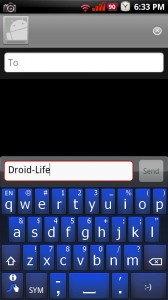
The week of custom keyboards continues! Last night, we received another batch of themed Swype keyboards which actually have full on color schemes. To put it simply, these are money. We’re still not exactly sure of the creator, but we’ve referenced where they were spotted. So if anyone knows the original creator, make sure to hit us up!
*For all users. Non-roots and roots!*
Download: SwypeBlue.apk
Download: SwypeRed.apk
Download: SwypeGold.apk
Installation instructions…
1. Uninstall previous versions of Swype.
2. Download the colored Swype of choice to your SD card.
3. Install.
4. Make sure Swype is checked in Settings>Language and Keyboard.
5. Open a text box, long press, choose “Input Method” and then “Swype.”
6. Enjoy!
And if none of these wet your whistle, remember to check out our custom HTC IME and black Swype skins.
Source: CyanogenMod Forums
Dev: sneaky_zekey (Great work!)
Cheers Dave!



I ran into a little situation, I don’t understand how I’m suppose to uninstall an original app.
Hhe article's content rich variety which make us move for our mood after reading this article. surprise, here you will find what you want! Recently, I found some wedsites which commodity is colorful of fashion.http://www.assure-every.com
Hhe article's content rich variety which make us move for our mood after reading this article. surprise, here you will find what you want! Recently, I found some wedsites which commodity is colorful of fashion.http://www.assure-every.com
Is there any chance the blue one would work on my Incredible? If not, is there a chance you could make these so they work on the Incredible lol?
Thanks,
Glenn
Is there any chance that this blue keyboard would work on the Incredible?
Thanks for the awesome work.
Wish it had a dutch directionality.
then i would definitely use it..
but just English wont cut it for me…
I dont know if i'm doing it right but i got a error saying “the swype package you installed does not match the screen size of your device. please contact swype about this issue. screen size 480X320” can anyone help me?
SwypeRed.apk put malware on two computers I know of.
Beware!!!
These were originally posted by the creator sneaky_zekey from droidforums.net and were removed by admins I had already downloaded them and reposted them over at cyanogenmod.com so It would be nice if you could aknowledge the creator of these Sneaky_Zekey he also has some themed handcents to go along with the swype version he made
how do i get the smile face to show? I switched from the moto droid to incredible and going into settings, language/keyboard I don't see the option?
Thank you
The Maps and Navigation is a bit of a challenge with Swype I am finding. Also, what happened to the new speech to text option that came with Android 2.1? It is not available on the Swype keyboard?
Swype keyboards are awesome. If you are that concerned in the text field you can long press to select a keyboard. Then select the android keyboard and enter that stuff. Then use your swype in emails and texts. Have fun.
I'm sticking with the official beta on my Moto Droid.
note…. I tried to load one into my kids Eris, and the download page froze, every time I tried to dl it. I don't think that the Eris's browser is capable.
I actually am concerned too! Don't know whether to use it or not!
Swype keyboards are awesome. If you are that concerned in the text field you can long press to select a keyboard. Then select the android keyboard and enter that stuff. Then use your swype in emails and texts. Have fun.
Did anyone have issues downloading these?
Since my Windows 7 computer doesn't work when I hook my phone up via USB, I had to download the file to my computer then transfer it to my Droid via SD slot. In the process, I've managed to get one hell of a virus on my computer…AND the keyboard didn't work.
I want a purple swype keyboard!!
Going back to stock keyboard, Problem #1: Causes problems with google maps navigation, when you click on destination your recent ones pop up, but with Swype nothing comes up. Problem #2: I believe I am pretty savy with phones and pcs, but the tutorial is either bugged or does not properly teach how to use the actual swype feature for words.
I had some problems getting the tutorial to go too, but after I changed the “speed v accuracy” setting to faster (it's about halfway between the left and the middle), then the tutorial worked great.
Haven't tried in maps navigation yet though.
Love the blue. But this seems to be the earlier version of Swype with which one can only backspace (delete) one letter at a time, not a word. Is true?
why is it that the only color change I get is the color of the “s” in the bottom left corner?
I tried the blue one and the red one but the only thing that changes color is the s.. everything else is just white letters on black keys..
YAY i got this one to work!! Thanks!
Is the same keyboard as the beta, or is it the original leaked version?
Just tried Swype for the first time and totally diggin' it!
Maybe some of you Swype-vets can gimme a little insight though – I'm trying to add <3 to the custom words (ideally to the emoticons, but that's ok), but to no avail by following the procedure in the help.
Thoughts/suggestions?
p.s. I guess that kinda tips off that I googletalk my Mrs. a bunch, eh? lol.
It's easy. Type <3, then slide your finger from the little Swype 'S' key in the lower left to the 'SYM' key to bring up the edit keyboard. There you have a 'Select All' key. Hit that to highlight your <3, the hit the little Swype 'S' key in the lower left. A screen will tell you that you've added <3 to your dictionary. Handy for passwords with combinations of letters and numbers, or email addresses.
Thanks a bunch!! Somehow I was missing the step about sliding from the swype key to the symbol key.
Yeah, it seems to be a hidden feature, but a darn useful one!
Wonderful, looks great on jrummy 0.7 red!!!!!!
Loving the blue themed Swype. Goes great with the cyan version of Jrummy's remix.
Went with the blue like it allot weird getting use to it
These are same as original keyboard of Swype just colored. Which is fine, but the blk/red one I have from few days ago looks like adifferent keyboard in all and I like it better. Looks “flat” and these & original keyboard of Swype look “bump”
can someone help me-
i have downloaded the file to the sd card.
i cannot execute the file
i cant get to it from the phone. and i cant open it via pc
what to do?
i downloaded straight from my phone (went to website via phone browser) and it worked fine for me.
ill give it a shot
thanks
hmm
says cannot download…the content is not supported on this phone 🙁
swilliams did you try opening it through astro files? Astro always works for me…get it in the market place
ill try thx
you guys are the best thx it worked!
cool look
Wow, My Norton Anti-Virus is going crazy blocking stuff after downloading SkypeBlue. I have no proof that thats where they all came from though.
Just got the gold one… really liking all these keyboards this week but this one is going to be my default for awhile
isnt swype in a closed beta? i can never get it to respond to swype commands whenever i install it. i know im installing it correctly because i followed the instructions to a T. so any help or advice you can give me would be great. im currectly using shapewriter. should i just stick with that until swype is officially released?
I am with you on this. Running 2.1 non-root and though i can install and run the swype keyboard just fine… it does not type when I “swype”. My only input method is to tap the keys like a normal keyboard. Perhaps someone will read the comments and give an answer.
@mark. Thanks… just thought I was missing something. I disabled, rebooted, disabled the android keyboard, enabled swype, disabled swype, enabled swype and checked… all is working now and I am giving the swype keyboard that I have heard so much about a try. Thanks.
Oh yeah.. I like these much better (Red – Go Angels!!!) than the black Swype themes from yesterday. Although the black Swype themes were ok, you could tell they weren't made on the newer beta version that we currently have. (didn't have the “Enter/Return” button at all, and I need this for my posts)… but to each his own.
Thanks again kellex.
I have the blue one – just love it!
Nice! Customization and community is what makes Droid the best phone on the market.
I saw these and just had to sharfe they go so well with my 24 k gold theme.
I just installed the black and gold last night. So many choice. If the gold had a Georgia Tech logo on the space bar for non-roots. I would be all over it.
I saw these and just had to sharfe they go so well with my 24 k gold theme.
I just installed the black and gold last night. So many choice. If the gold had a Georgia Tech logo on the space bar for non-roots. I would be all over it.
OUCH!!!! that's a low blow, LMAO. And yes indeed those were the good days.
Sorry, I couldn't resist. At least you aren't a UGA fan. 🙂