


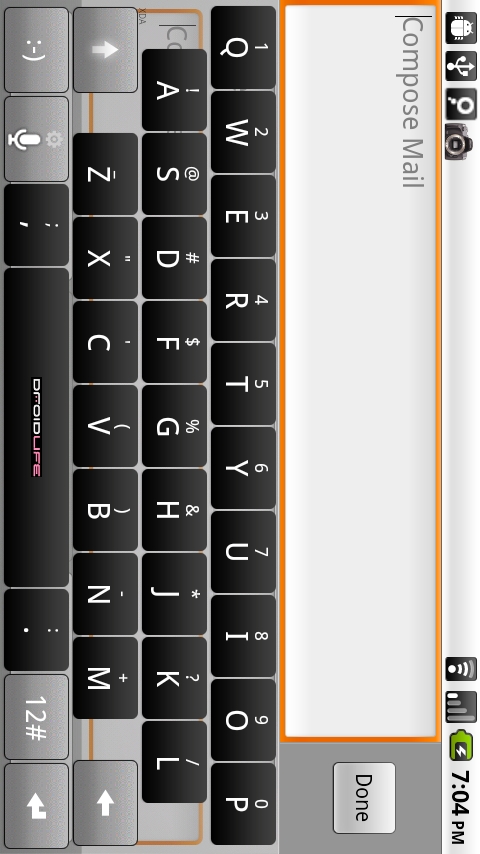
The ported HTC IME keyboard has already been updated by Gimpsta to work with all of the newest Froyo leaks to hit our Droid worlds. The “themer” he put together still functions just the same, giving you the opportunity to create the custom HTC IME of your dreams. Visit the link below to get yours!
Don’t forget to donate if you have the chance!



Good to know that HTC IME keyboard has already been updated by Gimpsta to work with all of the newest Froyo leaks to hit our Droid worlds…keep updating us with such useful information.
I’ve use the HTC IME keyboard,…it’s the best keyboard for out there IMO. I downloaded a version right after the Froyo update…well thanks .
Well the skinned keyboard from before? I didn’t see another OSU skinned keyboard..Thanks for this post!!
htc the best company in technology relating the various aspects in its own manner, the ime keyboard for foryo is a new version in Droid world.
Newest Froyo leaks to hit our Droid worlds…Thats a pretty cool news..HTC ime keyboard looks awesome with great features…
WELL THATS COOL!!! but It just came into my information that–This will be hugely useful for ROM developers once 2.2 ROMS start becoming widespread. It will not work on 2.1, so it will be of limited use until the CM6 build is ready.
I just downloaded the updated IME Keyboard for Froyo and can’t find anything different.
It would be great..as its features are great..i would like to download it.
HTC ime keyboard updated to work with Froyo… to hit Droid worlds.Its features are awesome… The “themer” putted together functions the same, giving the opportunity to create the custom HTC IME of our dreams.
I actually read somewhere that v1.5 of the HTC IME keyboard works. I installed it and it is working good.
Its a easiest way to download HTC IME Keyboard for Droid X but I have original one..
Its a easiest way to download HTC IME Keyboard for Droid X but I have original one..
The “themer” he put together still functions just the same, giving you the opportunity to create the custom HTC IME of your dreams..Thanks for sharing with us..
Awesome!! I agree with you guys, it’s still the best keyboard available.
Anyone who likes simplicity and awesomeness should download mine!
http://rapidshare.com/files/398651394/HTC_IME_h…
It looks amazing!
Anyone who likes simplicity and awesomeness should download mine!
http://rapidshare.com/files/398651394/HTC_IME_h…
It looks amazing!
Once again, all it takes is a droid-life post to set records on my server! hahaha
Glad people are continuing to find the site and getting good use out of it 🙂
An interesting stat:
Greatest number of keyboards made in an hour – 111 (1 every 32.432432432432 seconds)
That hour was on Wednesday, June 9th, 2010 between 01 and 2 pm EST
Where can I get that new Droid-life skin? I can't figure out how to make one of my own. Or is there a way to update my 24v skin to 27v thanks for the awesome keyboards 🙂
Oh Kellex, how about a step by step on how to install this bad boy. Thanks!
No good for me on my install of the latest FROYO / BASEBAND / PS3 kernel… too bad. nothing but F/C
Having the same problem
When you choose the version, make sure you choose v.27 FROYO
What's so new about the new swype. I just downloaded the updated swype and can't find anything different
Is there any way to use the “old” skinned keyboard from before? I didn't see another OSU skinned keyboard =(
If i dont like my keyboard how do I go back to stock
I made one I just wanna know how to go back to the normal keyboard for later if I decide that. Kinda new to this just rooted a week ago so kind of a noob lol.
hold on a place where you can input text, then click input method and choose which keyboard you want, you are going to have to activate that keyboard that you made by going to settings language and keyboards, and check mark ti.
NM it was retardedly easy.
Thanks for the response
HTC for the LOSS! All about Swype baby!!! Cash Money! 😛 lol
idk why i just can't really get into Swype, i've been using Swiftkey since I was sent the beta email and i'm semi happy with it.. i've got like 4 keyboards installed and switch back and forth, never happy with either fully..
what kind of stuff did you do to customize Swype to make it more user friendly than the default settings?
whats up with the txt imput behind the keyboard?
I was gonna ask the same thing….
Looks ghetto! lol 😛
I did the see-through background and thats just what it looks like. 😛
that's awesome….I created a BSU skined keyboard…
I've been having issues with swype (both the old and newly updated version) When I'm installing it i get the following message:
“swype could not be installed. free up some space and try again”
I went to “manage applications” and deleted a number of big apps I no longer use and I still get the same message. Any ideas???
I'm rooted with froyo 2.2
Pabs, you might have not freed enough memory…
Thats what I thought at first but how many mb is swype? No more than 5 right? I deleted at least 4 programs that were larger than 5mb.
Besides, I was able to install heavy programs like flash player and adobe reader with no issues.
Is there something I'm missing???
You are right. Between the installer and the app itself it is less than 5MB.
I actually had the same issue when I was trying to update my Handcent in BB 1.0. I deleted all sorts of files and it kept tellling me I had no room.
Once I updated to BB 1.1 the issue simply went away. So now I'm kind of stuck cus I love froyo but I'm pretty big on swype.
I just may have to stay patient for the BB version of froyo.
Why do I need to register to DL this? Why can't an .apk just be uploaded and downloaded straight from droid life?
So it can remember all the awesome stuff you did 🙂
It keeps a log of all the custom keyboards you make.
It's cool!
question, why don't you add the barcode links to all mobile app downloads??
so we have flash now kellex so now were is a good flash game site were the game or optimized for the use on our mobile device ?i know miniclip is one do u know any more?
Not sure if I'm doing something wrong, but created a keyboard, downloaded it (and the Clicker_hi.apk) and tried to install on my rooted, Moto Droid with the Froyo build from Monday. When I try to use the keyboard (after checking the box next to it in the “language and keyboard” section of settings – and unchecking the stock keyboard) I get a force/close. Am I missing a step or doing something wrong with this? Neither v26 or v27 have worked on the leaked Froyo.
I'm having the EXACT same problem. I didn't download the clocker_hi.apk but the updated HTC (prior to this) didnt need it either
I'm dumb – I was going with the straight v27 not the Froyo v27. Changed it, installed it – now workin' it
Ah…same here. Saw that v27 was for froyo and didn't even both to change the drop to see there were actually two v27's.
So I went to the website on my droid. I logged in to my account. Created the keyboard that I wanted and pressed download. It seemed to download to my phone but I cannot get it to work on my phone. I downloaded a HTC IME keyboard I got from droid-life a month or so back directly from one of your posts. But have not yet done it from the gimpsta site. Do I need to delete that one before downloading the new one? Am I supposed to do this from my computer and not from my droid, does it matter? I have downloaded many things from droid-life before and used astro, worked like a charm. Can anyone help me?
first make sure you picked the right version. If you now have froyo you have to have the v27 froyo and not just the v27 version. I made several yesterday. Its much easier to make your keyboard on a computer and then reopen gimpstas site and download. Especially if you use the chrome to phone app Droidlife posted yesterday.you dont have to delete but if your gonna have a couple or more keyboards i would rename them so you know whats what.
I do not have froyo so I used regular v27. That all sounds similar to what I did. I got to the download screen on my droid. Clicked on it, and it seemed to download the keyboard. Then when I go to astro to “install” it, it seems to already be installed. You can only choose the options “uninstall”, “upgrade”, and “launch”. If I click on launch it says activity not found. I went to my settings and then keyboards and went to the HTC IME settings, cause I already have one keyboard installed on my droid. But I could not find any option to choose other keyboards that I have downloaded. Or should there be another option when you click on keyboards to check the box, like there is if you have swype, and stock android keyboard? Sorry if this seems confusing, I just dont understand what I did wrong. Thanks
if you already have an IME keyboard you have to uninstall it in Astro then install the new keyboard. then go into your settings for keyboard again and check the IME box again. I have a cheesey website i did for some friends in florida that explains the process better with pictures and all that. mad-droid.webs.com in the how to section
I love my newly updated Swype – Got my “Update” email last night.. Works GREAT on the Droid.
I too got my invitation for swype, but when I go to the site (from the phone) I get an error that I am not on an android phone? Any suggestions? Rooted 2.2 w/ new baseband.
I dunno.. I downloaded the swype installer from the email and it worked flawlessly 🙁 2.2 w/new baseband
You wanna share your new swype with the community? 🙂
Can't, they've really locked this one down.
Dang it, I was looking forward to it. Oh well, the old version works fine so I guess I am good.
I have root explorer – Doing a search for it now. Will post my findings.. Any ideas Kellex? I'll help however..
Sweet thanks man if it works!
Never have really liked these keyboards. Maybe I am just a stock kinda guy.