


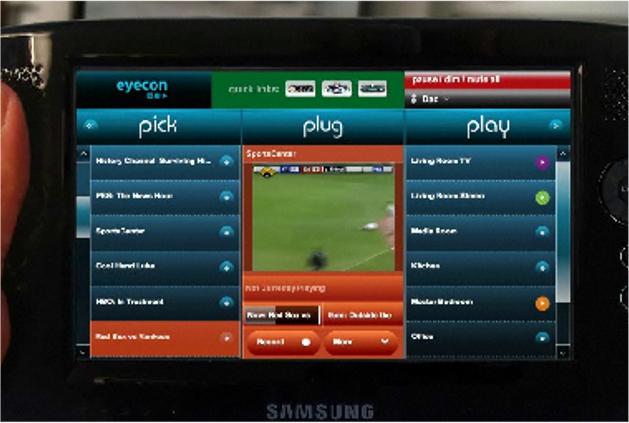
In one of the new Droid X commercials just leaked by DL, we were introduced to a new multimedia app called EyeCon which sounded as if it could give you full control to every media device in your house. It also had us drooling. So what exactly is EyeCon?
We just received this EyeCon site from a reader which looks to be the exact software mentioned in that commercial spot. I recommend that you take a few minutes to browse through some of their video overviews and you’ll immediately see how amazing this app would be on a 4.3″ Droid X display.
You’ll also notice the “Android coming soon!” note in the top right corner.
Update: The EyeconTroller app is actually available in the market right now. Grab it for free from this link. After that, head over to this link to register.
Cheers matrix2004!



Hi everybody!
I'm here to update you on the Eyecon situation and answer any questions, as well as resolve any issues! I hope you haven't had too much trouble so far. The first and most important issue here is that the current Eyecon site is NOT UP TO DATE, and a new site is in the final stages of development and will be launched IN THE NEXT FEW DAYS. The new site is better, easier to navigate, and explains Eyecon's purpose and function more clearly – but you'll see that for yourself.
Now to clarify – a PC/Mac installation is NO LONGER NECESSARY, i.e. all one needs to do is install the Android app ('EyeconTroller') and run it on their wireless network. It will recognize and list all the supported connected (wired or wireless) media libraries, as well as connected media players. To understand more about connecting devices to your network, and for other info about the App, visit http://www.youtube.com/eyecontechnologies .
Thanks –
Johnny
Hi everybody!
I'm here to update you on the Eyecon situation and answer any questions, as well as resolve any issues! I hope you haven't had too much trouble so far. The first and most important issue here is that the current Eyecon site is NOT UP TO DATE, and a new site is in the final stages of development and will be launched IN THE NEXT FEW DAYS. The new site is better, easier to navigate, and explains Eyecon's purpose and function more clearly – but you'll see that for yourself.
Now to clarify – a PC/Mac installation is NO LONGER NECESSARY, i.e. all one needs to do is install the Android app ('EyeconTroller') and run it on their wireless network. It will recognize and list all the supported connected (wired or wireless) media libraries, as well as connected media players. To understand more about connecting devices to your network, and for other info about the App, visit http://www.youtube.com/eyecontechnologies .
Thanks –
Johnny
I have big fingers will it effect my ability 2 use? When I use my sons chocolate I keep hitting wrong keys will that happen with the droid x?
I never got this to work unfortunately. have to uninstall till it gets sorted out. Best damn demo video ive ever seen though.
how do we work this?
In the market, it says “*IMPORTANT*EyeconTroller works with Eyecon Manager. Please download to a computer on your network before using your mobile app.http://www.eyecontec.com/web/go” Well, I went to that address and it's a GoDaddy site saying that domain has been parked. Obviously they haven't completely set up shop yet.
Wrong URL:
http://www.eyecontec.com/go/web/
I cant get this thing to work on my desktop it keeps disconnecting me from the network
Has anyone been able to get this thing to work?
Man I don’t have a clue how to resolve this. I am pretty desperate. Nobody seems to have a real answer. Least that I can work with.
I tried all the Froyo updates and after too many problems, I am back to 2.1 with BB Smoked Glass. I CAN’T boot into CW recovery. I have flashed SP, then CW. I have flashed SP then reboot and Flash CW. Nothing. I have flashed and flashed. I have asked and asked. Nobody can give me an answer. There is a lot of others having the same issue. That is the only thing keeping me for going back to Froyo. I really wanted one of the Froyo themes, but can’t get past this not booting into recovery. And yes I have the latest Rom Manager updates.
Somebody has to be able to help somewhere. Please!
Go into ROM Manager and scroll down to the All ClockworkMod Recoveries. Select an older CW Recovery. Choose 1.8.1.4. This is the most previous Droid Recovery.
I was having problems trying to flash ROMs after updating to Froyo and the latest update to 1.8.1.8 came out. Emailed Koush and this is what he recommended. Hope this helps.
Thanks. I'll give it a shot. Last downgrade gave a frozen boot. Maybe wrong
version
Did it work?
Well it booted to recovery, but I still need to try and flash a theme.
Yeah. I'm flashing everything no troubles. Whew!
My pleasure. That's how this site is, we are here to help each other out. What ROM are you running right now? I am running Team Chaos Red Rum for Froyo. Overclocked to 1.1ghz. Loving it.
I flashed BB Froyo. Then TC clean blk stock icons. Quadrant rocked over
1000. Thanks again
Just wanted to let you know…looks like Koush has updated ROM Manager. I was on 1.8.1.4 and couldn't get into recovery. Flashed the latest recovery 1.8.1.8 and didn't have any problems. So you might wanna flash the current recovery.
Cool. I was getting tired off seeing the update pop up. Thanks again
FYI. Un runnning jrummy blueberry color. Fast and nice looking
that's what I'm running right now too 🙂
Had to revert back on Rom Manager. Still can't run update
Also I downloaded Quadrant onto my phone. It rocked 1446 on JRummy's Kangerade Froyo ROM. 1.25 ghz
But then I kept getting FC issues and spontaneous reboots. Uninstalled Quadrant and it seems to have fixed the problem. Guess my phone doesn't like that app.
So far ok on mine
I'm only over clocked at 8
Thank you, thank you. Worked
Looks pretty much like the ORB app.
Awesome idea. Unfortunately my computer and wii are the only things with wifi in my house. Am I missing something? I don't think there are that many people that have wifi enabled stereos, tvs, and everything else. Great idea…just don't think most of our devices are there yet.
hey all quick question for the rooted users…i downloaded a kernel for froyo but SetCpu doesn't read the kernel…just at 800 max when i downloaded the 1.1 ghz…thank you to anyone who can help me…thanks
move indicator bar to zero then back
ok i got it to work,was able to search youtube and all…im stuck at how to add devices anyone knows how to do this HELP..
I wish Eyecon's website were a little more descriptive… I'm failing to understand exactly how the app would interact with my TV..? Will it work with any tv/provider?
Is it just me or is the website down.
yeah, i'm having the same problem
Maybe we crashed it hah.
Nice lol. Is anyone having a problem searching for things, mine won't find anything when I search.
to people not finding anything after searching try to reboot your phone or kill the app with a task manager it worked for me
Wow, check out this great news from Pete!!!
“Thank God for #RSDLite and .sbf files,
let's hope they can save my bricked #Droid.
If not it gave its life for #BuglessBeast”
Haha I saw that too. Classic.
Poor guy…
Wish I had a million bucks to help him…
He works at a freakin' car shop though?!?
Wtf?!?!? Donating….now!!! lol
I'm writing 1600 Amphitheatre Parkway, Mountain View, CA 94043 to recommend Pete as a developer for the Android team. His fully deodexed and zipaligned system has made Android better and is something that should be built straight into Android from the start. Pete could do a plethora for the guys at Google and it's time that he becomes an official partner on the Android team. Everyone at DL should write letters to help him.
You don't even know if the guy wants to work there. Lol… you get jobs with resumes not a letter
Well you may be right. I just want to give him a few options. As his pages says; “Help me live out my dreams to do this in the future”
Yeah I would mine helpin the guy but I'm kinda skeptical about bugless beast .2 I don't wanna brick my phone even though you can get everything back with rsd lite
Correction wouldn't mine
Pete would never release something he didn't fully back…
It won't brick your phone 😛 lol
What are you talking about?
Lol yeah… It's like you guys are talking in some type of code! Can you explain for us people who have no idea what you're talking about? At least a link or something?!
http://www.twitter.com/peteralfonso
🙂
Follow him! haha
Peter Alfonso is the Dev for Bugless Beast.
This is from his Twitter…
He is saying that he bricked his phone and is flashing a recovery to get it back up.
IF, it doesnt work, (which it will because he is Pete and he is a God amongst men)
then at least it died for the greater good ie. Bugless Beast…
Screen won't scroll for me…stuck on pick plug play, can't go back to search and media.
try using the d-pad to scroll left to right worked for me
you can go to the market and download the eyeconTroller app, then you need to go to their site and download the software, http://www.eyecontec.com/go/web
Thanks for that link!
This looks really cool but it probably will only work with satalite or certain cable companies.
Amen to that. Why does comcast always gotta be screwing me like this!!!
They say they'll show up at 9am to 1pm…what kind of time frame is that?!?!?!
I miss comcast I have this garbage called cox in vegas
Haha good ol' cox cable. They're not bad back in my home town of Eureka…
P.S….dude, Vegas? I'll be there in July…
You drink right? 😛 Let's roll! haha
Of corse I drink but what day you coming in july because I'm off to iraq on july 12th
Damn! I'll be there the last weekend of July…
How long is your tour?? BE SAFE!
Only 4 months but I'm pissed the droid isn't a world band phone…but I got my good ole unlocked G1 so it will have to do
Hopefully they put up some new towers, getting a signal can be a real bitch.
Wow……now this is neat…all I need are some sweet gadgets in my apartment now…
😛
Let's try this again…..
Christopher (the guy in the video) is having his first date with a very cute girl. The only problem with this is that Christopher's date is married. Notice the ring on her ring finger….not sure if it's from Zales or not…but there you go.
nice, i didnt even catch that. I dont know what they paid the people that came up with the video but it was worth it.
Awesome, that's just great. Good eye.
OMG the first video on their website is hilarious. Christopher brings his date back to his parents house and sends dad to his bedroom so he can get romantic with his date. The barry white-ish announcer and the porno mood music kill me.
“shes impressed and showing it christopher, show her what you got.” This is one of the best promo vids ive ever seen
This cant be the full App it's missing almost everything theres no source or no search tab ect.. Got the Pc program installed and let WM player stream but can access it on the android app Im guessing this is not full also the site says “Android Coming Soon”
Unfortunately this WILL NOT be an Android exclusive app. DAMN!! Iphone app demo video is on site.
While i like being able to do things the iphone cant wouldnt being exclusive kinda go against one of the main reasons we all love the droid, being an open system as apposed to being closed tighter than a german border crossing (by the way, im 1/4 german)
Then that was baked14@live3/4 racist
Im old, I dont get it. You kids with your fancy Idroids and titter/myfacebook stuff
That's not a very creative name. Eyecon = icon? Oh well. This app will only make Android better!
anyone figure out how to get the PC app to work?
So if well be able to control all our media devices does that mean wel wil FINALLY get a garage door opener app? That would make chris a happy boy. So, does this mean it has RF capabilities?
The app is already available in the market as eyecontroller
Oh interesting. Checking out now.
Fifth I hope Lol
Considering it is just a media management tool, i'll take it on my droid too 🙂
Sweet _First 🙂
Got some skillllzzzz! 😛
LOL 🙂 The Eyecon app looks sick
The Video on ther site is funny as hell LMAO @ the dudes Voice 🙂
Man, I couldn't help but think the same thing…he sounds sleezy and what kind of an idiot is going to try and impress a chick with the apps on their phone…unless she plays MW2, and can't get enough anime she's going to wonder what the hell is wrong with you….and creating a playlist before the date?? what the hell is that?