


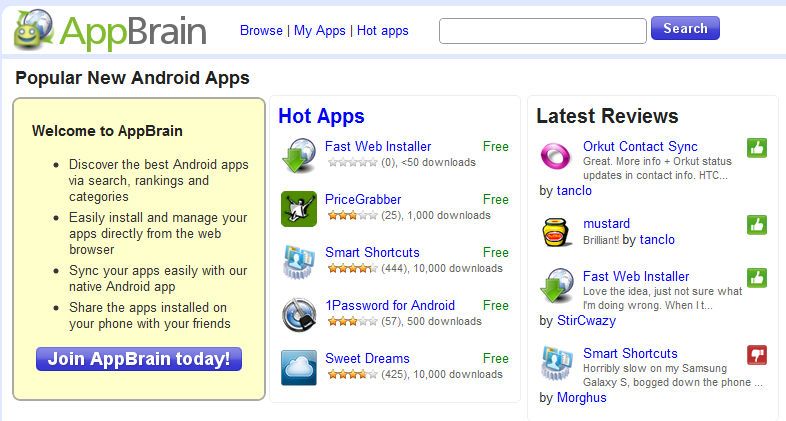
AppBrain dropped an app on the Android world today which unlocks a feature that most weren’t expecting until Android 3.0 or Gingerbread. The app is called Fast Web Installer and allows users to choose apps through the AppBrain Market in a web browser and install them wirelessly onto their Android device. If that doesn’t make complete sense, check out the video below…
Video Action and Instructions:
First Download:
Second Download:
Anyone already enjoying this fantastic new app? Let us know if you run into issues or have other tips!




I am experiencing the exact same issue on Nexus One CM6
Wow, great app. Just heard about it and I'm already using it a lot!
I tried some things and I'm not sure which step did it, but I did this.
1. I had two list on appbrain “on the droid” and “on the phone” I deleted on the phone which made on the droid my default list.
2. Then I noticed fast web installer was installed on my sd card. I uninstalled it and reinstalled it then moved it to the my phone then gave it permissions.
After that I went back to app brain and it worked!!! Hope this helps!!! Oh I'm running the latest Kangerade.
Well whaddya know, I figured it out why I was having problems with this thing (“He can be taught!”). Here's what fixed it for me:
1.) On appbrain.com, I went in to “Account Settings” from the “My apps” page
2.) So then, I notice this little nugget:
Choose default app list
When you press the “Install” button on an app it will be added to the selected default list.
3.) I noticed that my default app list was not correct (the sync'd “Apps on the phone” list from above)
4.) I updated the default app list to “Apps on the phone” and clicked “save”
5.) Now, I went back to the onion app page and voila — the install dialogue warning comes right up, and when I accept, almost immediately (as others have reported), it starts downloading in my progress bar on my phone.
Shuh-weet! Hope this is helpful to someone else.
DRROOOOID!!
Phil
There was a recent fast web installer update that was supposed to support custom ROM's, but when I try even now with BB 0.4, I get nothing. Same app brain behavior as before (queues for install).
The weird thing is that later, when I go in on my phone and sync my apps, the ones I've marked for install on appbrain.com don't show up.
Anyone having similar issues? Any known solution? I'm going to un-install both, reboot into recovery, wipe my caches, and then re-install to see if that has any good result and will post back with the results, but other recommendations are welcome. Thanks as always.
Phil
OK, here's what I did:
1.) Un-installed app brain
2.) Un-installed Fast Web Installer
3.) Open ROM Manager (currently flashed with clockworkMod 2.0.1.3) and rebooted into recovery
4.) Scroll down to – advanced, then select “- Wipe Dalvik Cache”
5.) Power key to go back a menu, then scroll down to “- wipe cache partition” and select
6.) select “- reboot system now”
7.) While I was rebooting my phone, I went in to appbrain and noticed that I had two lists under “Your app lists”; one called “Apps on the phone” and one called “Apps on the DROID”. I deleted both. What the heck, right?
8.) barcode scan the QR code (above) for App Brain and install it
9.) barcode scan the QR code (above) for Fast Web Installer and install it
10.) sign in to app brain on my phone, click manage my apps, then sign in using my google account; sync my phone to appbrain.com (Oh look, there's the “TalkBack” update again! <ignore/>)
11.) open fast web installer and enable it (continue, accept warnings / “Allow”, OK)
12.) I now notice on appbrain.com — “Apps on the Droid” list is back
13.) Attempt to install The Onion app from appbrain.com (http://www.appbrain.com/app/com.theonion.onn)
14.) Doesn't work — tells me that my phone is not yet sync'd. Wait, but I already saw my list of apps under “Apps on the Droid”, and my phone tells me it's sync'd. Appbrain.com is telling me to install their app by searching the market for AppBrain or scanning their QR code, but I know I've already got it on my phone.
15.) I rename my app list “Apps on the Phone”, then try to re-sync from appbrain on my phone
16.) Try to install the onion again: “Your phone is not synced yet. Please install AppBrain to get the app on your phone”
OK, now I'm getting pissed. Done messing with it for now.
Any recommendations? Maybe the cache stuff had absolutely nothing to do with it and I'm an idiot for trying that, but swype was giving me trouble after going 0.3 to 0.4 until I did that…
Phil
I am experiencing the exact same issue on Nexus One CM6
sounds just like crome to phone people….
Still waiting for it to download to my droid. I can get it to work but i have to go into the AppBrain Market on my phone sync it, then i can get them to download to my phone.
Not working for my BB 0.3 / Blue energy theme. OK, so the theme probably has absolutely 0.000% to do with the issue… but…
Which is why Droid Life needs a quick “Post your Droid Screens” here 😛
Agreed
is that an HTC EVO i see? traitor…
Incredible.
i say as long as he's using an android phone, he's no traitor.
looks like a X to me! *shrug*
Its an Inc… it says Verizon Wireless clearly in the video.
I downloaded and the transfer of files was perfect……till I tried opening other random apps I already had and they started to FC. Did a couple of shut down's as well as a batter pull and nothing
Sadly, had to uninstall….at this point (at least on my phone) it didn't want to play nice with other apps.
Guess we'll have to wait till it gets fixed or till Gingerbread comes out
😉 1st
Wudda beat ya but i guess i gotta do something at school besides flashing roms 😛
haha keep the one you got 😉
You got 'liked' out of the first spot. 😛
Dang you all!! lol
this is the dumbest thing ever…doesnt work at all
42nd!!! Im just as excited being 42nd than being 1st. why? Cause im trying to bring 42nd back its alot hader these days to get!
Does any one know if u must apply a stock rom to add a theme to the rom or can u just lap over themes
More times then not, you can apply certain themes over others…
BUT! To be safe, Dev's and users will always say make sure it's a fresh flash of a stock theme…
Just to be safe 🙂
Hey, I've got BB 0.4 and I installed the web installer however when I click install I get the pop up asking to install but it never goes to my phone. I'm not on WIFI, but I didn't think I needed to be.
I'm using Sapphire 0.7 (2.2). Just got in touch with AppBrain support concerning the same issue. They said others are reporting problems with non-standard ROMs.
I can't get it to work either. Bugless Beast 0.4
only way i got it to semi work was to sync with google account again and the apps show up but its not automatic
NEW JRUMMY KANGERADE PPL V 5.0.9 its in rom manager fixes the bugs with the last one 9 themes including droid x theme u kno u like lol more goodies then last time and they all work more themed lwp go try it out if u havent already
I'm running the 2.2 Kangerade 4.0.7 and I cant get it to work. 🙁
My 2.2 Sapphire Droid also appears to not be working.
Saphire and Kangerade both break my market app. when I click it it just flashes a white screen for a second and exits with no warning. Seems like several have had that issue but I havn't seen a response to anyone's questions about it.
anytime I try to d/l something from the market, i get fc's while it's installing, then it will cause two or three more random fc's after that.
Sapphire ROM btw
Same here…
UPDATE: An update has been pushed out on this and says it now works on custom roms. Its now working on mine so maybe give it another try.
Is there a prize for being first?
Yes…..the enjoyment and rush of adrenaline you get when calling out “FIRST!” 🙂 lol
Is there a prize for being first?
What case are you using for the Incredible in that video? Is there an extended battery?
Silicon black case from VZW. There is an extended battery but I haven't bought one.
Awesome, thank you – so that's using the standard 1300 mAh battery? The backed looked bigger to me for some reason, I thought you were using a different battery.
pretty sweet
LOVE it!
Absolutely love appbrain. Never use the market without it.
Same here! Can't browse the market any other way now!
I never really enjoyed AppBrain because it kept screwing up my Android Market downloads section.
Does this work with 2.1?
this works with 1.5 forward, and doesn't require root
if i had a faster pc i would have been!!! lol
This is my works internet. Some of the fastest in the world 😛 lol
http://www.speedtest.net/result/872179385.png
That's ridiculous. I love it that you use those speeds to browse Droid Life. 🙂
It definitely makes sifting through the trolls a lot easier 😛
5ms PING?!?! holy crap… mewantssobad…
Probably a stupid question but forgive me I'm still learning computer lingo. What's a troll?
Taken from urbandictionary.com 🙂
Internet Troll- A person whose sole purpose in life is to seek out people to argue with on the internet over extremely trivial issues. Such arguments can happen on blogs, Facebook, Myspace and a host of others. The best thing you can do to fight an internet troll is to not answer..or report them.
Thanks man your always so helpful on DL to everyone 🙂 I appreciate it. I feel so stupid I don't know why I didn't think of the urban dictionary.I only have the app on my Droid, duh :-[
How is your upload beating your download?
Comcast download up here in WA is about 25-30Mb/s – Upload lacks @ about 8Mb/s..
Crazy stuff mang!
Oh.. And a worthwhile post from me coming in 3… 2… 1… I used AppBrain once before, but forgot what it was and didn't want to use a “clone” so, this is actually what I've been looking for! Nice that when I finally get it, it gets amazing features..
Also: Works great on BB 0.4 over 3G!
Haha, i wish I knew the specifics. I'll ask my IT rats…
Might be because the next door neighbor to my building is PC World 😛
Or the fact that Qwest communications is on the floor right above me lol
Got to love the Bay Area! 🙂
You could be everybody's friend on P2P..
[URL=http://www.speedtest.net][IMG]http://www.speedtest.net/result/872285611.png[/IMG][/URL]
I got you beat Tim-o-tato
http://www.speedtest.net/result/872287530.png
HOLY CRAP THAT IS FAST!
I tested my droid over 3g from the side of the road in Starke, FL and got 1.73 down and .3 up right before it crashed my browser.
Thanks for the boner.
Wow, havent heard anyone say that to me since in my past life as a Mississippi Southern girl 😛 lol
Does tha make you mrs potato hwad lol…
Is that a stale french fry in your pocket or are you just happy to see me? lol
Hahahahahah
Wow…just cleared up some network crap and it almost doubled 😛
http://www.speedtest.net/result/872195641.png
Tim I am trying to get set cup from the market not there. Also the new ESPN I can not find. I have never had this problem. Can you help me please. Thanks, Tim