


When you buy a smartphone, one of the features that’s obviously being considered is its browser. The ability to browse the Internet is integral to the smartphone experience; without it, you lose a lot of the functionality that makes it so damned useful. API Internet calls to fuel our apps are one thing, but the inability to bring up any web page we want, whenever we want would strip smartphones of a lot of their core usability.
So naturally, the browser that one uses on their phone is pretty important. Right now, there are numerous options for the discerning Android users to take into account. The ones that I have spent time with (and have detailed in this post) are all viable choices, but have little quirks that may or may not influence your decision.
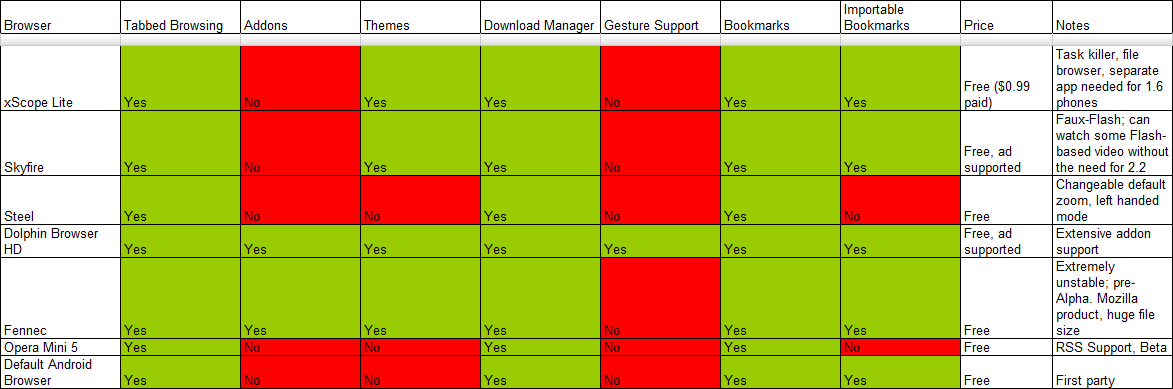
I originally set out to do this post at a reader’s suggestion, in order to determine which browser was “best”. However, I came to realize that not every browser suits every user’s needs. I can’t really make a clear decision if the default browser is the one that suits me, can I? Hopefully you’ll find something here that suits your needs, and download accordingly. For your convenience, I’ve created a feature table for quick reference: it’s embedded at the bottom of the post, if you don’t feel like viewing it via link.
To review these browsers, I used a Motorola Milestone that is on Canada’s Telus network. I felt the need to omit speed comparisons, as networks differ from region to region, and under wifi connection, I found they all performed relatively the same.
Testing was accomplished by a general “to do” list, which included:
- creating and managing bookmarks
- creating, switching and deleting tabs
- sharing with the web/apps
- viewing Droid-Life.com via the browser
- app-specific features, like viewing a plug-in video with Skyfire or testing gesture support
So, without further ado, I present to you the Droid-Life.com Android Browser Super-guide.
The Default
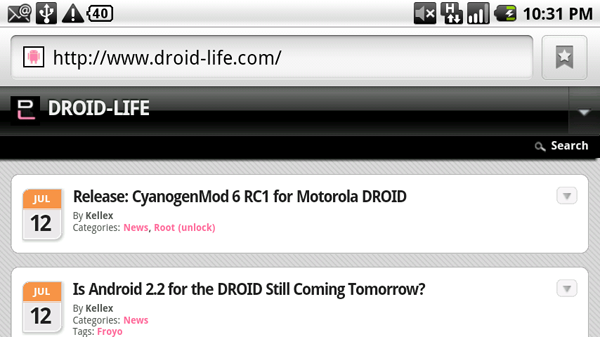
So, here’s the benchmark. The default Android browser has many of the tools most people need in their day-to-day operation on the Internet. It draws from your phone’s global bookmark pool, handles tabs (if not a little clumsily), has the ability to share pages on a variety of different app platforms and generally works quite well. It lacks a lot of the features some browsers have, like themes and add-ons, but really, for the average user, it doesn’t need that. For some people, they’re content to just browse the web, period.
Default-y has the advantage of being first party, and designed by Google: what it does is do all these basic features extremely well. Honestly, the only notch I mark in the “con” column about the default browser is its unwieldy tab interface. It just takes too many clicks to change, delete or make a new tab: while I don’t use it that often, its awkwardness keeps me from trying to use it more.
Download (or keep?) the default browser if you: don’t care about extra features, and like the way Google designs things.
Skyfire
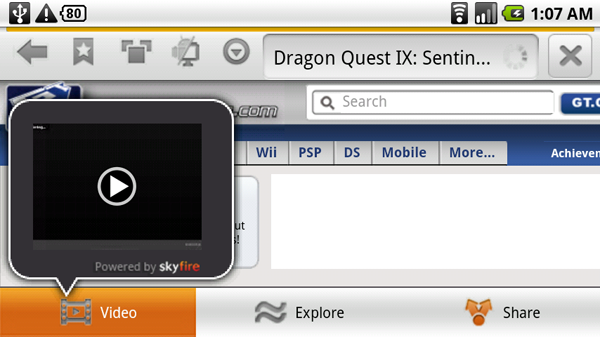
There was much fanfare upon Skyfire’s release, as it was the only browser to offer “fake” Flash; under this browser, one would not require Android 2.2 or Flash 10.1 in order to view enabled objects on web pages. I decided to test this out by going to Gametrailers.com and viewing a video for the upcoming Nintendo DS title, Dragon Quest IX. While a screenshot of the video itself couldn’t be taken, I assure you it did work; after the browser identified a Flash (or Silverlight!)-enabled video, it could load and play it. Sadly, this does not include Flash-enabled games, but really, it’s better than nothing.
Otherwise, the feature list is quite unremarkable: it does tabs and bookmarks and all the other things we’d expect from browsers. These functions are enabled through push buttons at the top of the bar, and perform quite nicely. They’d better: I’d take core functionality over Flash wizardry any day.
Download Skyfire if: you watch a lot of plug-in-based video, and have a generous data plan.

xScope
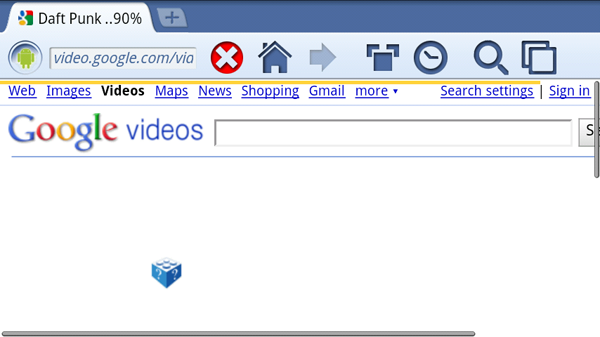
xScope was the only browser I reviewed that had the option of a paid version. Naturally, being the cheapskate I am, I optioned to take the lite version for a try; I feel that if you’re going to charge for a browser while all your competition’s are free, that free version must be able to stand shoulder-to-shoulder. What struck me about xScope (Lite) was the precense of its UI. Unlike its bretheren who are all too happy to get out of your way, xScope seems to like sticking around. While this makes the tab navigation extremely easy, it runs into the problem of trying to squish in too many features at once.
Yes, I will admit that having to navigate a series of menus to organize tabs can be a bit annoying, it keeps me from having to wonder how I would actually close them; with title bar text and a nice little percentage-based loading indicator (instead of a bar), there isn’t much room for a touch-sensitive “X” to close it. This can be achieved by a long-press, but it’s not exactly apparent. What would make it better would be a (hideable) “Are you sure?” pop-up. That way, people wouldn’t be closing things by accident.
Inexplicably, besides a download manager it also has a task killer and file browser built right in: I didn’t like this, as I have apps that do these things much better installed on my phone already. While I’m usually a fan of consolidation, I don’t like when a company feels the need to shoehorn in other features needlessly.
[update]: I’ve been since notified that it only requires a single press of the tab to close it while you’re viewing it. I don’t mean to doubt the devs, but I can’t get this to work at all. It seems to require a long press for me.
[update2]: I neglected to mention a big selling point of xScope: its one-finger zooming. By double-tapping on any point on the screen then dragging your finger left or right, you can zoom in or out accordingly. This is a great feature (when I can get the feature to trigger, which is rarely) and is actually worthy of some praise: it adds a little bit of functionality to portrait browsing.
However, I have a problem with the way it’s implemented: the tutorial to use this and other features is a small link at the bottom of the settings page; unformatted and lonely, I would have passed over a feature that does not make itself apparent otherwise. The least the developers could do would be to give it own graphical button.
Download xScope if: you don’t have ASTRO file viewer or a task killer on your system, and do a lot of one-handed browsing.

Steel
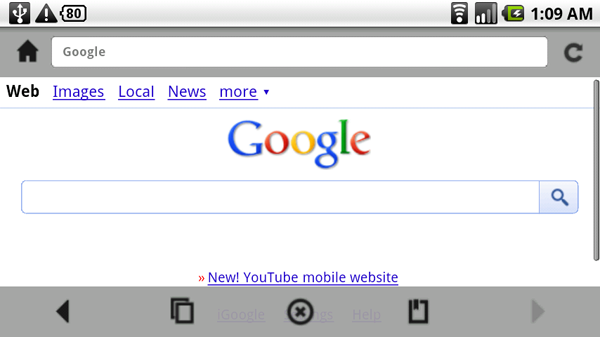
Checking out Steel, I found myself questioning my phone’s graphical capabilities; it seemed like there was fine coat of Vaseline covering my screen. There’s a certain something about Steel’s UI that just doesn’t feel right: there’s a lack of sharp edges, almost like it doesn’t want you to hurt yourself.
Of the browsers I tried, Steel was the most like Android’s default in that it is very bare bones. You’ll get bookmarks (though curiously, not global bookmarks) and a download manager, along with a better tabbing system than the default; it just seems to run smoother, and you’ll find that it takes less clicks to get you where you want to go. On a whole, however, Steel gives me the impression that there’s a lack of ambition on the part of the developers. It’s almost like they got their browser to a working state, said “good enough”, then left it. Not the best browser to download if you’re looking for frills.
Download Steel if: you don’t care about graphics and are looking for something different from the default Android browser.

Dolphin Browser HD
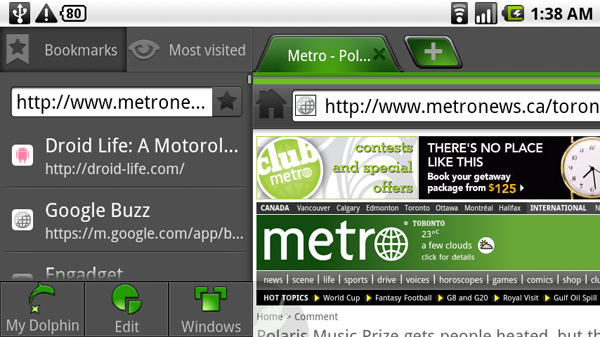
When Dolphin first came on the scene, its big selling point was the inclusion of a Youtube downloader; with it, people could rip videos to their phone for later viewing, saving their bandwidth and time. However, Google put the kibosh on this, but a powerful browser remained. Seen as one of the “big boys” of third-party browsers, Dolphin brings some unique features to the table with add-ons, themes and a kick ass “most visited” panel (as seen above). The tab interface is slick, except for an all-too-small “X” button to close tabs. I find my fingers have a hard time hitting it, and will either change tabs or create a new one by accident.
It also seems to have a problem of scrolling midway down the viewable page when switching tabs: because the tab itself (and its closing “X”) is located at the top of the page (and isn’t a wrapper), one has to scroll all the way to the top every time this happens. It’s frustrating, but you can get used to it.
Dolphin also has gesture support enabled, but I’ve never been a big fan of it; I find that it’s not very forgiving when it comes to wrong swipes, which results in some mild frustration. Some default gestures require a pooling of ink, so to speak, as well: this leads to frustration when I didn’t roll my finger just quite enough to smudge enough area. They’re programmable, but honestly, I have a keyboard on my phone; if I’m going to sit at a phone browser for an extended amount of time, I’ll use that, instead.
Dolphin’s add-on support can also let you do things like tweet from inside your browser, but really, I have better apps for that outside of my phone.
Download Dolphin Browser HD if: you want a browser with all the fixings.

Opera Mini 5
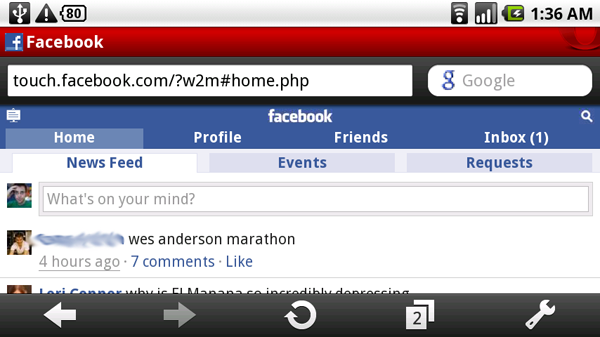
I’m not a big fan of Opera’s offering into mobile browsing; it’s too much eye candy and not enough functionality. It brings a lot of the features of Opera (like the Speed Dial) to the mobile platform, but it all seems very… messy. Look at the Facebook page above: some things don’t line up with each other. The issue’s the same on other high-traffic web pages, like Youtube, which puts me off entirely. A browser can have all the extra bells and whistles in the world, but if it doesn’t do the basics right, it doesn’t deserve my phone’s memory. This is kind of disappointing, considering Opera is a big name in desktop browsing; you’d figure they’d have more resources devoted to a proper Android offering.
Maybe I’m being a little hard on it: it is in beta. However, Opera will need to put a lot more work into the client before I’ll consider giving it another chance.
Opera handles tabs and downloads, but remains unable to import from my phone’s global bookmarks: like with Steel, this is quite an annoyance, especially if I’m looking for easy data migration. It supports RSS feeds in its bookmarks manager, though, which is a plus.
Download Opera Mini 5 if: you want to try a polished product, and don’t have an RSS client.

Mozilla Fennec
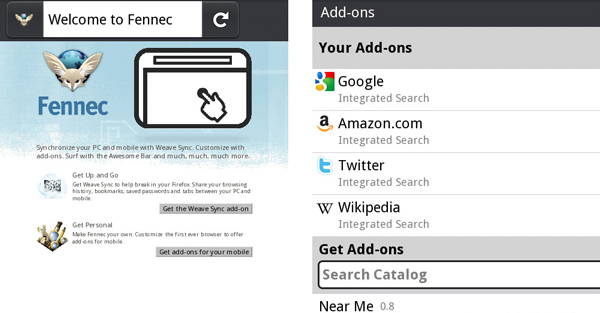
While initially I felt like Fennec deserved a spot in this mega-guide (and the feature table), after installation and quick prodding, I went back on this. Fennec is a pre-alpha product, which means it’s very unpolished. While nightly builds are being updated to the product’s page, it seems like Fennec needs a lot more work before it becomes fully functional. Therefore, it doesn’t really deserve any bashing hammers of criticism I’d like to lay down on it.
But from what I can see, the future looks bright: add-ons, themes, downloads, tabs and RSS will all be a part of this browser. However, curious users will have to put up with choppiness all around as well as a 30MB file size (!) on their phone/SD card if they’d like to get their feet wet.
Download Fennec if: you’re looking to mess around and have another browser installed, just in case.
Wrap-Up and Features Table
So, there you have it, one super-guide for all your Android browsing needs. As promised, here’s a spreadsheet documenting the major features of the browsers I mentioned for quick reference. Hope you enjoyed this guide: if you have any other suggestions for super-guides in the future, feel free to comment on this page, send us a tip, or e-mail me at matt [at] mattdemers.com
(Click to enlarge.)
Matt Demers is a Canadian Android enthusiast who wishes Telus would unlock his Milestone’s bootloader, already. You can find his writing on Droid Life and his personal website, MattDemers.com. You can also listen to him on the Not So Horrible podcast on iTunes, where he and two other geeks discuss tech, pop culture and the world we live in. You can follow him on Twitter, as well: @MattDemers









‘D like to know more about tabs in the default browser. You mentioned the default had that capability, but I sure don’t see it.
Thanks for the article, I've been using Skyfire for a while and just got the 2.2 update. I think its pretty great, I was watching ESPN videos on my Evo, it loaded fast and worked well.
Thanks for the article, I've been using Skyfire for a while and just got the 2.2 update. I think its pretty great, I was watching ESPN videos on my Evo, it loaded fast and worked well.
Got'ta say I've been using Dolphin HD for about a month or 2 (was using Default since I got the phone in January) and now I've been converted to Xscope. I really like it and it does seem like it runs faster (the linked to the actual tests showed the numbers)
Well , the view of the passage is totally correct ,your details is really reasonable and new balance shoes you guy give us valuable informative post, I totally agree the standpoint of upstairs. I often surfing on this forum when I m free and I find there are so much good information we can learn in this forum!
xScope has by far the least intrusive UI. The bar at the top goes away with a quick swipe, it's one of the reasons why I like it so much. It's also the best I've used when it comes to handling tabbed-browsing. Really quick and simple to manage.
Also, Telus didn't lock the Milestone Bootloader, Motorola did. All Milestones have a locked bootloader, not just the Telus version.
Apologies. Thanks for the clarification.
I've used the Android browser, Skyfire, Dolphin Browser HD and Opera Mini 5 for various amounts of time. I always just end up using the stock Android browser though. It just seems to be the best out there to me.
I wish they would bring Netscape to android. Memories.
First off, thanks for your comment.
1) I recieved no such tutorial on xScope Lite. Like I updated, the tutorial is hidden at the bottom of their options menu.
2) Speed and performance were left out because of my perception that there was no major difference between the browsers I tested. There were no standouts and variables (network, wifi, carriers) to consider in speed, so I left it out.
3) Pin zoom was added to the article. It was frustrating, but usable.
4) I am on a Telus Milestone, which does not have Flash 10.1.
Thanks. I'll be keeping Steel there, as it seems like a very good no-frills browser.
Hey Matt, Basic to Advance I weas referring too, All of the new and future Droid owners out there, maybe a how to get started w/some cool Apps, form there you can start discusiing about root access and what it means. We are going to see alot more Dorid fans with all of the really cool phones coming out and having a site like Droid life to have a begginer section with some of the top Apps to help users set up there phone would be a great plus in the community. Then alot tof the new users will start looking at root acces and what it means. I've talked to alot of Droid owners just on the street, must of the questions revolve around “What app do you have” or “How did you do that” so just a thought 🙂
Sadly, I'm unable to root my phone at the moment, as my carrier refuses to unlock the Motorola bootloader for my phone. With the amount of tutorials we have on the site, however, it might be worth doing a “back to the basics” kind of thing.
Who do you have and what type of phone is it?? A back to basic would be
great maybe a portal for getting started. Sounds cool.
I’ve finally found the link I promised to send http://tenebook.com/about.html
I like your articles, they're very well written. Regarding this one, I think you missed the main point of Opera Mini:
“Opera Mini and Opera Mobile look the same, so what’s the difference? Opera Mini, Opera Mobile and Opera for desktop all share the same rendering engine, Opera Presto. With Opera Mini, this is located on a server. In Opera Mobile, it is installed on your phone.
When you request a page in Opera Mini, the request is sent to the Opera Mini server that then downloads the page from the Internet. The server then packages your page up in a neat little compressed format (we call it OBML), ready to send back to your phone at the speed of ninjas on jetpacks.
By using Opera Mini, our servers do most of the work, so it works well with less- capable phones. Pages are often smaller (saving you money) and faster to load due our server-side compression. Opera Mobile can compress pages also, by enabling Opera Turbo.”
http://www.opera.com/mobile/help/faq/
Opera Mini is what I use on my blackberry storm. Slaughters the Blackberrry browser in speed! Android phone in 2 days though!!!!!!
Thanks for the clarification.
However, no amount of speedyness fixes how disjointed some pages on Opera Mini look. The page loading properly comes before speed in order of importance (at least for me).
It's nonsense to use it as a main browser but I find it very useful when I need to access simple pages and my carrier reception is not helping 🙂
I was having issues with my Default browser too, this could not have come at a better time. One more thing, can anyone recommend a 2.2 froyo ROM that actually works well with Chaos 1.4 Black Ice theme for froyo. I upgraded to .7.0 sapphire and Chaos theme did not install, just stayed stuck on Moto logo. I'm using FRF57 froyo leak now but it made my browser unstable on some websites. browser would just go off and return to home screen. I'm hoping the dolphin browser works better. Anyone have any combinations that work well for Droid 1?
This was for the Milestone, so my impressions carry over to the Droid 1 quite well.
Glad you found the information helpful.
I keep the default around, but use Dolphin HD. Being able to specify user agent is important–that was one nice feature of SkyFire, you could change user agent from a button on the main screen. The default browser doesn't offer control over user agent.
Great Article! Kellex, can we see more of these? E.g. what's the best task manager? The best feed reader? Pdf reader? Etc.
FYI you blocked out the wes andersons dudes name, but not Lori Connors.
Shall be fixed. Thanks!
My concern with Opera Mini is their method of improving the speediness.. it purposefully breaks SSL (HTTPS), compiles down javascript, and other stuff. The worst is the SSL, but the compiled javascript is always a tad broken somewhere.
Otherwise, it's a good browser.
Kellex, did you know you can pull from the right in Dolphin, opening an.. 'icon bar?', and there is an arrow-in-a-box, in the top right. drag that down, and you have a much more convenient method of managing the tabs. Enjoy!
Off topic, but I'm having a force close issue in the market with cyanogenmod rc1. When I try to cancel a download, I get a force close. Any ideas?
Change kernel to jdlfg 1.0ghz 2.0 series will clear it up I had same problem
did you wipe date??
Yes
I use stock and dolphin, if stock doesnt work on a page I go to dolphin and that usually will work. Best so far until google will make a chrome version for the droid.
I use Dolphin and must say its worked quite well
The best configuration I have found is using DolphinHD with the user agent set at desktop, and having froyo and flash, so it is close to identical to how it would be on a desktop computer
ive found that works best for me also
So, for those of you (probably about 1% of this group) that know I've been battling co-workers not wanting to make the amazing switch from their crappy phones to Android: Well, the owner just went out today and bought a Droid! I told him to return it and get the Droid X Thursday.. He agreed and will get the X! YES! VICTORY!
Did you tell him if he joined you, you would rule the office as boss and employee. 🙂 nice work btw
Ha ha ha.. Yes. Would there be any other conversation that is worthy after such a feat?
In xScope, the little “X” on the tabs is eye-candy. It's not a long-press; it's a single press on the current tab in order to close it. Additionally, xScope has single finger zooming (which is arguably a gesture) AND allows for scrolling using the volume buttons. Also, there's no need to keep the URL bar up. It can be hidden automatically and only recalled when you swipe down (a second swipe down will bring the status bar — thus allowing for full-screen browser action).
Mr. Demers should take a longer view at each browser before reviewing them. RTFM comes to mind… at least before saying that a feature doesn't exist.
Single press seemed to be quite buggy to me: sometimes it didn't work, and other times it did, which might have led me to believe a long press was needed more.
While more time could have been spent on each individual browsers, these reviews came from genuine day-to-day use. A day-to-day user of the browser is going to want functionality out of the box without having to literally hunt for an unformatted “tutorial” link in the bowels of an options screen, like I had to.
Thank you for your comment.
roflcopter
The Skyfire section mentions silverlight. Would I be able to watch netflix with this browser?
Matt, nice writing, great post!!!
i used to love xscope, its fast, and i love the tabs and ability to swipe between them. its easily my favorite browser (having tried all the others but mozilla and steel), BUT when using flash it becomes annoying because when you swipe up and down it shows/hides the top bar, and this became the deal breaker for me when it came to browsing. so now i use stock, which is a total pain to switch between different pages.
I tend to like skyfire, but it tends to slow my phone down and hangs around well after I close it. It would be nice to know what the author thinks is the best browser. I still think the stock browser is best.
Correction: You just have to tap the focused tab in xcsope to close it. It's pretty easy. Occasionally you do close them accidentally though.
Why isn't Chrome on as the default?
I myself cant wait till they get chrome to our phones, its the best browser by far in my opinion.
I have never got any of the plugins to work well for chrome. I can't get the pdf plugin to work for it, and it drives me crazy. Therefore I am on firefox until I can get more reliability
I agree. It's very strange to me that they don't have an Android version.
the default android browser is basically a mobile version of chrome.
Is it just me or does the default browser lack the ability to change the order of bookmarks? Seems like the default browser just organizes the bookmarks in order of how many times you visit that page?
@skltr2 1I've been using Dophin Browser too, it's really a good browser, I haven't updated to the latest version since I have the version still with youtube support on it.
that facebook page looks fine to me
and ill be sticking to android default for now
I have only used the default browser and skyfire so I'm not sure if the other browsers have something similar, but skyfire has a nice feature you didn't mention. The top menu bar has a one click button for switching your preference between mobile optimized and desktop version web pages. This is really nice when you're trying to access a feature on a page that isn't available on the mobile site.
ive been using dolphin browser since the start….. i love it. they upgraded to dolphin browser hd a couple months back and i love that even more. its the best! if you havent tried it out yet….. you need to.
I would suggest to Matt that he spend a little more time with each browser. I use the xScope browser which has a lot of nice features he failed to include, such as 1 hand pin zooming. This feature allows you to double tap on the screen then move your finger in either direction to your desired zoom level. It's basically “pinch” zooming but doesn't take two hands to accomplish.
It's also supposed to render pages faster than any other browser.
He plans on posting an update to the xScope section. Thanks for pointing it out to him though.
I'm using xScope exclusively for the last week. It renders websites MUCH faster than Dolphin and Stock – much
I was one of the many that asked the “which browser do you prefer” question & the answer came back several times with xScope. After using it for a week, I've uninstalled Dolphin, never use Stock, and only have Skyfire handy for really pesky media pages.
Are you using the Lite version or the paid version? Exactly how much faster does Xscope load a page than Dolphin
Tony, I'm using Lite. I don't know how much faster xScope is to Dolphin & don't care to do a comprehensive test (would need multiple pages with different media types all loaded into fresh browsers with similar background activity & be measurable in more than milliseconds to adequately gauge difference).
But, it *feels* faster, how's that? 🙂
LOL 🙂 well said…..
http://androidheadlines.com/2010/06/xscope-kill…
Thank you, this is perfect.
Thanks for the reply. Disqus doesn't seem to work well on my phone, so I couldn't answer earlier.
The section has been updated.
Also, I'd like to see some facts on the “renders pages faster” claim. I didn't really notice any big speed boost between any of the browsers I tested; not to say some weren't faster, but it wasn't apparent enough to make me go “holy crap!”
Didnt even realize I just passed 500 posts woot woot yeah for me:-)
Hey Kellex, this is really good info for all users and just to keep up with all of the browsers out there. As this community grows with the new Droid Fans we should put some basic to Advanced apps out there. Thanks Kellex
Basic to advanced apps? How so?
First
First reply to First!
First reply to first reply!
Last reply to first reply to first reply to first?
Last reply until the next reply.
I've been outreplied. Kudos, NewsWorthy.
Damn! If i didn't have to re enter my password and user name I would have been first. Why did I delete all browsing data an hour ago?
Great write up. I've been going back and forth between the default, dolphin and xscope lite and still can't deicde.
My first reply to reply to you….