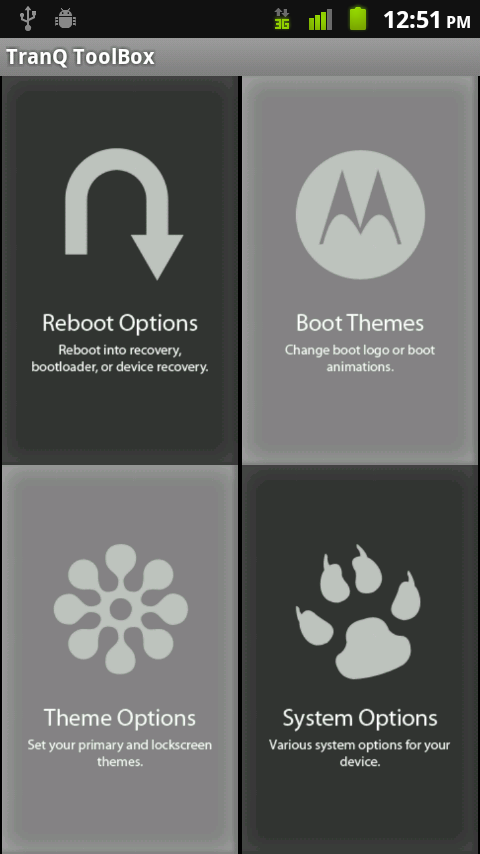
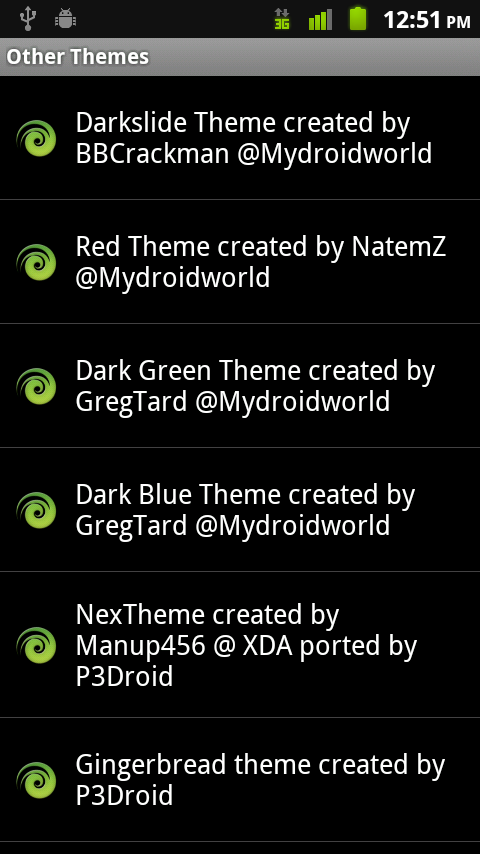
Our buddies over at MyDroidWorld put out version 3.6.0 of their Tranquility ROM which includes something only MIUI has been able to do at this point. Through Tranquility’s Toolbox, you can change themes that have been preloaded with just a couple of simple clicks. There are currently 6 options including a Gingerbread theme, but the goal is to add more as long as they can get permission from theme developers. So if you have a theme for the DX, you may want to reach out them to see if you can make it into this ROM.
Of course, the theme changing ability isn’t the only selling point here. It’s based off of the 2.2.1 (2.3.340) update that went out for the DX last week, it’s own custom launcher, and the backing of one of the Droid community rocks. You can also add or remove Blur on the fly, fiddle with a variety of reboot options, and change boot animations with ease.
Download: Tranquility 3.6.0
Download: Toolbox Update with Themes
Instructions:
*DROID X only.
1. YOU HAVE TO BE RUNNING official 2.2.1 (system 2.3.340) (2.3.320 could work too).
2. Do I need to say it again? YOU HAVE TO BE RUNNING official 2.2.1.
3. You obviously have to be rooted. (Instructions)
4. You need to have Koush’s Bootstrap Recovery.
5. Open the DX Bootstrap and “boostrap” the recovery.
6. When that finishes, “reboot recovery.”
7. Once your phone boots to Clockwork Recovery, scroll down to “backup and restore.”
8. Choose “backup” to make a clean backup of your phone.
9. After that choose “wipe data/factory reset” to wipe your phone.
10. When that finishes choose “install zip from SD card.”
11. Then “choose zip from SD card” and find the Tranquility.zip, select it and hit “yes.”
12. Your phone will apply the ROM. When it finishes go back into “install zip from SD card.”
13. Now choose the Toolbox.zip and apply it.
14. When that finishes, back out, reboot and enjoy!
Comments
127 responses to “Tranquility 3.6.0 Released for DROID X with Theme Changer Toolbox”
Does anyone know how to get rid of the Tranquility splash screen on this rom? I restored my phone back to it’s original state, and the splash screen is still there. Any help would be appreciated.
My phone works 1st but after reboot stay in the main screen. Try to restore for clockworkmod and is not working try restore not work. Take bat. Out. Nothing. Stay in the M screen
My phone works 1st but after reboot stay in the main screen. Try to restore for clockworkmod and is not working try restore not work. Take bat. Out. Nothing. Stay in the M screen
I resend my previous comment, after installing this I got to the factory reset menu – and it all got better. It's now configured and it seems pretty rad. I will have to see how the battery life and other things perform with this though.
Way too many issues with this, tons of FCs, random soft-reboots, etc. If I can get it to install the bootstrap I am getting my ass back to Fission.
This rom needs to be fixed asap. Lock slider is invisible, and as soon as you sign into your google account the phone automatically resets itself every few minutes. Complete crap which sucks because what I could do in the short few mins before it automatically resets looks like this rom has some bad ass potential. Will be going with Apex until this gets fixed.
dude… idk what this did to my phone. takes like an hour to boot. restarts everytime i hit the homescreen. wtf wtf wtf. help.
Where does the toolbox install? I cannot find it in my download folder on my SD Card.
cant install any apps any ideal why
I had the same problem. You need to boot back into ClockWork and clear your cache and “wipe data/factory reset” again. Install the ROM but not the toolbox at first. Then once you're up and working you can go back and install the toolbox. This is what worked for me.
How long should it take for this to install? When I get to Clockwork and initiate to install the zip it seem like my phone just freezes. The progression bar near the bottom of the screen never seems to move.
I've had this problem with .340 and now it seems like its the same with .320.
please help i installed but i am having issues uninstalling it, for some reason i cant flash it back to stock.
im having trouble finding the zip file in where its suppose to be its never the so i cant install the zip file can someone help???
My phone rebooted with the complete wrong package, and now I'm stuck on the Tranquility boot screen…what thefuck
Turn your phone off. Hold down the top (power) and Home buttons. You should be able to get to a recovery screen from there. If you get the triangle android guy error just press the search key to bring up recovery console. Hope this helps!
I just did a quadrant benchmark. Overclock at 1.4 with this rom installed it bench marked at 1814. i don't know how to do a screenshot yet if I knew how I would post a screenshot to prove it.
if i ever wanted to go back stock from this or any ither rom how would i do that?
Boot back into ClockWork and restore from you back.
how do u restore to factory defaults? idk if i did it wrong but it wont let me reinstal bootstrap and all of my contacts are gone. HELP PLEASE
if i wipe my phone can i still get all my apps back
This is the first ROM for the DX that I've seen and been enticed enough to actually install! I had a few issues at first as you NEED to clear your cache as well as wipe/reset before installing. I love how fast and simple this ROM is !!!! TRAQ FTW :-]
My droid x don't wanna updaed to the new software can anyone help me …I got a deodexed droid x runnin 2.2 still I wanna updated but it does not let me ….
Apps from the market are downloading but not installing.. any ideas why?
yes I know the reason I had this problem last night I installed the rom and didn't have bootstrap installed yet I was unable to recover back. However I took a gamble and figured out that if you do these steps you should be fine and the rom will run more smoothly. first shut your phone off. Second push and hold the power and the back button until you see the little droid dude and the triangle symbol. then push the the search button this will put you into the stock recovery. push the volume to navigate the options. first clear your cache. do this like three times for safe. and after that do a factory reset. after this has completed reboot your phone this may take a few minutes to load just be patient and you should be good to go.
These are the same steps that worked for me as well. I'm not sure if the bootstrap is the issue however as I'm certain I had bootstrapped before my ROM install process.
How do I restore my phone back?
I want it off… I can't get it off… lol
I installed this ROM and it did not work out for me at all. Went into constant reboot. I am having to restore completely from scratch…
Once installed, how do I get my contacts and everything I backed up back?
Both APEX and TranQ are very close in Quadrant results using the stock CPU on DX:
Apes 1.3.0 – 1428
TranQ 3.6 – 1378
I think I saw Nexus S at 15xx something last night on DL twitter so with either ROM its only 100pts behind. Just shows how good the DX really is even after 8 months in circulation.
Note: I also tried Overclock CPU 1.2GHZ with both results being lower than those above. I would have thought they would increase.
I can't even get the overclock to work somthing about no module and not supported phone. which i know its supported cause it worked just before i did this.
Apex or Tranquility? That is the question…
I have one little problem with this rom How come I can't get my contacts to load sync? I don't even see backup assistant. I look to reinstall it in the market and can't even find it. is this something I should be worried about cause I had alot of numbers and email addresses that I manually added there not synced with my google account. how do I get this back on with this rom?
Go back to your backup you made before installing, and then export your contacts to the sdcard. When you install the new ROM, you can then import your contacts. I had to relink my facebook and phone contacts but after that they are now listed under “google contacts” and there are none under “phone contacts”. I haven't tried a new ROM yet but I think I'm set now that they are under “google contacts” instead of the usual phone contacts.
once again amazin rom..very simple..all i can say if ur switchin from stock rom dont wipe/reset no need too..thats what ppl r doing wrong…once again one of the best roms i eva seen…thx dev
oh one more thing no need to install toolbox zip it already comes in the first zip..
Installed this ROM through the directions above. Wont load anything, just stuck on Tranquility image… let it sit for a while… pulled battery, and “power+home” to do a factory reset in the blue screen to try and load my back up and I can even get to clockwork recovery.. anyhelp?
In my opinion i would just fun the TBH sbf. I had the same issue about two hours ago haha. The system only TBH .340 sbf works just fine.
can anyone post a video that shows off this ROM or know of anyone who has a video about this ROM, I wanna know what its like before I do this.
So I Tried Flashing this Rom Earlier and it wouldnt even boot past the traQ replacement of the M logo. So i got home SBF'd and tried again And it hot rebooted every 30 seconds my phone heated up to an insane temperature, no apps would install and i cant stand these animations. But no worries, it rebooted and got stuck at the Tranquility logo (The one Replacing the M) so i had to SBF again. This was probably the worst rom experience ive ever had with any phone. I refuse to ever buy,use, or endorse anything made by Teamblackhat ever again. Just Wow does this Make me angry 😛
Agreed…came from Apex 1.0 (from the 115 build) and was my favorite ROM to date. I RSD'd to a clean 115 that I had on my PC…took the OTA to 340 then flashed Apex 1.3. No theme add ons…just the way it comes and this thing is great. I love the new funky animations when opening and closing things, its stable as hell and I love the black bar. The little touches of green and orange look clean…it feels like a new phone.
awesome p3. trying again, thanks.
This looks awesome! I'm pretty much a theme whore and I was on tranq 3 for a long time not too long ago.
I'll be trying this out for sure!
This is progression
Once upon a time, there was a Droid X. The phones master installed Tranquility on it one day and the Droid X became happy. The next morning, the phone being fully charged, flew away into the heavens but fell back down because its battery life sucks ass (well, it doesnt actually suck at all… lawl. )
i liek chikn nuudel suup
Okay, all the uploaded data has been corrupted so I have erased it and am reuploading it now.
I like the transition effects. It adds a nice touch. Some reason it keeps rebooting tho…
same here. Cant pull up bootstrap either!
this is really pissing me off. everytime i try to install it…REBOOT
cant get back to apex!
Ditto…Hosed…No Apps reinstall and Reboot Reboot Reboot
OKay so I did a Factory Reset from privacy and looks like the reboots have stopped…Scary Stuff so far Tranq??
Did the “hold power and home then search button” and did another wipe and stopped reloading. Might at least let you get into bootstrap to restore a back up. I also cant get the toolbox update to work. Always says its bad and aborts
The toolbox wont work for me either but I found doing a power off or battery pull helped the reboots. If you can't get into recovery, try clearing bootstrap apk data then uninstall and reinstall, that's what I usually have to do
I had the same problem. But I found a way around the problem shut your phone off push the power and home button and boot into the stock recovery. select factory reset and you should be fine after that I couldn't install apps all I took a gamble and did this after I did it I was able to install apps from the market and get bootstrap installed this might work for you.
worked prefect without wiping data! I like it a lot
hey dude, do all your apps work properly with apex, i had it on earlier this week and non of my apps seemed to work properly and kept force closing, so i restored back to plain old rooted dx.
Everything seems to work very well with Apex.
all righty thanks man, i really loved apex but non of my apps worked for some reason, must of been a fluke, def gonna put it back on tonight. thanks again.
unless someone comes up with a ROM that has some super cool new thing I don't see much point in moving over from Apex. The theming stuff on this is pretty nifty, but not enough of an incentive to go through the hassle of switching ROMs
this or apex?
i want a vote. haha
Apex, its pretty amazing rom faster than rubix 1.9.0 even with all the eyecandy.,
Apex is pretty awesome, I have to admit
Good themes on it too…rockin gingerbread right now
ApeX 1.3 is the way to go!!!!!
Its easy and safe.
Apex is pretty awesome, I have to admit
Oops sorry wrong comment
Am talking about Fission and apex 2200 Quadrant. I now jow to doit
ho can beet Fission2.3.1 whit Ginb stable 2.2Quadrant?If need tha speed considere Donation i sbow u jow dmota25@gmail.com Paypal..
u need… to fix ur english cuz i hav no clue wat u just said
I try voice 123 English.. Jejeje but the tink is am runing 2200 Quadrant. Stable. U gate now. I now how to doit. But onley Donation paypal. onley DroidX.
About bricked my phone with this rom. Crap…
Well I just gave it another try In case there was a fluke problem the first time and the results are:
Same as my first try the multi touch keyboard force closes on initial sign in.
As soon as I get signed in it starts rapid rebooting every 30 seconds.
I’ve not had major problems with any other roms. This rom just does not work on my phone. I’m surprised it works for others.
At least I gave it another try.
Then you shouldn't be putting custom roms on your phone because this rom is sick. Don't call stuff crap because you can't get it working.
lol totally agree….promise you he didn't update to 2.3.34 before trying :p
I tried to sbf from 2.3.15 to 2.3.34 the other day lol..WRONG! Had to sbf back to 15 and then update to 34 and then apply rom. SBF isn't fun for updating overall versions.
Again…this is my last Motorola phone, POS assholes.
You guys are wrong … I am fully updated and followed the instructions. I’ve tried almost every rom and owned the D1, D2, and now the X. I’m glad its working for you guys, and crap may be harsh. But I know many that have problems with it. I purchased their app for the help the group provides … have you?
Honestly….if you know how to use SBF files, I doubt you’ll ever literally brick your phone. You may get to a situation where you can’t figure it out yourself, but people like me can always get my phone back to stock. It’s not hard, just takes some thinking.
To say you “about bricked” your phone is like saying you almost had sex….you didn’t, so don’t brag.
Lol… you are correct. Only we are still waiting on the true full sbf for the latest update. There is some question about using the leak sbf and the system only sbf whether it fully updates everything. I will rest much easier when the real sbf comes out for the latest update.
Ahh, i used the 2.3.34 just fine after i updated to it. I wanted to make sure it was pure, then wiped everything and installed 1.3.
omg i want this, someone upload a step by step video on youtube!
for the week i had my OG droid before exchanging for the DX, i thought i remembered being able to name the backups
is that not an (EASY) option now or it never was?
it is on the OG droid i do it all the time must be the locked bootloader or you are looking in the wrong place
If you make a backup with Bootstrap, you aren't able to name it at the time of making the backup. However, if you go into Rom manager and hit 'Manage and Restore Backups' you can rename them.
make sure you not to rename with any spaces
Awesome features but I'm a loyal ApeX fan
can some one please tell me if its safe to do this rom over the leaked 2.3.320? it would be greatly appreciated
I can tell you that in the future, and with future updates you will have problems. Your best bet is to go here http://www.dev.droid-life.com/2010…/ and take your phone to the official update.
Thank you for the helpful info 🙂 but I regret to inform you that when I go to select the sbf rsd lite says chipset not supported. 🙁
ah, you probably need the patched RSD lite. When you download the zip that says rsd lite + patch there is an extra file in the zip. After you have it all installed, move that extra file into the RSD lite directory and over write. Should solve your problem.
where would I be able to find this rsd lite + patch?
(Is there a way I would be able to upgrade via update.zip?)
http://rootzwiki.com/index.php/Smartphones/Motorola/Droid-X/Droid-X.html about half way down the page is a link to the RSD+patch. Only way to get back is the instructions in the other link.
Ok, I did that patch..but now rsd lite doesn’t show my phone is connected.
Use rsdlite 4.8.
If you’re still having problems after that you need the drivers as well. I’m using 4.7 patch with no problem on Windows 7(64), XP, and Vista(64). If patched 4.7 isn’t working 4.8 probably wont help. The drivers should be on rootzwiki.
Well I did some asking around on droidforums.net and I used a zip file to update my system 🙂
I had all drivers for my windows vista (32bit). I don’t know what was the issue, I had used rsd lite to upgrade to the leak before. Thanks Timoh for all your help and the others who chipped in also!
Glad you got it working.
If you’re on Windows 7 you’ll need the up to date drivers too. Also, I’ve noticed running as admin helps. I had to tweak the hell out of my RSD for it to work…it wont even read my sbf files unless they are only 4 characters long lol. i name mine to 2334 or 2315 etc b/c the bits wont be read by RSD any other way…its dumb and finicky
uncheck usb debugging on your phone. thats what i had to do and then all the drivers installed. once that was finished rsd saw my phone instantly
So I just followed all direction and installed this. It looks awesome but reboots my phone every few min….. Not like a full reboot it goes to the tranquility screen and resets itself.
Use RSDLite 4.8, no need to patch.
Btw kellex keep blockin me but I keep posting lol….SUCKA IPHONE 4LIFE
loser
Iphone blows… go to an iphone site loser
It's actually my job to “block” you 😛
So I guess I should get fired. But it's not like I can block every IP in the world. It's gonna be up to you to stop being a complete newb and grow a pair. Annnd get a life while you're at it <3
Lol @droid users u need adw ir launcher pro just so ur phones run half as smooth and snappy as iphone lol…suckers…wait verizons iphone will BLOW AWAY any droid…AnyOne
pathetic piece of flesh
what was up with the comment section being all weird and new? now its back to normal.
also, rom looks good.
My flash player will not work.. The only rom that ever has worked w/ flash player on my droid x, was the Flyx. The roms load flawlessly, but for whatever reason, flash player will not work on the browser. I have reset the phone, wipe/cached until the buttons will fall off. I have spent hours “googling” this, and cant figure it out. I want some of that tasty gingerbread, but also want to be able to watch videos on espn.com… Any ideas, would be gladly appreciated.
I'm very happy with my apex. I won't be changing, but this looks cool.
Just went to Apex yesterday from Rubix, APEX FTW!, great rom and will be hard to get me on anything else anytime soon without a large wow factor..
As did I. loving it so far. No known issues so far
Apex has so many bugs for me in the 1.3 version…it finally started doing the screen timeout compared to it just sitting on for hours and hours burning my screen and battery ;o
Glad i noticed it on the first day
Did you wipe the cache and data? I’ve had it running flawlessly since it was featured here on DL. My only issue is there isn’t advanced editing in the gallery, not a bug though.
I didn’t the first time, b/c it said it was possible to upgrade. Then it was really screwy with wifi acting up, bluetooth not streaming smoothly etc. So then I wiped data cache dalvik and battery info, reinstalled, and booted. It still gives me issues, especially with the screen not timing out (known issue) but i’m just going to bear with it unless it gets to the point where it actually annoys me. At that point I’m just going to go back to Tranquility, b/c i used tranq since it was out.
Ah, well I’m glad I’m one of the lucky ones without issues. Glad there are so many options for everyone.
All I know is I came from bricking my phone, to flashing the 2.3.320 SBF, then from there Flashing the 2.3.340 system SBF. Then I installed apex with gingerbread theme, it’s running so smoothly. and if I were to try this one out, I would flash those SBF’s again too.
Apex runs very well for me. Maybe try a fresh install.
Noob Q? If I flash a ROM … do I lose all my apps and settings? or the rom just replaces systems files and keep my apps and settings? I want to try a different rom but have to weight-in the extra work to get my phone back to my likes.
DX 2.2.1 Stock + root + bootstrap
It depends.. You have to follow the dev's instructions for each rom.. Usually, if you're just upgrading the same rom, you can keep your data. But if you're installing a completely different rom, it's best that you wipe date and cache.
I use titanium backup to backup and restore my USER apps only.. When you restore I usually just restore the APP and not the app and data.. Hope that helps.
Thanks for the info..so to see if i follow… I also have Titanium so. Flash the rom, restore apps to new rom and I should be at same spot with new rom on? contacts and accounts dont get affected ??
DX 2.2.1 Stock + root + bootstrap
Yes, that's is what I do and it works for me. Make sure you don't backup or restore system apps, otherwise you'll have a mess on your hands.
When restoring user apps, I always choose “install only” except for my Angry Birds backup, for that I restore apps & data. But some people say they install both user apps and user data and it works.. Its up to you. I always like to start as clean as possible.
Your contacts should already be synced with google. You can always go into contacts and export your contacts to your sd card just to be sure.
And don't forget to make a backup of your current setup via bootstrap recovery..
Ok thanks for all the info. I want to give it a try but this is my only way of comms. so its going to be a weekend project.
good luck.. Just make a backup via bootstrap of your current setup and you’ll be fine.
MMMMMM FIRST!
second to bad i just slapped on apex dont feel like messing with it now
lol.. same here except I just installed DarkSlide v4.1..
holy comment section change. how do i login via facebook again?
this rom looks cool