

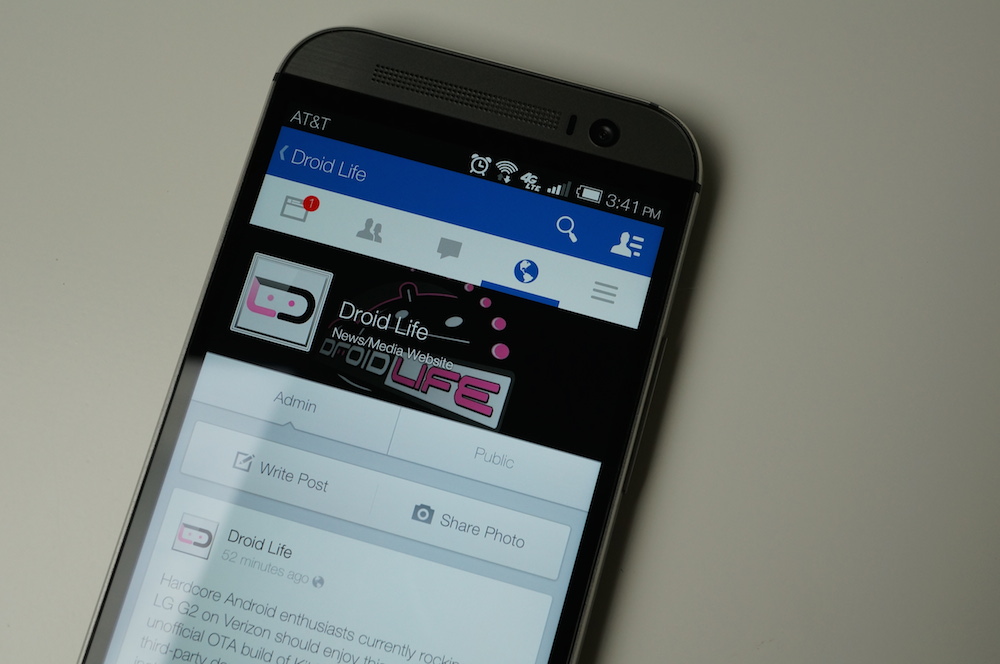

Over the past couple of months, Facebook has been experimenting with a new UI for its official Android application. Members of the Beta testing group, as well as the Alpha testing group have seen it come and go, while others in the group have never been able to use it, thanks to the UI being completely controlled by Facebook’s servers.
While that still might be the case, it looks like anyone running Version 9.0 and up of the application should be seeing the new UI. In order to get Version 9.0, you will need to become an Alpha tester for Facebook. Luckily for Android users everywhere, this is very simple.
Follow the steps below to run the new Facebook Android app user interface.
Directions
- Make sure you are not a Beta Facebook tester. If you are, simply leave the Google Group under Settings.
- Become an alpha tester by joining this Google Group.
- Follow the link in the Google Group to download the alpha version of the app from Google Play. (If you are asked to “Become a tester” before you hit the Facebook landing page on Google Play, click “Become a Tester.”)
- Push the application to whichever Android device you would like from Google Play.
- Log into the Facebook application on your phone after it is installed.
- You should now have the new flat Facebook UI.
Note: If you do not see the new interface, and have confirmed you are running version 9.0+ under the app’s settings, do a click “Clear Data” under the app’s settings on your Android device. Once you have done that, you should have the new UI if you didn’t already.
Alternative Method
For those who are merely looking to dabble with the new UI, as this is still an Alpha build, you can sideload the apk onto your device, but you will not receive Alpha updates for it through Google Play, since you are not marked as an Alpha tester.
Again, if you sideload the apk, and do not see the updated UI, simply wipe the app’s data from the Settings menu on your Android device, then sign back into Facebook, you should be good to go with the new interface.
Download: com.facebook.katana_9.0.0.0.18.apk [mirror]
Enjoy.



![Show Off Your Home Screens Day! [August 2014]](https://www.dev.droid-life.com/wp-content/uploads/2014/08/Home-screen-2-768x510.jpg)
![Show Off Your Home Screens Day! [August 2014]](https://www.dev.droid-life.com/wp-content/uploads/2014/08/Home-screen-2-270x179.jpg)

Does anyone know how to get out of this test version after you’ve downloaded it? I’ve cleared cache and data on the FB app, uninstalled, and left the test groups. Still showing as test version when I download from Google Play store. Extremely frustrating. Any help would be appreciated.
http://www.emoneyspace.com/katharma
Thank you.. It worked! 🙂
Easy to navigate.
one word…..Flipster
Am I the only one who has refused to update FB since they started asking for permission to edit your texts and send emails to people without your permission or knowledge?
I actually like it WAY better than the regular app! Hopefully they dont jump ship on this design.
This actually worked for me. Make sure you either uninstall or clear the data on your old install.
The fact that I can’t turn my main news feed tab to most recent feed is incredibly annoying.
9.0.0.0.19 here
Mine is 9.234.4.3.2124.1234.123.1231.34.1245325…532…32…4.56.5.3.2..21..14.3525.6..432..41.
Any ideas how to go back to the old version? I left the group, uninstalled, installed Facebook from play store an still have new design. Anybody have any suggestions?
Did you ever find this out? I’m having trouble with this as well.
just clear data and uninstall update FB, and install older version apk. Also have remove yourself from the alpha testing. But now the FB on play store is updated to the new UI so you’ll have to find an older FB apk.
I don’t mind the new layout, I’m just looking for the “official” version of it so I can leave a review in Google Play without getting an error message. So should I just look at the official build number in Google Play and find an apk of the same number? Thanks for your help it’s much appreciated
Because even in Google Play it shows 10.0.0.0.17
Yeah, I would just clear data and uninstall the current version you have. Leave alpha group. Then go download the official newly updated FB on the play store that has the new UI.
This worked. Thanks!
Uninstalled the app because of frequent crashes, left the alpha test, restarted my phone, I downloaded the regular Facebook app and now I’m still using the new UI but seems stable no crash so far. 🙂
Uninstalled the app. Put a Chrome link on homescreen. Done.
Install tinfoil. Profit.
I did not have to leave the beta to get it working. Just side load and it was good to go. Kind of. Time line is a convoluted mess since they removed the option to sort between Top and Most Recent.
For the longest time, the app kept forgetting that setting. I had to keep changing it to “most recent”. Are you telling me that the option is gone in the new version? What is it set to now, “top” or “most recent”?
Mega Fail on my Note 3. Dammit. It opened once and I really liked the look, but now it’s just crash after crash after crash.
ive had it for awhile without being in either, while its not the most eye appealing its much easier to scroll through different tabs now i must admit
The only time it crashes on my GS4 is if I kill it from the task manager. I have to leave it running the whole time. Still obviously very buggy, but I do like the layout and the fact that I can FINALLY post pictures to comments section. A long way to go, but what do you really expect from an alpha build.
Really works for me. Thanks
So how do I revert back? Somehow I got this UI rolled out to me despite not being part of any testing group and I hate it. Its inability to sort by most recent makes it useless.
You can sort by most recent. Use the 3 bar icon furthest to the right, press it again and scroll down to most recent. Kinda dumb that you have two separate feeds on the same top bar.
I have no such option on any of my devices.
Hmm no clue then. I wonder what build you got.
This is a joke.
Definitely an alpha build. Nice and buggy. I’ll just wait for the official rollout.
So, what about a way to prevent using this UI? It started getting pushed to me a while back, and I hate how needlessly large the top bar is. The older top bar is more compact. Staying on version 3.8 seems to keep it at bay (plus that’s before they added even more permissions I don’t want to grant it. One day I’ll start using AppOps, lol).
You can control the permissions with Xposed, and the ‘App Settings’ and/or ‘XPrivacy’ modules. App Settings revokes permissions, and XPrivacy feeds apps fake data (e.g. when certain apps request my location, XPrivacy tells them I’m in Pyongyang).
My wife has had this for months on her motoX somehow. She definitely didn’t sign up to beta or alpha test.
Few of my friends have it as well, no clue how – I guess they just roll out the UI in small pools to random users as well.
How to turn the feed to “most recent”? I dont want the “most important stories”.
It’s in the far right tab.
Don’t see it. Am I missing something?
Far right tab. Then scroll down.
Thanks. What a mess. Why not implement it into the main feed like before? Hopefully its fixed.
Most likely will. It’s alpha quality, make a suggestion.
Id like to see another swipe swipe to the right to switch between the most recent and popular news feed and make it pop back and forth between the two. When you do a swipe to the right now it just pulses like its run out of cards. Add it in!!
i have this theory that they’re doing it to keep you away from whats recent/showing a lot of content. to showing whats popular. why? i have no clue, i hate it enough already that they hide most posts from your friends
Where is it? I can’t find it on the “more” tab. I looked everywhere.
I don’t see it in the far right tab, I’ve scrolled down. What should I be looking for?
“Most recent”
So it keeps crashing, how do I reinstall the old version?
New UI is super optimized. It even gives Google+ competition.
This is an April Fool’s joke by Google to break everyone’s Facebook app and bring them over to Google+
facebook distributed the app genius.
It was a joke genius.
It wasnt funny Genius
It was mildly funny
oh look. fake accounts…
OH LOOK, A LOSER.
it isn’t joke genius
Ok… I give up.
I’ll tell you what, Why don’t you and that Chris guy go get some coffee together and go on about how my moment of facetiousness didn’t agree with either of you and how everyone is retarded for understanding the jest in my statement except the two of you. The only thing genuine about that statement was that the app was actually crashing on peoples phones because it wasn’t ready to see the light of day yet.
So yea… relax.
you need to be relaxed
Installed fine on my Moto X, runs pretty well so far…. But I suppose only time will tell.
Now it won’t open at all. Time to uninstall.
Haha that was quick.
Yeah. I kept opening it and it kept crashing. I left the test and it said it may be several hours before I can download the old version from the play store. Ugh.
Don’t download the latest update from play store, immediately crashes now haha.
Continually crashes on my Moto X. I was able to launch it and log in after installing it, but I can’t even open it anymore
Same issue on my note 3 and droid maxx
Look in my reddit post (bottom of this article). I posted a temp fix.
Same issue on the S3
Restart your device, it should start working again.
works great on my Moto X. Try clearing data.
.19 just pushed out. Seems to have fixed the problem after I cleared data and rebooted.
Would youshare the apk, please?
Wow this app is a complete mess. How could this be considered a step in the right direction?
its called an alpha for a reason
Of course, but still the design language is somehow worse than it was before. The navigation is somehow worse than it was before. That’s not a good start for an alpha build where you expect to find issues like performance problems, or stability problems.
But thats kind of expected from an alpha build. Its different from a beta build as its the very early stages and since this looks like it was rewriten, theres bound to be even more problems then if it had the old look/code.
when i think alpha and beta, i dont think of the design as either. I think that design should always be iterated on. Just like im sure this “alpha” already went through months of bickering at the FB office. the best we can do is hope they listen to the users. that is the point of alphas and betas right..
If this is an APril Fool’s prank, I will excise you all off the face of the Earth.
So I randomly got this interface a few weeks ago. Even showed up when I went from an HTC One to a Nexus 5. Didn’t do any of those steps
Didn’t seem to work for me, I cleared cache after I updated to v9 but still on the old crap lol
And still no tablet layout. What a joke.
Desktop, phone, who needs a tablet. Hint: Tablet apps are hard to find on android. Check out ios for them
Oh, pssh, who needs a tablet? Hmm, maybe someone who doesn’t like paying hundreds of dollars a month for cellular data plans, and likes to watch movies on a decently sized screen?
still, why would you buy an android tablet…
Read the previous post, dumbass.
My girlfriend has a Note 2 on Verizon and she’s had this build for forever.
Forever seems like a really long time.
She’s had it for months, three or four I’d say at the least. And she doesn’t know the first thing about becoming a beta tester or anything.
Same.. and i was on the latest beta build and could not get the new look, she was on v7… since this latest build it’s work for me too now, finallllllly.