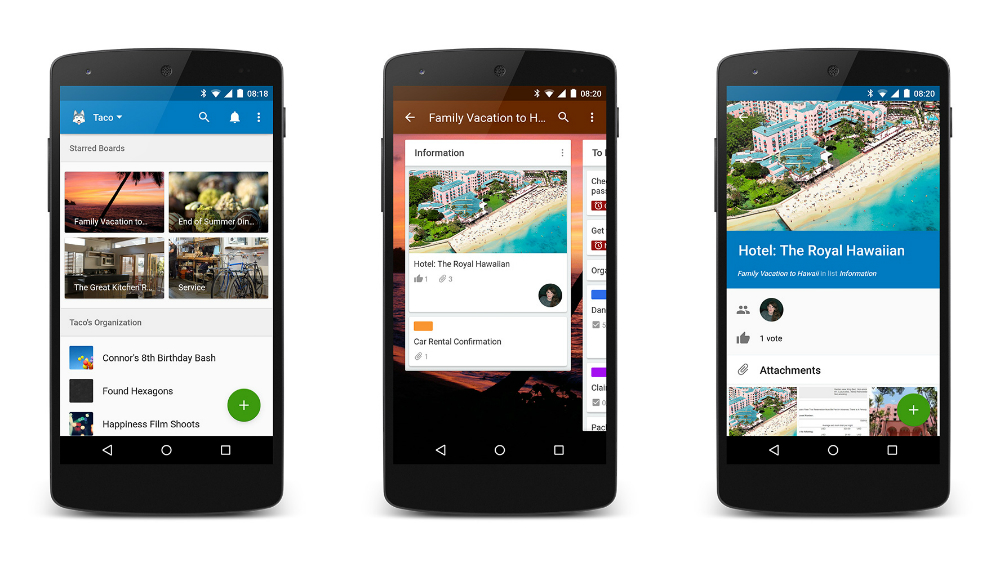
Everyone’s favorite online collaboration tool, Trello, is receiving its Material Design makeover on Android this afternoon. While all of its features remain the same, the app does seem a bit more flat, fitting itself quite nicely inside of Google’s new design guidelines.
For those who don’t know about Trello, it is a cloud-based collaboration system, which allows multiple users to see an overview of a project. You can create a card, then inside each card, you can add details, such as links to the web, images, comments, or assign cards to other users.
The update is now live on Google Play, downloadable by all.
Looks nifty, I’m going to go use it twice then probably forget about it! I freaking love modern tech.
Yay! I love trello. I thought their design was great as it was, so I hope this doesn’t change too much functionality. Also, I can’t see the update yet 🙁
How is this any better than say, Google Docs?
A ton, if someone is foolish enough to use google docs for project management.
Trello makes project and task management more visual and streamlined than trying to do the same with just a collection of docs. You can setup a meaningful workflow that everyone can use on your team. You can include files from Google Drive in the cards being collaborated on as well.
It serves a different role. Trello and Google Docs are not mutually exclusive. Trello is more about managing a project and it’s tasks, where Google Docs is really more for documentation. Technically you could use Google Docs to manage a project as it has collaboration features, but I don’t recommend it.
Everyone’s favorite? I’ve never even head of it lol
Meh, I use it. It has a million plus downloads, so….
I use it for all my team and personal projects at work. It’s a great visual way to keep projects organized. I suggest trying it out if you need a way to manage your personal or work life!