

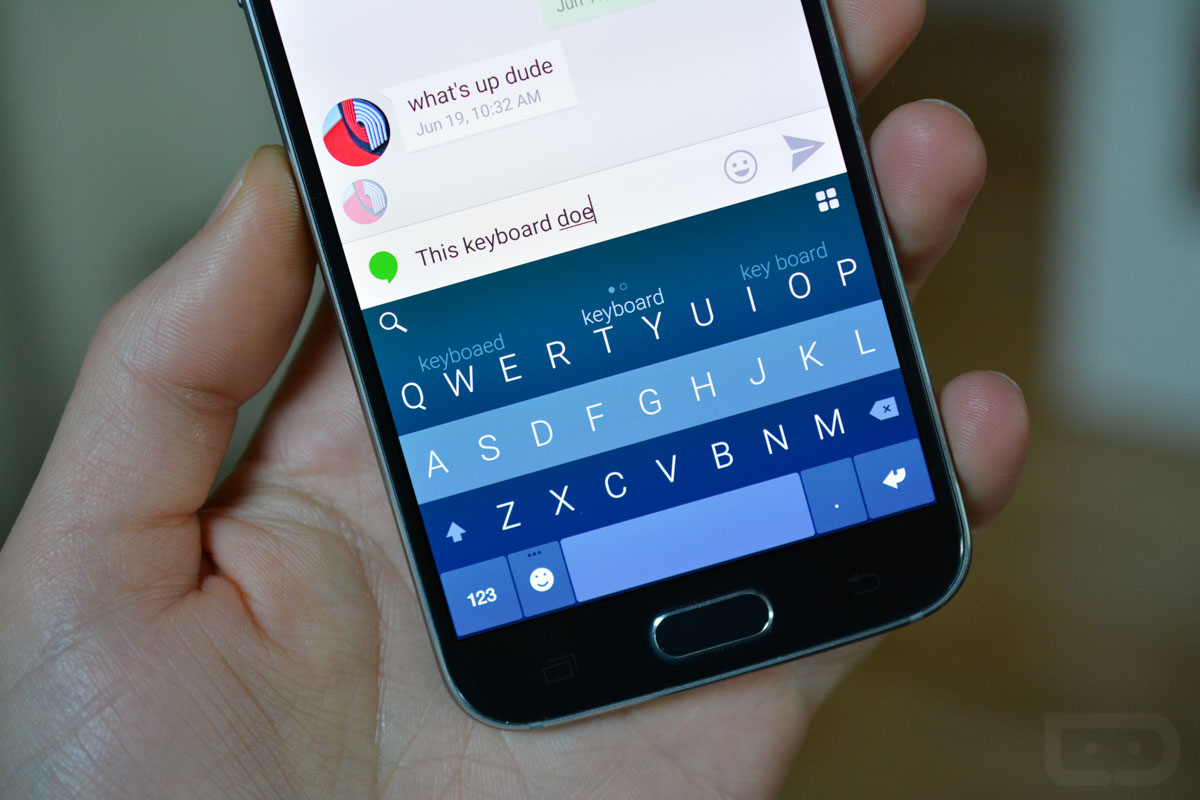

Fleksy, a keyboard that relies on prediction and gestures to speed up the typing process, dropped its price tag today and is now free. If there was ever a time to give it a shot, now would be it. For those who already bought it, Fleksy says they are gifting $8 in free themes and extensions to thank you.
We showed all sorts of love to Fleksy a couple of years back. In fact, I was using it as my daily keyboard for a very long time, but eventually found myself more comfortable with Google’s keyboard as they continued to improve its look and accuracy. But Fleksy is back on my phone for now, just to see if it has improved or if the experience better fits me now.
What is Fleksy? As I mentioned in the opening, it relies on prediction and swiping gestures to get work done. You can blindly type out words, then swipe to the right as Fleksy autocorrects. If it autocorrects wrong, a swipe up or down will get you to another suggested word. Two swipes to the right get you a period, but a swipe back fully deletes a word.
Confused? Trust me, it’s not that bad. Once you walk through the tutorial and use it for a day or two, I think you’ll get used to it. That’s not to say that it doesn’t take quite a bit of getting used to, but it can be a really solid keyboard once you do. Keep in mind that it doesn’t have gesture/swipe/trace typing.
It also has one of the cleanest styles you will find in any keyboard. I’d actually argue that it’s the best looking of any Android keyboard out there. It has themes too, plus “extensions” like a GIF keyboard or number row add-ons.






Meh, I don’t understand ANY keyboard that doesn’t show the long-press symbols on each key…so sticking with Swype’s midnight theme…
What would James Joyce use? Durn, I typed in gmail into my address, and it came out aol. Whats up GK, you mad?
Giving this a shot, but one thing that is gonna bug me is the extensions not being expanded on the keyboard. The Search is on the far left and the Extensions button is on the far right of the keyboard layout. You have to tap the Extensions button and then it shows all available. Why not keep them expanded (visible by default)?
Not being able to turn off double space inserting a period and not having dedicated punctuation keys are deal breakers for me. The latter really destroys the experience having to swipe 4 times just to get a comma.
fleksy was my go to keyboard but with no predictive text its dead in the water, and for some reason it won’t save my @ names for instagram but swiftkey will. just wished I can make the text bigger on the swiftkey board.
Some New Features with droid-life….. Go To Next Page
Swiftkey or nothing! I’ve tried this keyboard several times it looks good but sucks
I’ve been using this keyboard for over a year now. Got it ever since it came out. I type with two thumbs and i feel like it’s the most accurate. Love swiping forward to space. Tried going back to swiping for Swiftkey, Google keyboard, swype, etc, but cant do it anymore.
I have tried Fleksy and Swiftkey multiple times. They just can’t beat out Google Keyboard for me. I really wish they could since G.K. has awful predictions, but neither Flesky nor Swiftkey can offer the same user experience I have become accustomed to. It’s like trying new launchers all the time just to realize nothing can beat Nova once you have gotten used to it.
The only thing that comes even remotely close to GK is Swype but they have horrible predictions too. I wish we could at least theme the GK beyond that horrid material design.
Yeah, I guess it wouldn’t hurt to have a few more themes from Google. But having a ROM with the CM12 theme engine allows me to have several different theming options so that just sweetens the deal.
Swiftkey has one killer feature though – it lets you use up to 3 languages at once.
Tried this, tried swype, and swiftkey I always keep coming back to the Google Keyboard it just works for me and really good. Though I love the competition as it obviously makes all the keyboards better as they try to outdo each other
Same here. I can’t pull myself away from the Google keyboard. Everyone praises SwiftKey like it’s the best but I can’t stand the look and feel of it.
I understand liking something for different reasons, but swiftkey offers so many themes. And the autocorrect/prediction is unparalleled. I have the Material Dark theme and it looks almost identical to the google keyboard with the material theme on it.
Same, except I am using the AOSP/CyanogenMod version which is basically the same, just like it better than all the rest.
I will fully admit that I’m a Swiftkey fanboy and can’t live without the swipe to the left to delete the last word. But will give this a try and see how long it takes for me to go crazy and go running back.
Do they allow gestures in all text boxes? That’s one thing that’s kept me on Swype over SwiftKey is for some strange reason SwiftKey disables gesturing in certain types of text boxes and it bugs the hell out of me. Also, the inability to disable auto-spacing.
I feel like there should be a keyboard poll up very soon….
Love the look, just not the experience.
Swiftkey FTW!
Have you had the issue with swift key recently where it doubles up on words when you choose the predicted word? Then jumbles things up when you try to fix it?
I have had this. Seems to be really prevalent in Discuss comment threads. Google Keyboard and Flexy have this issue too.
That might be right on point. Because it doesn’t happen everywhere.
I’ve seen other problems with Disqus responding as well. My phone seems to lag a lot when trying to respond (like right now) regardless of browser.
agreed. and i can say that i have only seen the issue in Discuss threads personally. what i have found helps is to hit the back key til the keyboard disappears and then click on the space you were typing again. Its not 100% fix, but i would say it fixes it for me at least 80% of the time.
I switched to the Google keyboard after getting fed up with Swiftkey. I have never experienced the issue with Google’s keyboard.
I recently updated the app and that should take care of it.
Hmmm okay cool. I’ll need to update. That thing drives me insane
To be honest, I want to try the Z3 Keyboard I heard some good stuff.
That bug/issue/annoyance along with the fact that SwiftKey would hang and crash using Textra led me to try Google keyboard again. I’ve since changed phones and find that Google and LG’s default keyboard are essentially on par with SwiftKey. It seems to me that all the major players homogenized with time. You can swipe to type with all them these days and they all offer predictive text and auto correct options.
I use both together and I never have issues with Textra or Swiftkey
Textra sent a text to users after the issue was discoved. One or both of them even made a veiled reference to the issue in the notes for a recent update.
I remember that notice. I shrugged it off at the time because I wasn’t having problems. Like two days later, I started having the problems. I’ve only seen it in Textra and Hangouts so far (with Swiftkey).
Yea I’ve seen the changlogs on both Textra and Swiftkey but I never noticed the issue
My issue with Swiftkey has been the performance of it since the last update. It’s got some jank when you open the keyboard. Never did that before the latest update.
Swiftkey has been really messing up on here
➧♪❖►✈☃☛❖☃☛❖✌
< Being sedentary counteracts diet & exercise efforts. While standing all day isn't ideal either,simply sitting less contributes to higher overall daily calorie expenditure, fights off hormones attributed to belly fat, and the boost in both physical and mental energy is significant and instantly noticeable. This report is really Free▆▆▆▆▆▆▆▆▆▆▆▆▆▆▆✒✒ http:// Watch Here /news/,,,/
…………………….
I have. I left a bad review on the apps Play Store page. I still am waiting for them to address the issue.
Cannot say I experienced that. I did, however, start having to fight with Swiftkey’s lag (especially when pulling it up) more and more. To the point where I’ve been on the AOSP keyboard for about 5 months. Prediction is nowhere near as good. But it is clean and quick, which is enough for me.
Touchpal ftmfw
Home Run, Chippah!!!! I tried Touchpal again after getting hopelessly frustrated with Swiftkey, and I can’t believe how awesome (and underrated) it is! (Plus, it has “Touch” in the name… TSS)
Just re-tried Fleksy a couple weeks ago and while the extensions are a nice addition, I still can’t seem to get as good with it as I can with the Google Keyboard. I missed swipe typing too much. It also seemed to slow down after a while.
I’ve been using this for about the last year or so, and I love it. Easy to use, doesn’t lag like SwiftKey can from time to time, looks very clean, and is customizable. Plus, the themes are very well done, too. I’m partial to the chameleon theme that changes the keyboard color to match that of the app you’re currently in.
I love Kellen’s conversations with himself.
He’s a lonely man it’s sad.. lol
🙁