

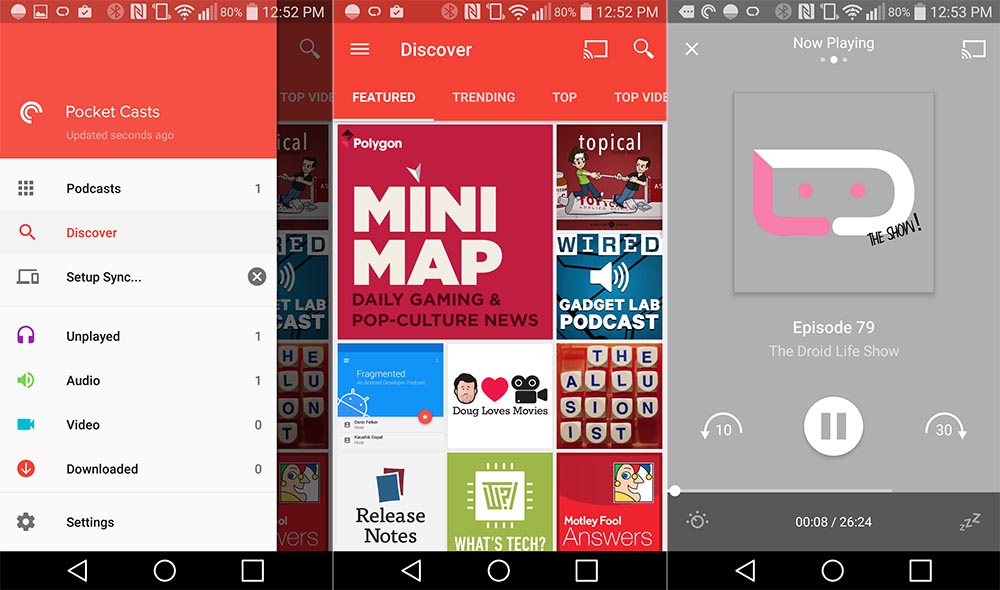
For all of you podcast fans, a massive update has hit Pocket Casts, one which brings improved search functionality, emoji support for titles and podcast descriptions, and Marshmallow permissions.
Once updated, listeners can use “OK Google” to start up a podcast by saying, “Listen to podcast name in Pocket Casts,” or even, “Listen to playlist name in Pocket Casts.” This should allow for quicker firing up of The Droid Life Show, which is always a good thing.
Also included is faster unsubscribing from podcasts, landscape video player fixes, a sync issue for starred shows, and much more.
Here is just a smidgen of the changelog.
- Marshmallow Auto Backup feature added so if you have app backups turned on (System Settings app -> Backup & reset) it will backup your Pocket Casts settings and database so after restoring a phone your app should look a lot more like it did.
- Switched to Marshmallow permissions. We now only have one permission that requires user approval, the storage permission. The app will only ask for permission for this if you change your storage location to a custom folder.
- Stats page data is now included in your sync account so if you reinstall they aren’t lost. The stats page is now a summary of stats across all your devices.
- Improved switching to a custom location so it picks up any existing episode files in the new location.
- Improved the search for podcast interface.
- Improved voice control. Give these a try after you have said “OK Google”
“Listen to PODCAST NAME in Pocket Casts”
“Listen to PLAYLIST NAME in Pocket Casts”
“Listen to Up Next in Pocket Casts”
If you have yet to try Pocket Casts, allow our friend Ron to explain how awesome it is. This quote is snagged from his Google Play review of the app. “Look no further. This is the best podcast app for Android, no questions asked.” That says it all right there, folks.





I prefer Podcast Addict.
I bought this app based on the rave reviews and was disappointed. It’s good, but it’s not much better than podcast addict.
It needs the ability to play podcasts downloaded to phone memory from other sources. I do like the syncing though.
other sources? As in you couldn’t find it in the discover area? You can add podcasts to it with direct rss podcast links if that’s your issue.
Love Pocket Casts! Does anyone know if you can sort or only show downloaded episodes?
There is a preexisting “Downloaded” playlist (they call it a filter). You can also set playlists to show only downloaded episodes, only not-downloaded, or both. You could use this to see only the downloaded episodes of a specific podcast by creating a playlist containing a single podcast, then allowing only downloaded episodes to be shown. When viewing a podcast from the podcasts list (as opposed to within a playlist), you can only sort by date or episode title.
I bought Pocket Casts after reading Ron’s review. It’s a fantastic app! 5 stars
still doesn’t automatically pause when Google Now on phone or Auto is activated 🙁
Does this one allow you to cast to Chomecast audio or SONOS? That’s what I’m looking for…
Pocket Cast supports Chromecast. As long as the podcast episode is still on the publisher’s server.
The GOAT of podcasts app. And it’s the only Dev that has me looking forward to their changelogs
“- Marshmallow support. Delicious permissions. Squishy backup. Sticky fingers. Ok that last one isn’t Android.”
I love Pocket Casts.
That is all.
whatever happened to GPM getting podcast support?
It’s not ready yet.