

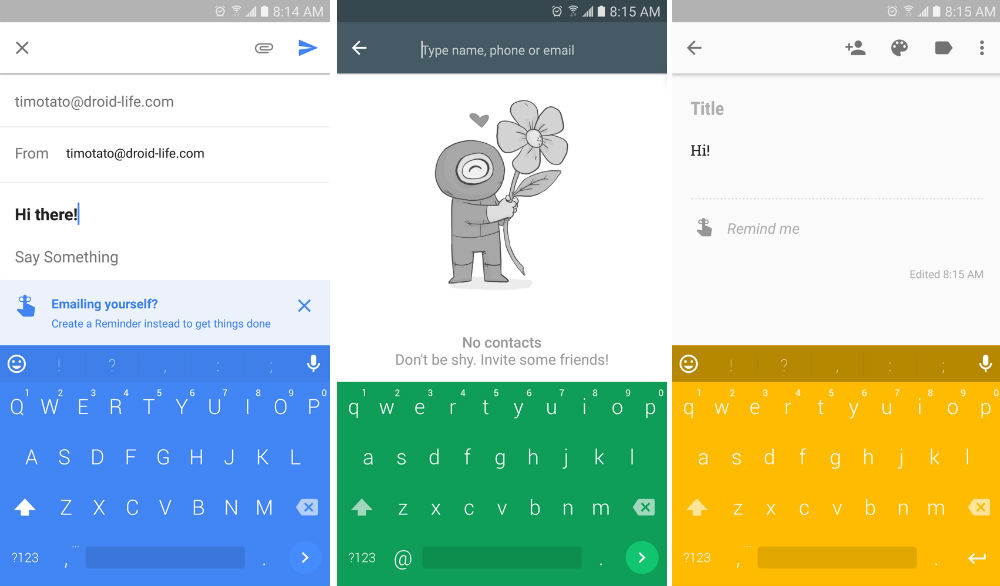
Chrooma Keyboard, our absolute favorite 3rd-party keyboard app on Google Play, is now free for all people of the world. First launched with a price of $1.49, the developers have switched to a free model, providing a wider audience a chance to try out the keyboard’s unique features.
For those who already purchased the app, don’t freak out, the developers have built in a way for your to restore your purchase and log into the app, meaning you aren’t losing out on any features or updates. To do this, update the app, go through the entirety of the setup process to make sure you are logged in properly, then slide out the hamburger menu and hit “Restore Purchases.” All features will then be made available to you. If you happened to purchase this app in the past 24 hours for its full price, your upgrade will be carried over automatically, so don’t start thinking you somehow got ripped off.
As for what’s new, beyond the free pricing(!), the settings for the app have been completely reworked, multi-language support is added in, new color styles are available for your viewing pleasure, and a new prediction algorithm will offer a better predicting experience.
Additionally, for those looking to help beta test this app, you can join this Google+ community, then download the beta via Google Play. Betas are awesome.
Check out the changelog, then go download it.
What’s New
- App is now free
- Brand new settings app
- Multilanguage
- New color styles
- New prediction algorithm
- Preference synchronization








Hey! I love Chrooma Keyboard so much, so I made a quick run-through of its best features.
Check it out! Thanks!
https://youtu.be/O5s-bV2_NfQ
no love for the blackberry keyboard?
The one thing I wish this keyboard could do is match the color I’ve assigned to different contacts in Android Messenger. My contact is green, for example, but the keyboard will be red/orange.
Decided to try this out, very bold colors that really pop so i’ll definitely have to get use to them but i had a question.
running a nexus 6, stock software, how do you get rid of that keyboard icon that appears in the navigation bar? That annoys me, don’t want it there at all. actually i dont want it all.
Running stock software I don’t believe you can get rid of it.
It’s always there if you’re running stock. It used to bother me at first, but now it doesn’t. Plus, it has the benefit of allowing me to easily switch between keyboards when I’m testing things out.
Have you tried turning off all of the keyboards you don’t want to use, then going to Applications in Settings to disable the default keyboard app (my Shield tablet, admittedly not running stock, forces a default availability of either “Android Keyboard” or Google Keyboard)? With only 1 option to choose from, the selection icon disappears for me.
Worth a try, anyway. Worked on the Shield tablet, not on the S4. Yep. Need an upgrade…
The only real reason i’ve stuck with swiftkey is that it’s the only keyboard i’ve found that allows you to shrink the size of the keyboard. I hate the fact that even on a big screen, the keyobard takes up so much of it!
You can adjust the size of this one.
You can do that with Swype too.
Are all of the color themes just white on a color? That is all I have seen in the examples.
I really like my current red, white, & dark gray theme with SwiftKey.
The title says “Free of Google Play” instead of “Free on Google Play”. I thought they were removing their app from the Play Store and switching to 3rd party installation only.
ditto
I think there are a lot of people, myself included, that are really aching for something to replace Swiftkey. Hopefully this can step up to the plate and knock Swiftkey down a peg. The Android keyboard market has struggled for years and still doesn’t have one that stands out. That’s probably the one thing that Crapple has on Android, their keyboard.
As someone who bought swiftkey years ago and has been using it over multiple devices. Why? What is swiftkey missing?
I was a Swiftkey user, but the lag became unbearable so I switched to Fleksy, and then to Chrooma, which I love, and have been using nonstop for the last several months.
So I downloaded it (first-time user) and signed up for beta and all of that. My settings screen is crippled and just wants a ‘pro’ unlock of $2.49. Am I alone here or am I misunderstanding the post?
No you arent misunderstanding it. The app is free to download. You want premium features? pay up.
Just gave them my money 🙂 thanks
I wish I could switch to this or any other keyboard, since I’m pretty fed up with Swype. I hate their “Dragon dictation” and wish they had an option to just use Google. I hate that the material theme doesn’t have the symbols on the keys so I have to use the old school Holo theme (why can’t it just be an option that can apply to any theme?).
But the thing that I can’t live without is the keyboard gestures.
By which I mean…
• Select All (Swype key to ‘A’)
• Cut (Swype key to ‘X’)
• Copy (Swype key to ‘C’)
• Paste (Swype key to ‘V’)
• Search (Swype key to ‘S’)
This is much easier and faster than long pressing, and much more intuitive for me since it’s the same thing as Ctrl+A, Ctrl+C, etc. on a real keyboard. Not to mention, Swype also has a separate page with Up, Down, Left, Right arrows for selecting text without using those infuriating on-screen things.
Every time I try something other than Swype, I come crawling back in a week tops 🙁
Have you tried Swiftkey? Much better than Swype. Try this, although the symbols on the letters are a “pro” feature. It’s still worth a look before going pro IMO.
I wouldn’t mind paying extra for the symbols on the keys… but last time I looked at Swiftkey it didn’t offer any shortcuts like what I described above.
Same boat. Plus, I have “Flat Style Color Keyboard” xposed module installed that changes the keyboard color based on the apps’ color. (Pretty much the only usp of Chrooma).
My favorite is Swype key to ‘5’ to bring the num pad, in case I need to put a number
I use Fleksy keyboard and its my favorite so far. They have an extension that you can cut, copy, paste, and select text so that could be an option for you. It doesn’t have swipe typing though so you would have to do without that.
That’s a non-starter for me. At this point pretty much every keyboard (except Flesky apparently) supports swiping.
I miss it occasionally but Fleksy’s gestures are very convenient and make up for it for me.
It’s also worth noting that Chrooma Keyboard is open source (under the Apache License), unlike almost all of the other 3rd party keyboards, or even the official “Google Keyboard.”
I’ve never heard of this keyboard. I’m with SA_NYC What’s the difference between it and Swiftkey which I thought used to be Droid-Life’s favorite keyboard?
It’s pretty much Google Keyboard but with color enhancements (adapting to whatever app you’re using), dedicated Number Row option, Night Mode, Split Layout option, customizable One Hand Mode, and a few other options.
Comments on this versus Swiftkey (my incumbent keyboard)?
With this keyboard, think of it as pretty much all of Google Keyboard look/feel/functionality but with color enhancements (adapting to whatever app you’re using), dedicated Number Row, Night Mode, Split Layout option, customizable One Hand Mode, and a few other options.
That’s a great description. This is the first keyboard that has ever taken me from the Google Keyboard and to be honest? You barely even notice until you see the sexy colors. Seems a lot smoother as well.
sooo…do i get my 1.50 back i wasted on this continuously freezing/crashing keyboard then???
Have you emailed the developer or are you just throwing your complaints in to the ether?
throwing complaints…seemed to work fine
Hi Chris! I’m the dev, first I’m sorry if you are running into any issue, then please reach us via mail and we’ll try to solve all the issues 😉
i appreciate the response, was a frustrating becasue i like the keyboard…ill see how this update goes before wasting your guys time
Fine! Don’t hesitate to write in case.
Read this as:
Bet those $1.50 will make you rich…
no, just richer, by $1.50
And here I thought that was a feature. 🙂 I am having the same problem in the app, but attributed it to being on the N preview. Keyboard still works great though.
I really like the customization of this keyboard such as adding a number row and showing special characters on the keys. One thing is the algorithm for the swipe gestures are a little off of Google’s keyboard, but this update seems to have improved it.
Yep. I’ve noticed that predictions are much, much more accurate now.
I love this keyboard. It’s the only one in a long while that has pulled me away from the Google Keyboard.
“my room mate Mary Is getting paid on the internet 98$/hr”..,……..!wc337ctwo days ago grey MacLaren P1 I bought after earning 18,512 DoIIars..it was my previous month’s payout..just a little over.17k DoIIars Last month..3-5 hours job a day…with weekly payouts..it’s realy the simplest. job I have ever Do.. I Joined This 7 months. ago. and now making over. hourly 87 DoIIars…Learn. More right Here !wc337:➽:➽:➽➽➽➽ http://GlobalSuperJobsReportsEmploymentsUrgentGetPayHourly$98…. .❖❖:❦❦:❖❖:❦❦:❖❖:❦❦:❖❖:❦❦:❖❖:❦❦:❖❖:❦❦:❖❖:❦❦:❖❖:❦❦:❖❖:❦❦:❖❖:❦❦:❖❖:❦❦::::::!wc337……,.a
Love this keyboard, but it did not play well with my Exynos S7. Hoping this update fixes that.
Will this keyboard automatically switch between languages like Swiftkey?
Well, looks like I have to pay for that option…
You don’t need to switch between languages, you can use them together 🙂
That’s exactly what I meant. Used the wrong words. But I paid for the option. I am constantly switching languages, so I like predictions being together.
I guess you need to pay to unlock that feature