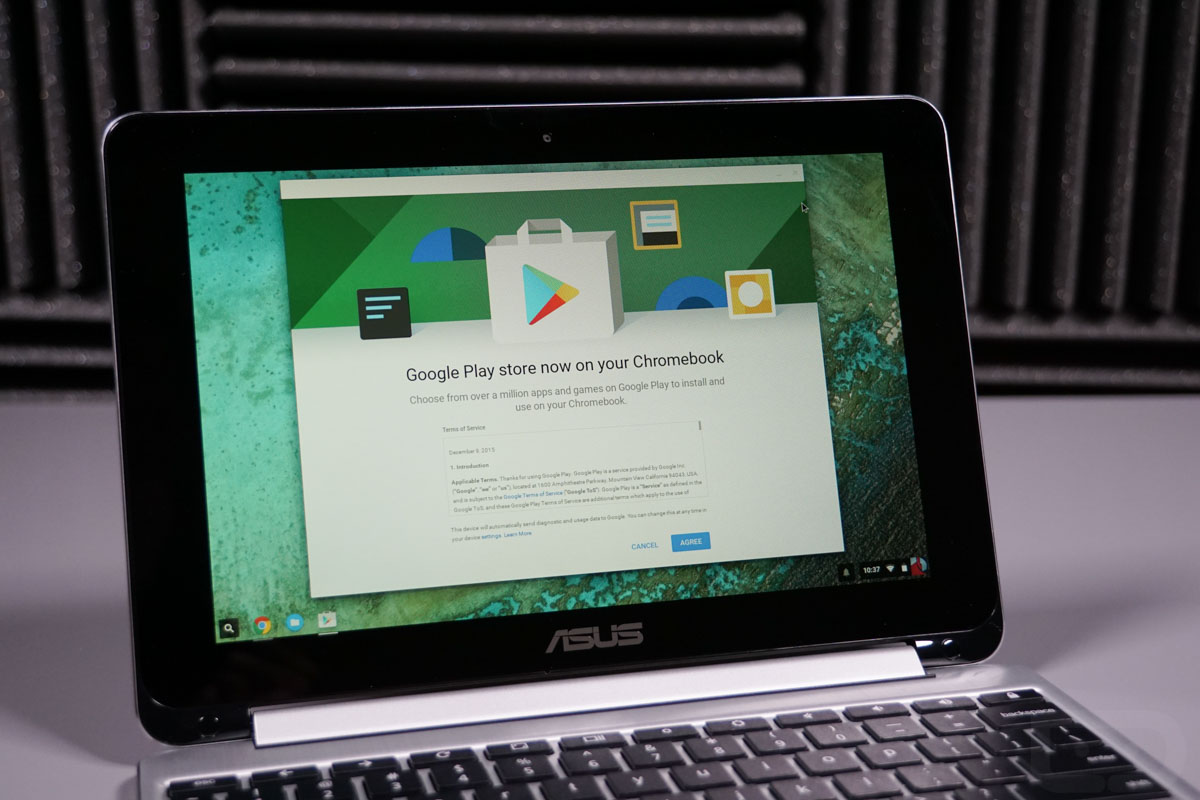
As we noted this morning, Chrome OS 53 is rolling out to Chromebooks, bringing with it Google Play and Android apps. Three devices are scheduled to receive that access this month and the ASUS Chromebook Flip just so happens to be the first to go live. Since we have one in house, it’s only fitting that we take it for a spin to show you just how this whole Android-on-a-Chromebook thing is going to work.
Keep in mind that this is Chrome OS 53 in the developer channel and it is running on the Chromebook Flip, which isn’t exactly the most powerful of computers (2GB RAM, 16GB storage, Rockchip 3288-C). What I’m trying to say is that there will be bugs and slowness – lots of both. Not only that, but things aren’t going to be the smoothest or quickest just yet, since this is the first release and all. Still, this is pretty cool stuff.
In the video below, you’ll see how to get setup with Google Play on your supported Chromebook and take a tour of the store, install an app or two, and then enter a quick walk-through of apps and games up and running on the device.
Enjoy!
[responsive_vid]
Comments
26 responses to “Video: First Look at Android Apps on Chromebooks”
The Apps here are so amazin. It really complements the Chromebook. https://play.google.com/store/apps/details?id=com.crittermap.watch.sunset
Chromebooks are one of the trends today. It is very good and has many features. https://play.google.com/store/apps/details?id=com.crittermap.games.puzzle.sudoku.free
What’s the big deal about this? What can’t the desktop level browser and existing ChromeOS apps can’t do that an Android app can?
Can’t wait to get Google’s Allo on my CB!
Will we get android widgets on the chromeOS desktop?
Holy Crap… I never even went there. This would be awesome!
Nobody has this posted anywhere. I want to know so bad.
Few things people should know about buying chromebooks:
1. IT MUST HAVE 4GB RAM MINIMUM. You can get by with 2GB if you’re a light user but with the Play Store now, you’ll see lots of slowdowns.
2. If it has a fan you’re good. Fanless CBs are slow as hell (new HP CB 13 is the exception) Look for xxxxU Celerons/i3 based Chromebooks. i5/i7 is overkill.
3. If you’re patient, wait for OEMs to build Chromebooks with the Playstore in mind. Good SoC, touchscreen, form factor etc.
4. Bookmark this site and check it every time you’re thinking about buying a CB. (it gets updated often) http://zipso.net/chromebook-specs-comparison-table
5. r/ChromeOS has tons of info and lots of people can help you out and give you recommendations https://www.reddit.com/r/chromeos
Hey @kellen, does your ask you to pay for apps you’ve already paid for? All my purchased apps in “all” show a price, not “purchased”.
It took maybe two more reboots, and an overnight, then my apps were finally labeled correctly.
Older Intel 2995u ChromeOS machines too. older HP Chromebook is still Chrome OS 47. Android Apps needs Chrome OS 53 dev.
Kellen I have the 4gb ram model and it’s running pretty smooth not sure if the ram makes a difference but mine is smooth so far
I haven’t checked if this is possible, but can I run chromeos from a flash drive? I got a tablet to use a couple of apps, but I’d rather use the computer if I could boot from a flash drive.
Now that we are going to be able to install apps, then we should get more than 16 Gigs.
Right…. Although I really don’t understand paying so much for a chromebook. 16GB is a joke.
<"my room mate Mary Is getting paid on the internet $98/hr"…..!td227y
two days ago grey McLaren. P1 I bought after earning 18,512 Dollars..it was my previous month's payout..just a little over.17k Dollars Last month..3-5 hours job a day…with weekly payouts..it's realy the simplest. job I have ever Do.. I Joined This 7 months. ago. and now making over hourly. 87 Dollars…Learn. More right Here
!td227y:
➽:➽:.
➽.➽.➽.➽ http://GlobalSuperJobsReportsEmploymentsAuthorityGetPay$98Hour…..
★✹✹★✹✹★✹✹★✹✹★✹✹★✹✹★✹✹★✹✹★✹✹★✹✹★✹✹★✹✹★✹✹★✹✹★✹✹★✹✹★✹✹★::::::!td227y….,….
How much are you paying for a Chromebook?
<"my room mate Mary Is getting paid on the internet $98/hr"…..!td116y
two days ago grey McLaren. P1 I bought after earning 18,512 Dollars..it was my previous month's payout..just a little over.17k Dollars Last month..3-5 hours job a day…with weekly payouts..it's realy the simplest. job I have ever Do.. I Joined This 7 months. ago. and now making over hourly. 87 Dollars…Learn. More right Here
!td116y:
➽:➽:.
➽.➽.➽.➽ http://GlobalSuperJobsReportsEmploymentsExcellenceGetPay$98Hour…..
★✹✹★✹✹★✹✹★✹✹★✹✹★✹✹★✹✹★✹✹★✹✹★✹✹★✹✹★✹✹★✹✹★✹✹★✹✹★✹✹★✹✹★::::::!td116y….,..k..
Too much.
ran out and bought a Flip just to make this video?
It’s worth noting that when you switch between any of the stable, beta, and developer channels, your device wipes it’s storage. Meaning any files you have on your SSD will vanish after you reboot into your new channel. I know Chromebooks are mainly cloud based devices, but there might be some folks out there who need to backup their documents before switching to the dev channel.
You only lose your files when going moving backward.
Please god just put chromeOS on the pixel c
Pixel C has an Nvidia SoC. Those aren’t compatible with this implementation of Android apps. That’s likely why it’s running Android in the first place.
Never gonna happen.
Give it up already!
I want to believe.