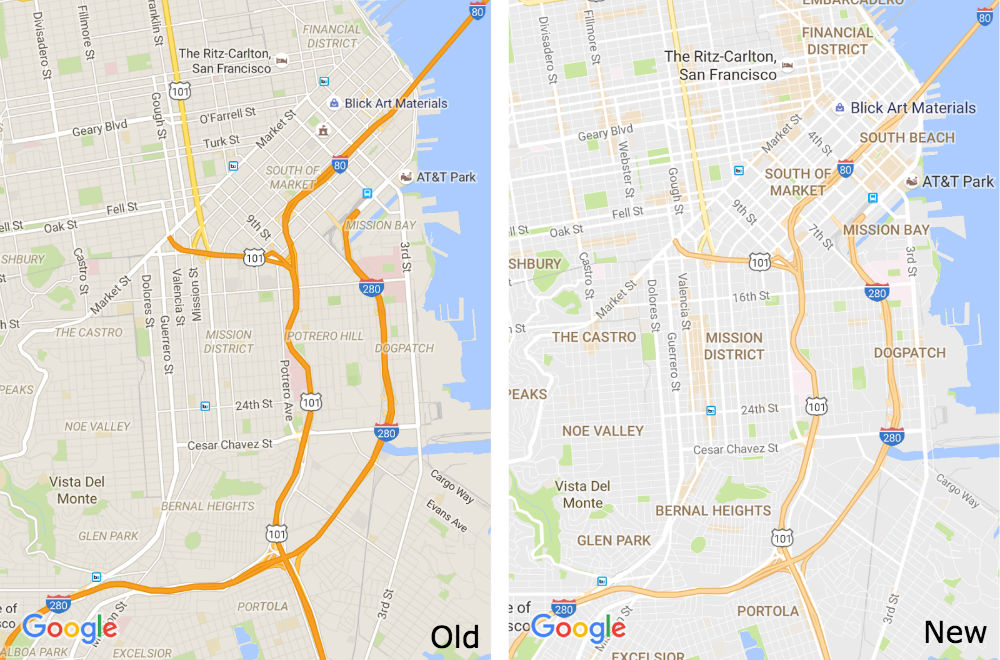
An update for Google Maps will affect users on Android, desktop, as well as iOS, bringing a cleaner look, improved typography, and much more. As you would assume, when looking over a city in Maps, there is a lot of information, all condensed until you zoom in. Because of this, Google is redesigning the layout of Maps, but don’t expect anything too drastic. Google will be providing a “cleaner” look, plus improving the typography to make things a bit easier to read.
As described by Google, they have removed elements from the overview that are not absolutely required. This will result in a cleaner look that makes it easier to find helpful and actionable information, such as traffic and transit lines. For the improved typography, you should much more easily view street names, points of interest, and transit stations.
Google is also adding in a new “Areas of Interest” feature, highlight places on the map where there might be a lot going on. These areas on the map are shaded orange. When you head into an orange area in the Maps app, you can view different details about local hot spots or other activities you can do.
This update is rolling out to Google Play, iOS, and on the desktop version right now.
[responsive_vid]
my gooness, it is much better now. i star a lot of places on google maps. places that i’ve visited and places i want to visit, places i plan on visiting. living in nyc, the stars can accumulate big time. before i had to zoom in pretty darn close to see what the name of the star was. now its much easier to see the name at the default zoom level.
So much better. Easier to see streets and looks a lot less busy
I like it. I think you can see the roads better when zoomed out. Moving on.
It’d be interesting for these “hot spots” if they could source check in data from location apps and have them turn a different color based on amount of people there. Could mildly see if places are crowed to either go to be part of the action or stay away to avoid lines.
Tapping on the location tells you when it’s usually busy by the hour if they have the data.
I definitely like the old look better. The is the first update I haven’t liked in a really long time on Maps. Removing road outlines (“not absolutely essential?”) was a bad move. The font change is nice, the rest seems like form over function here ..
I can still clearly see where the roads are on the new maps, you can tell by where the white changes to gray.