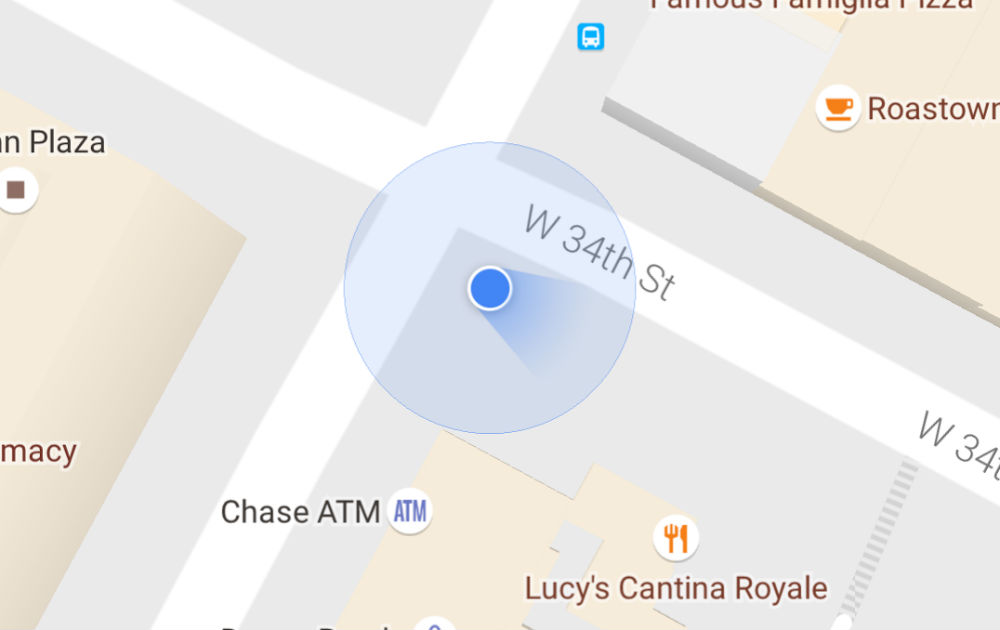
In a Google Maps update that was first given to beta testers, as we’ve seen it for what seems like a couple of weeks now, the blue dot that indicates your location will now also indicate your direction. Not that this needs to be broken down any further, but let’s break it down for all to understand.
When you fire up the updated Google Maps, your little blue dot will face in the same direction as yourself. For example, if you are walking north, the blue dot will also be facing north. There’s your breakdown.
Google also implemented a way to see how well your device’s location settings are calibrated. This is actually the cool part of the announcement. On that blue dot, the wider your beam is, the less accurate your location reading is. The narrower it is, the more accurate your location is. To help increase accuracy, users can draw a figure 8 with their device, which will help calibrate the location.
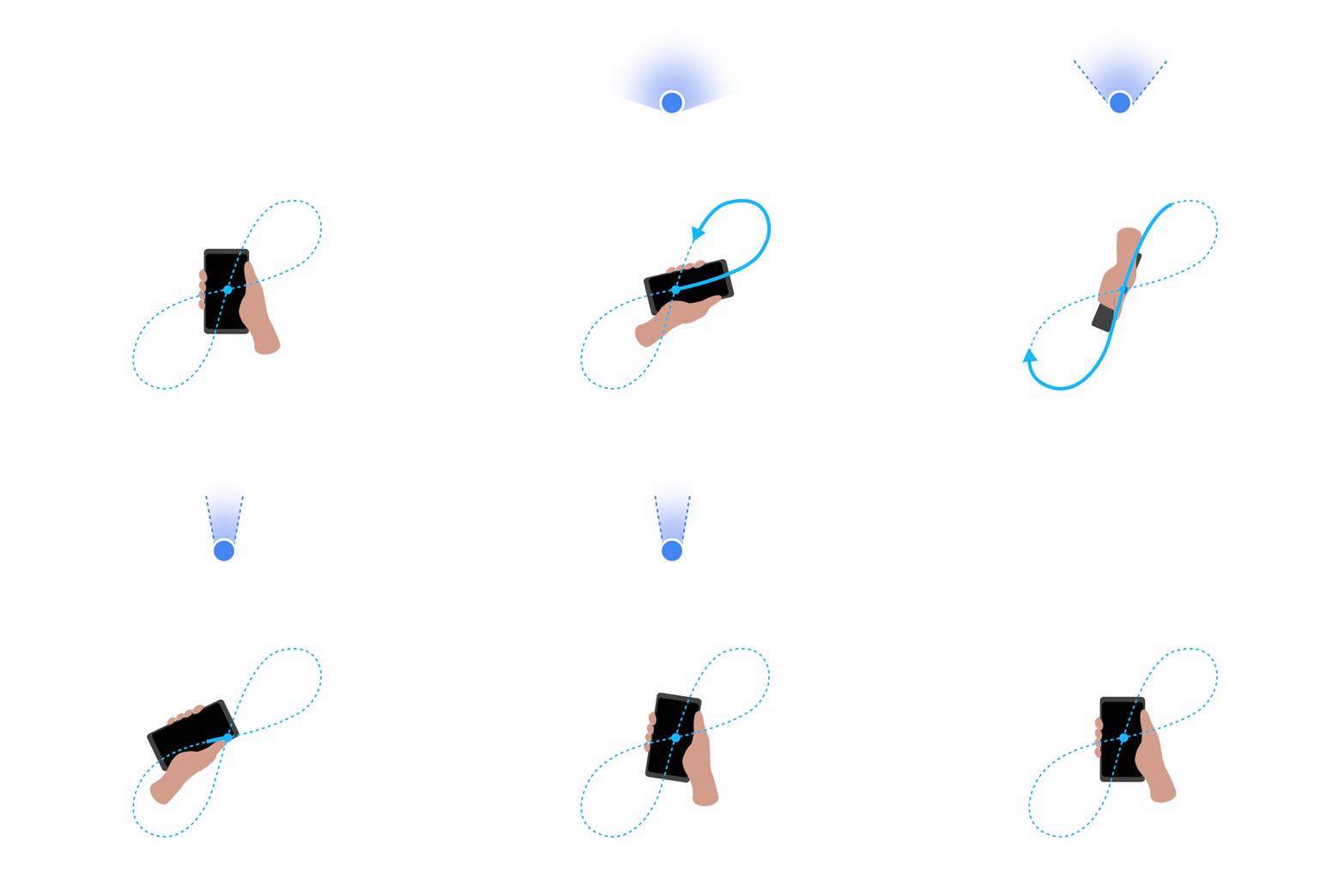
The update for all that includes this change is now available on Google Play, so don’t be shy, go grab it.
The beam doesn’t show the direction in which I’m moving. The arrow used to. Did Google try to fix a problem that didn’t exist??
Just got the blue cone field of view. Now, while there has always been an arrow pointing the direction you’re facing, this blue cone make make up for it’s lack of accuracy.
I see the field of few changes. So when it knows it’s not very accurate, it’s wider, but still covers the area you are actually facing.
So maybe this IS a new feature. Just not a brand new concept.
Accuracy should be the bone here.
Is the beam in front of you like a headlight, or behind you like a tail?? Mine is in front like a headlight, but I’m thinking that must be wrong since navigation always has me going the wrong direction at 1st. Every time. Samsung Galaxy S6Edge
Headlight.
Actually it’s your field of view. The narrower it is, the more precise is the phone’s orientation.
It just reminds me of the blue dot Apple had with their first iPhone….My friend had one and it was impossible to tell which direction you were going until you started to move. This is a much better approach!
That figure 8 is different from how Google used to tell you to calibrate.
Old one…
Nice to see the cone, but it says I’m facing southeast when i have the phone pointed north. Good try, Google.
Edit: it took about 20 seconds, but now it’s pointing the correct way.
In the past few months, my G3 has gone from always being 90 degrees off, to consistently being 180 degrees off. At least with this update I can confirm how inaccurate it is by the fact that the spotlight effect never narrows from the widest possible range when I try to calibrate.
I’ve been having that issue with my Moto X Pure, too. When playing Pokémon Go, my trainer was often looking the opposite direction I was, which also meant the auto-rotate option for the map was useless.
I thought it was just a problem with my phone and calibrating it (i.e. hardware issue), but I guess the issue isn’t just limited to one model or manufacturer… hmm…
I noticed it this weekend. It was remarkably accurate on my phone.
What’s the best way to test if your gyroscope is working? This arrow doesnt move regardless of which direction I turn my phone, and calibrating it doesn’t work. Skymap, not sure if it’s the update or my phone, doesn’t move at all. Again, regardless of how I orient my phone.
I guess the simple test is if the screen rotates, right? Oops.
I think there are apps that can test it for you and/or show diagnostic info that you can see whether it’s functioning properly or not. Unfortunately I don’t have time to find one that I recall using awhile back.
Which phone? Samsung devices that haven’t been destroyed by their carriers (I’m looking at you, Verizon) can go to their phone dialer and enter *#0*# and select sensors to calibrate about any sensor they have.
Samsung, apparently destroyed by my carrier. Tried that but nothing came up. Figured it was something they did. I’ve gone on the road each and every direction and my “arrow” stays pointing southwest regardless of which way I’m going/facing/traveling.
Sorry, man, I know it works on Sprint Note 4, but VZ locked it down. Which specific phone/carrier combo do you have? Also, you MUST be using the Samsung stock dialer (not a 3rd party).
The carrier you were looking at lol. S6 on Verizon. Stock Sammy dialer.
have had a blue arrow for quite a while. it never points in the right direction, always at about a 45 to the right.
I’ve found that my device only points in the right direction when in left landscape mode but points perfectly in POGO. wtf
When walking it always had a little arrow… but it’s NEVER pointed in the right direction for me even despite “calibrating” the phone several times.
Useless feature.
Dunno how you had one – I was in New York walking in the wrong direction each time. I only had the dot. This would have saved a lot of time on foot!
This is a VERY useful feature.
Google is paying 97$ per hour! Work for few hours and have longer with friends & family! !mj26d:
On tuesday I got a great new Land Rover Range Rover from having earned $8752 this last four weeks.. Its the most-financialy rewarding I’ve had.. It sounds unbelievable but you wont forgive yourself if you don’t check it
!mj26d:
➽➽
➽➽;➽➽ http://GoogleFinancialJobsCash26DigitalGroupGetPay$97Hour… ★★✫★★✫★★✫★★✫★★✫★★✫★★✫★★✫★★✫★★✫★★✫★★✫★★✫★★✫★★✫★★✫★★✫★★::::::!mj26d:….,…….
yeah mine has always been about 60 degrees off. makes it totally useless. Only navigation gets the direction right.
Every app that comes out with a new feature. You will have 20 people post that they have had that new said option for years. Never fails haha
Well, when the feature only changes its look, it’s not really a new feature. Just pulled up my maps, and I have a blue arrow.
Pepperidge farm remembers…
Andy, no need to be so condescending to people, or you will be the one to look foolish.
I can assure you that I have had a little arrow that points in the direction my phone is pointing for months, maybe years.
See also Dustin’s reply.
I would agree that the calibration arc is new, but that is not what the headline featured.
I never had an arrow – how did you guys get an arrow? There never was one for my Google Maps. This is a life-saver!
No clue how I got it years ago, it all I ever had… I mean, according to Andy, I just got.
I’ve had the arrow ever since I got my OG Droid. I know because I spend about 15 minutes trying to trick it in what direction i was facing. At that time, it was surprisingly accurate. But I don’t remember doing anything to turn it on. It was just there. Maybe it is a feature that needs to be turned on within the settings of Maps?
Yea the arrow has been there for years. Some screenshots from a quick googling…
2015…
http://www.technewstoday.com/27245-google-maps-finally-allows-offline-navigation-and-search-for-android/
http://images.technewstoday.com.s3.amazonaws.com/tnt/google-maps-finally-allows-offline-navigation-and-search-for-android.jpg
2014…
http://news.softpedia.com/news/Google-Rolls-Out-Maps-9-0-for-Android-with-Materials-Design-UI-Screenshot-Tour-464402.shtml
http://i1-news.softpedia-static.com/images/news2/Google-Rolls-Out-Maps-9-0-for-Android-with-Materials-Design-UI-Screenshot-Tour-464402-5.jpg
2013…
http://www.frandroid.com/android/applications/151230_google-maps-7-0-la-nouvelle-application-android-est-la#
http://images.frandroid.com/wp-content/uploads/2013/07/Android-Google-Maps-7.0-image-0-630×549.jpg
You probably have to go back to like Froyo or Gingerbread to find a version that didn’t have it.
I always have and still do have an arrow
Did they remove and add this feature back in? I remember very well that there used to be a arrow, or something that showed the direction you were facing. Or did they change it to a blue cone of view?
Yeah, I faintly remember an arrow. I don’t think it’s been around for a while now though.
You are correct. The arrow has been there for several years. They never removed it. They just changed from the arrow to this new style. The author just did a really bad job explaining it… maybe he doesn’t use Google Maps? I don’t know. It is very clearly worded as if this is an entirely new capability that didn’t previously exist.
There used to be an arrow, like a year ago or more, but they removed it and just had a dot. I HATE the dot, because you’d get to an intersection coming out of a gas station or a neighborhood and you wouldn’t know which way you were facing and weather to turn right or left. I always turned the wrong way, of course. This new feature seriously made my year. I know many people may not find it as much of a big deal, but for me this was MUCH needed. Thank you Google for giving us this feature back, and it looks better than the arrow too. Bravo!
You, sir, are correct. There has always been an arrow. The author is mistaken.