


Google’s Pixel phones and their cameras, a relationship that is almost never separated from a conversation over why you should buy one. The cameras are arguably the #1 or #2 reason people buy Google’s phones, so when changes to them are on the horizon, we pay attention. We already believe that a hardware upgrade is headed to the Pixel 8 Pro and now we’re seeing the updated camera app that should accompany it.
A new report this weekend shows off a new Google Pixel camera app that is supposedly running on the Pixel 8 series. This app doesn’t show a wild reinvention of what a camera app can be, but it does make meaningful changes that will force long-time Pixel owners to adjust some. Overall, I think it all looks like improvements.
The biggest change to notice is the new switch that changes you between photo and video modes. Currently, the Pixel camera app only requires a swipe or touch in the modes carousal at the bottom of the app, but this new layout lets you see all photo modes or all video-related modes at once. That’s kind of nice.
So when you have the switch set to photo, you’ll see a line of modes for Portrait or Night Sight or Pano and so on. If it’s set to video, the options will change to Slow Motion, Timelapse, Blur, etc. Instead of viewing all of the available modes and wondering how they apply, you’ll soon be able to easily tell if each mode is for photos or videos.
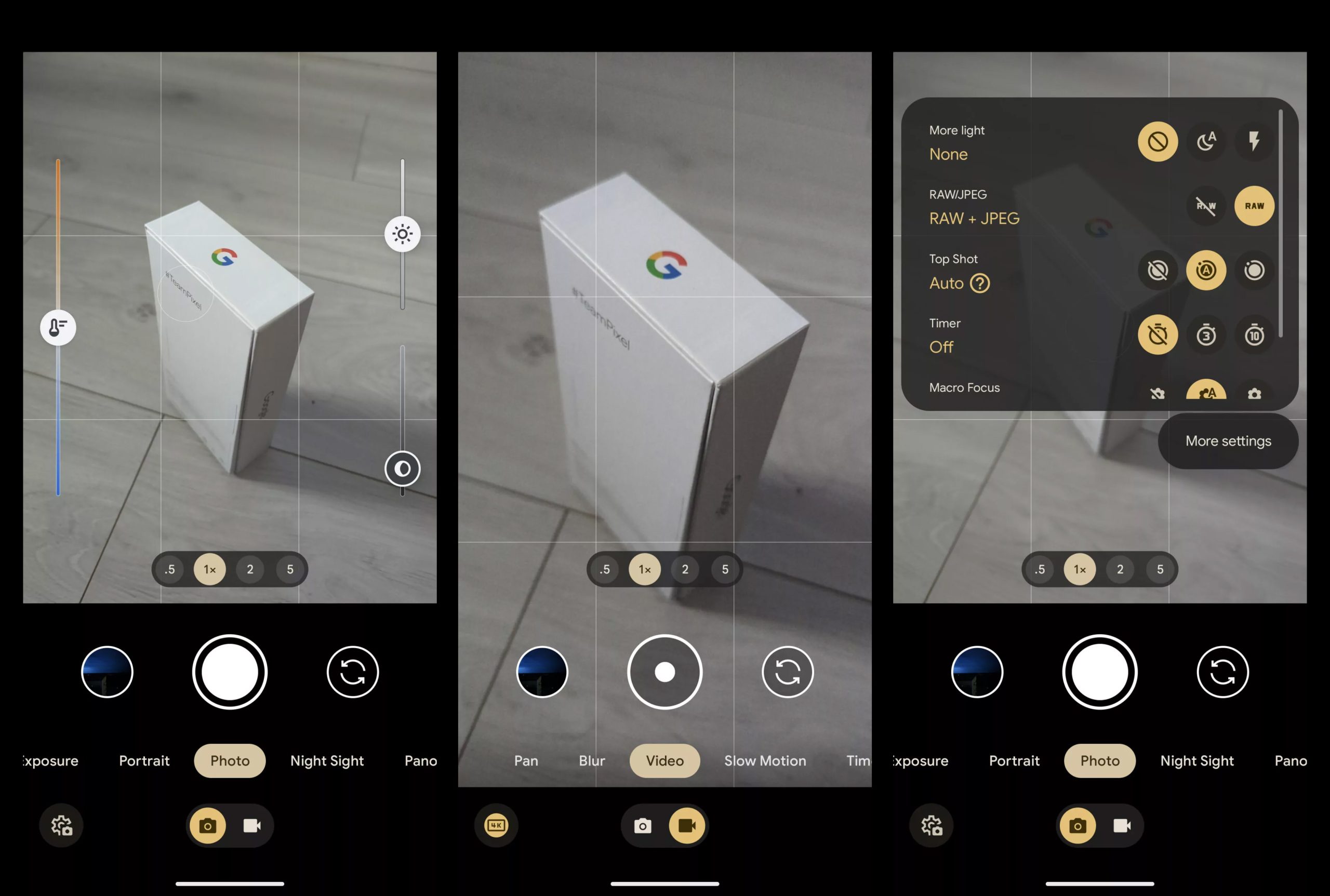
Google is apparently also separating Long Exposure and Action Pan into separate modes rather than a single Motion mode. They are giving Cinematic Pan its own mode too.
As for other layout changes, the settings button is moving from the top left corner to the bottom left corner, next to the photo/video switch. You can access it by swiping up from the bottom if you don’t feel like pulling a muscle by reaching for it in the corner.
And finally, the selfie switch and gallery shortcuts that sit on either side of the shutter button are changing positions. Who knows why, but they are. Get ready to re-train that muscle memory.
In case you missed previous coverage, we’ve already had renders of the Pixel 8 and Pixel 8 Pro released, a list of specs, and even a Pixel 8 Pro in the wild in the hands of a person who is likely now in some trouble.
It’s time to get excited.








AI, so much AI and so little manual control. And people complain about Samsung’s moon photos 😉
Just make video better.
Not liking that anemic bottom row. Just looks slightly odd or off balance with nothing on the right as well as giving a double decker look. Rather have had google remove the gallery shortcut and put the camera/video switch button there. I do like a more unified options bar when switching modes between camera/video. Not sure why the settings had to be made more prominent either. Looked fine where it currently is…accessible yet camouflaged on top. New hires on the team must be competing for employee of the month