


The Pixel 8 Pro has been official for a full month now and we can’t put it down. I tried to, briefly, because that’s typically what I do after reviewing a phone, but I came running back. This phone is so good and there are several settings or features I’d point you to to make sure you are enjoying it as much as I am.
I’ve put together a list of 8 settings that aren’t always so obvious that you may want to consider turning on. Things like Extra Dim, auto-rotate face detection, and all of the special call settings aren’t typically on out of the box. Here’s where to find them all.
Auto-rotate face detection: Ever been laying in bed or on the couch as you stare at your phone and it rotates to landscape because you are, well, laying in landscape? Google built-in a face detection that pairs with auto-rotate to try and counteract this problem. With this setting enabled, your phone should lock to your face orientation to decide if it should flip to landscape or not. In other words, even if its little internal gyroscope notices you have flipped the phone almost sideways, as it lines up with your face, it understands it should remain in portrait. It’s amazing.
You can find this setting by heading into Settings>Display>Auto-rotate screen. If you tap into that “Auto-rotate screen” option, the next page has a “Face Detection” toggle. By turning that on, your phone will then try not to rotate as you do.

Extra Dim: This is a setting that lets you take your display down an extra couple of brightness notches, even if you’ve already slid the brightness bar to the far left. The idea here is that the minimum brightness is still too bright, so Google added this “Extra Dim” setting to let you go darker.
To find it, you’ll head into Settings>Accessibility>Extra Dim. Once enabled, there is an intensity slider to let you get crazy with the dimness, a toggle that lets you keep the setting enabled even after a restart, and another that adds a side-mounted shortcut to the screen at all times. Once enabled, you’ll also find a Quick Settings tile for it in your notification area that is super handy.
Lock screen shortcuts: Google was at one time one of the leaders in lock screen customization, but backed away for a more minimal approach for years. Now, they’ve seemingly found new motivation to make lock screens more robust after seeing their success on iOS and on Samsung phones. One of the ways they have made the lock screen more useful on a Pixel phone is through the shortcuts you see in the bottom left and right corners.
These lock screen shortcuts used to show a Home and Wallet shortcut out of the box, but Google will let you customize these to things you might actually use more often. For me, I’ve changed the shortcuts to a flashlight and QR code scanner, but there are several other options you can choose.
To change these shortcuts, you’ll head into Settings>Display>Lock screen>Shortcuts. Once there, you’ll find a simple UI that lets you change the left or right shortcut. The list of options isn’t huge, but there are shortcuts for none, camera, do not disturb, flashlight, home, mute, QR code scanner, video camera, and wallet.

Quick tap gesture: Did you know that you can launch actions by double tapping the back of your Pixel phone? Google added this option some time ago, but it’s so buried in settings that I doubt most know where to find it.
If you head into Settings>System>Gestures>Quick Tap to start actions, you’ll see a screen that shows you that double-tapping on the back of your phone can do all sorts of things. You could double tap to take a screenshot, access Google Assistant, play or pause media, see recent apps, show notifications, toggle the flashlight, or open any app. You can even tell your phone to require stronger taps if you find that gentle taps keep taking screenshots too often or turning on the flashlight.
Swipe up to start search: I hate to bring up the iPhone for comparison, but if you’ve ever used one, you might know that swiping down to open up a search is about the most powerful thing the phone can do. For me, it’s the central hub for accessing apps, settings, and almost anything else on an iPhone. On a Pixel phone, Google has almost copied this idea by making search within the app drawer extremely powerful. But to take it to an iPhone level, there is one setting you need to enable.
If you open up the app drawer on your Pixel phone, at the top right there is a 3-dot menu you should tap to get into “Preferences.” On the Preferences page, the top option should be to “Swipe up to start search,” which you need to enable. By doing so, this automatically opens up the keyboard as you swipe into the app drawer to let you start typing quickly or searching.
The search within the app drawer searches through apps, all of your phones settings, contacts, the internet, and more, so by allowing the keyboard to open with a swipe up, it makes your searches happen that much faster. You can just swipe up and then start typing in an instant. It is probably my favorite Pixel setting, assuming you get used to just searching for things all of the time rather than tapping around in menus. Trust me, start doing this and you’ll never look back.

VPN built-in: Your Pixel 8 and Pixel 8 Pro comes with a built-in VPN service through Google One for free. Yes, your Pixel 8 has access to a free VPN service that you don’t need to pay for. Why should you care? Because as the screenshot above suggests, you may want to protect your internet sessions from time to time or reduce what is being tracked as you use apps or visit websites or download items.
To access your built-in VPN, you can perform a search of “VPN” using the setting you enabled above or head into Settings>Network & internet>VPN. Once in there, an option for “VPN by Google One” should be listed as being built-in. You can tap on it to go to an additional page that provides more info about Google’s VPN service, along with a toggle to turn it on. Once on, you’ll see two extra options that let you pause when on selected networks or to exclude selected apps.
Clear Calling: This feature first showed up last year on the Pixel 7 and is included once again with the Pixel 8 line. If you make calls often, you should enable this, as it is likely off by default. You’ll find it easily by searching or through Settings>Sounds & vibration>Clear Calling.
Once enabled, Clear Calling attempts to reduce loud or obnoxious noises surrounding the person you are talking to. So if you are on a call and the person you are having a conversation with is on a busy street, has an annoying child banging something in the background, or is building a house with power tools everywhere, Clear Calling should try to reduce all of that and let their voice shine. It’s magical AI stuff, I think.
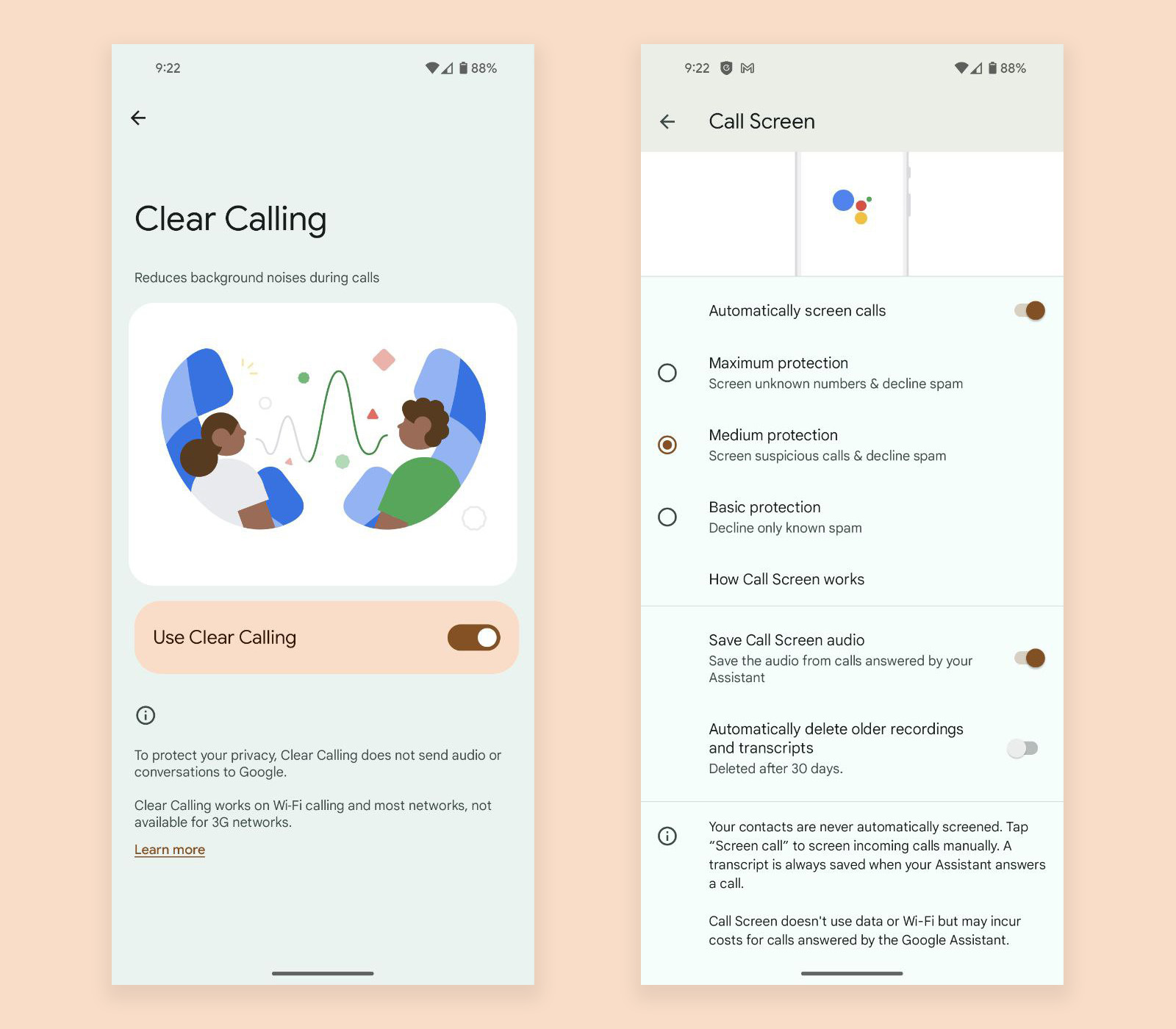
All of the call settings: Google includes a bunch of calling features outside of Clear Calling that also might be off out of the box and that you should enable. I’m talking about Caller ID & spam info when calls come in, Hold For Me, Direct My Call, and Call Screen. All of these features can be incredibly useful depending on the situation.
- Caller ID & Spam simply tries to identify spam or business calls and tell you on the call screen about it. You have likely encountered a similar service through Verizon or your carrier, so this should be familiar. This is just Google’s version.
- Hold For Me is one of Google’s Assistant-powered calling features that will attempt to sit on hold for you if you call into somewhere that has a long hold time. Once someone enters the call, it’ll let you know to then join the call.
- Direct My Call can both transcribe phone menus for you and also select menu options on phone calls.
- Call Screen might be the coolest of them all as it allows you to screen calls using the Google Assistant. It can straight decline known spam or suspicious calls or even those from unknown numbers. It can also let you send a caller to Google Assistant to talk to so that you can get more info about the caller and decide if you want to take it or not. It’s amazing.
You’ll find all of these settings by opening the Phone app, tapping the top right menu, and then Settings. All of these options should appear at the top of the list of Settings for you to dive into and enable if you think they sound useful enough.
Did we miss anything? What other settings would you recommend Pixel owners turn on right away?






How about using the full screen resolution? I cannot believe that is not enabled by default.
The phone ships with “High Resolution” enabled. Switch it to “Full” if you want to use all the pixels you paid for.
All those pixels are being used no matter what. “Full” just makes the GPU work harder for no noticeable benefit.
I actually agree with you. However, I’m sure there’s someone out there that might be shocked to find out their display doesn’t come set to max resolution out of the box.
Overnight battery drain is unbearable. I charge my phone to 90% before going to bed around midnight. the battery is at 80% when I wake up at 6:30am. Meanwhile my other phone only lost 1%.
You may have some programs waking up your phone during the night.
Yep I love pixel phones but the overnight battery drain is a joke. I’m not doing anything different than any other phone Ive had or used. Pixel Tensor plus Modem are a joke. I will say though the Phone runs less hot than my 7 Pro and the reception is better. And my 7 Pro had a weird issue receiving calls sometimes or calling out it would need to be put in airplane mode and then off. This phone i haven’t had that issue yet. But the red tint on the AOD at the top is annoying and google is ghetto for allowing that on such a nice screen otherwise.
Wasn’t the AOD tint issue supposed to get fixed with November update?
That hasn’t been my experience. I get about 2-3% drain overnight. It’s not the best I’ve ever seen but not but in my experience.
Free VPN, right. Now instead of you ISP knowing where you’re going online now Google knows your every move online more than they already do.
Lol that’s why its free.
I like that face unlock auto rotate info…didn’t catch that one! Thank you
I use the double tap for google wallet, super fast and awesome.
Swipe up to search reminds me of the OG Droid.
On the home screen, if you just started typing something with the physical keyboard, it began searching it.
Something about the battery drain while the phone is idle? I recommended the 8 Pro to my in-law and he keeps complaining about how the battery can’t hold a full day without recharge. Should he deactivate adaptive battery? he had the phone since release so I think he passed the two weeks-mark
I would check any installed programs that are may be waking up the phone.
set double tap to open specific program, specific program = google 1 so you can easily access the VPN. no one wants the VPN always, but if you’re connecting to some random wifi, you want to quickly get that thing up and going.
I like having the skip lock screen when using face unlock. It’s off by default but now when face unlock is successful it brings you right into your phone. https://uploads.disquscdn.com/images/8d3906b1616ea075be86f2ac2b04a97e517452bcc903aa190aaa4d46691f973b.png
I just recently turned off “Swipe up to start search” as I pretty much rarely use the app drawer anymore, and when I do, I get tired of having half the screen covered with the keyboard (I like my number row always on).
After turning it off, I tested the Google search bar at the bottom and it’s functionally the same as “Swipe up to start search” now, only the list of Google searches is much longer than if you search on the app drawer screen. Just scroll up some, and things like contacts, settings, and Play Store apps still appear. It could be an Android 14 change because I know it didn’t work like that before, but I like it.
I decided to not wait for the Pixel 8 and try an iPhone 15 Pro instead, primarily because of all the Android features (Like AOD) that’s now on the iPhone. And tbh, I’m a bit bored at this point, and I really miss using Pixel software. So I’m waiting for the sale this month to switch.
I was on the iphone 14 pro max for a year and went back to the 8 pro (had pixel 5 before iphone)….so happy I did. I can’t pin every reason why but I missed little things like articles with pixel laucher when you swipe from the left…a search on the dialer which I didn’t realize how much I used (I search for a restaurant from that screen and used that a lot. I think I like how I can manage group notifications on android way better like if you get 4 gmail emails and can delete two of them just from the notification which I do not recall being able to do that on iphone.
Yea its definitely all the little things. The Pixel is so fun, the iPhone just isn’t for me.
Everything about this phone is amazing. Never understood why Google got rid of the squeeze feature vs. tap on the back for a gesture action? If you use a case, odds are the tap on the back will never work whereas squeezing would still work
I really miss squeezing my phone. Used it all the time to fire up Assistant.
I can tell you. The squeeze feature was removed due to the lack of use. It was less than 38% used of active users… and those that did had a high “cancel/back” rate. It’s a feature I miss as well.
Probably in the minority here on this one. But the hold the power button option gives me the same exact functionality and is easier to do. Because that squeeze function was not always easy for me. Especially when using a case on the phone.
The squeeze side worked great with a case on my Pixel 2 XL. I really miss that feature. I want the hold the power button to actually serve its intended purpose of showing the power menu.
Just press and hold the power button and the volume up button and you still get the power menu. It still works exactly the same and is still easier to do in my opinion.. It makes the power have many features and it’s very easy to reach and hold the power button. No disregard to what you said. But that set up works easier and better for me than to have moving parts or buttons in the frame of the phone!
There already are “moving parts or buttons in the frame of the phone”. Personally I wouldn’t want to have to use two hands just to get to the power menu.
If you actually want to have the power button show the power menu that leaves no reliable way to launch Google Assistant from hardware. It’s either by voice or by tapping the microphone icon on the search bar on the home screen.
This makes no sense to me. How often are you turning your phone on and off or restarting or locking down your phone? It’s just a shift of your wrist.. which still allows you to have to the button squeeze functionality that you want. The math just ain’t mathing here (to me. Maybe others see it differently)
¯_(ツ)_/¯
I probably restart once a week. I also power off completely sometimes if I have to start with 100% in the morning and don’t have time to do that in the morning. I don’t like to live my phones plugged in and turned on for long periods of time after they are fully charged since it isn’t good for the battery.
It isn’t just a “shift of the wrist”. It’s a two handed operation.
I’ll probably try the double tap on the back to launch the Google assistant again with the Pixel 8 Pro. It didn’t work very on my Pixel 5. It would just randomly trigger it.
Literally just accessed it by pressing the power button and volume up with my thumb. We do the same exact things with our phones and you’re making it harder for yourself. And you don’t have to use to hands. It’s a quick press. Again. Just did it again with only my thumb and my hands are pretty small. And to be honest the double tap on the back doesn’t work well on this phone yet either. Attempted to use that for my flashlight and it’s very inconsistent. Had to figure out the rhythm of the tap to get it to work right. So for now it’s set to my wallet which works ok. It was definitely inconsistent for the flashlight. Hopefully this helps you a little. That power off menu is very easy to access with a quick press off your thumb finger (try it for yourself and see) and then having your assistant at a quick hold on your power button will be just like the action you miss having with “squeeze for assistant”
I just tried several times and it either turns the screen off or turns the volume up.
Ok Cool. You should probably trade your phone in for a P2 then. Not sure what else to tell you..
Yes, I miss the squeeze too! I have back tap set to take a screenshot and I get so many false screenshots. When I intentionally want to use it, it takes 2-3 attempts to get it happen. It sure does take them easily when I accidentally set the phone down a lot though. (Guessing how I set it down can happen as two bumps bottom and top.)
For the rear tap quick launch, I mapped it for opening the calculator. Comes in handy. On the lock-screen, I have Google Wallet (loyalty/gift cards) and Do Not Disturb as my shortcuts. Giving free VPN to Pixel 7 and 8 series is one of the best things Google has done along with extending updates by a couple of years. Definitely turn on VPN full time if you haven’t. It doesn’t slow down your phone at all but keeps you safe.
I haven’t actually used it full time because I’m mostly at home. If you do run it for extended periods of time, any impact you’ve seen on battery?
No impact that I have noticed and I have been using the Google VPN 24/7 on my P7P for a year. It truly is seamless. It also helps when I use my phone as a hot spot when working out in public so I don’t have to use public wifi to stay safer.
If you don’t want to use Google’s VPN even though I read everywhere that it is totally safe and private then ProtonVPN offers a free VPN for one device. Proton is a Swiss open-source company so very strict with encryption and privacy.
Hmm, When I try to use the QR tile on the lock screen, it tells me I need to install a camera app??
Maybe your camera is not the default for QR codes? Mine goes right to Google Lens when used from the lock screen.
Mine does the same thing (says I need to install a camera app- of course it has one!). So odd.