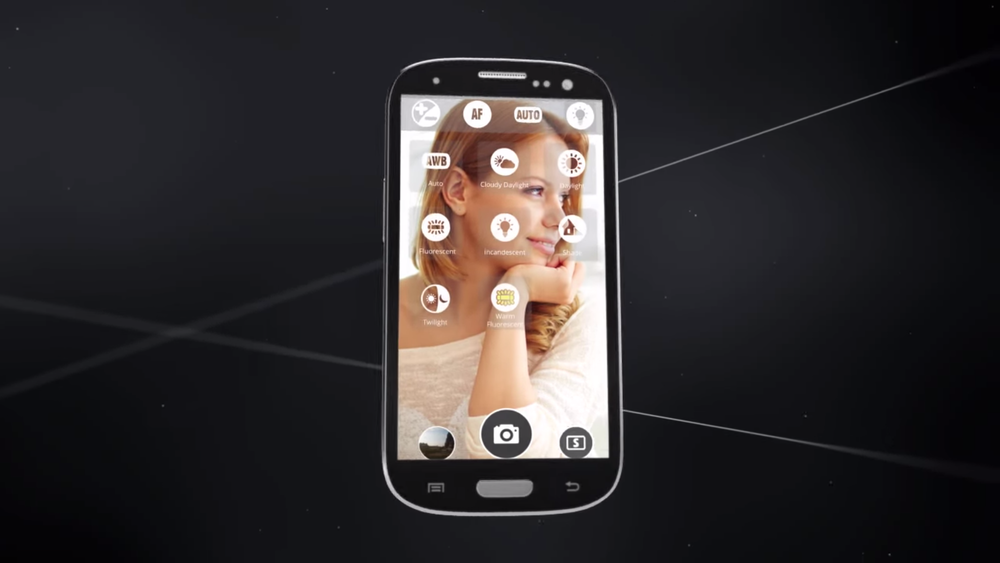
Sometimes when you’re taking photos or videos, the stock camera app just doesn’t cut it. Perhaps you require a histogram. Maybe you could use faster burst shot. Populating Google Play is a myriad of third-party apps to fill whatever the need, but some are well-executed enough to warrant special mention. The aptly named A Better Camera is one of those.
Its simple aesthetic – big, blocky symbols and text – is unassumingly utilitarian. But in terms of features, A Better Camera is the opposite: bursting at the virtual seams. In addition to standbys like overlayable grids and adjustable exposure, focus, flash, and white balance, it features support for RAW and the Android camera2 API on select devices (currently the Nexus 5), timelapse videos and photos, and even a barcode scanner.
One of A Better Camera’s differentiators is HDR video. It’s a $3.99 in-app purchase, but uniquely applies the principles of HDR to moving pictures. Another, Dynamic Range Optimization, uses a technique similar to tone mapping to bring back lost detail. And Smart multishot lets you remove unwanted objects and select the best faces from a group photo.
I used a Nexus 6 to test A Better Camera, and every feature worked as well as expected. I did, however, always seem to experience a delay in taking photos no matter the setting. Other Nexus 6 reviewers on Google Play mentioned this, too, so I can only assume it’s a hardware compatibility issue.
Still, I think I’ll keep A Better Camera installed for a while. I’m all for consolidation, and the app really is a one-stop shop for hobby photography.
A Better Camera is a free download at Google Play, but like HDR video, the aforementioned Smart multishot is an in-app purchase – $2.99.
[responsive_vid]

It’s the best camera app on Android devices. Much better then Camera FV-5. Especially on Android 5
Wish you could get the Moto X to open up another camera app with the wrist flick. I try other cameras (though I don’t mind the stock one) and I never end up using them because that’s how I get my camera open.
Not necessarily a better camera. Way more shutter lag than the stock LG app on my G3. 3rd party camera apps have never been great in my opinion.
I have used a better camera for a few years on my S4 and my old droid bionic. I normally use the HDR setting and have loved the photos i get. Many great shots.
NOTHING will make the camera on the RAZR MAXX HD better – NOTHING
Moto cameras suck
ok..maybe a stupid question and probably answered somewhere else….but I have a motox and the camera leaves alot to be desired. Is it more a hardware issue with Motorola when it comes to their cameras or is it a software issue that can be rectified with a different app?
It’s a software issue that has to be partially rectified with a software update. If the phone supports the full lollipop camera API, then apps have enough access to make a difference, but if it’s still using older ICS APIs (which right now is every phone except the nexus 5 & 6, even if they have lollipop installed) then it gets the processed picture from motorola’s kernel software. That’s why no app was able to really make a difference in the past. If you get an update with support baked in for the new API, then you’ll at least only have the limitations of the hardware to contend with.
I liked the camera but the HDR stills seemed to be incredibly bright and almost washes out the picture – the Nexus 6 HDR+ does a much more natural photo, IMO.
Ok, I tried this app. It’s just a poor clone of the camera app/features that come standard on my Galaxy S5.
Will it fix Motorola’s crappy photo quality? (I still love my Maxx but this camera…)
is there an easier way to change picture size/resolution? i do that quite often and it seems pretty buried here.
Downloaded, played with the settings for about 2 minutes, experienced no less than 4 force closes. I’ll pass.
Why can’t these apps make icons that aren’t an eye sore when they are thrown into the dock on the home screen?
If it’s a popular enough app maybe an icon pack has a redesigned icon. But you’re right, they shouldn’t be that ugly.
Axis icon pack replaces it with a nice red/white aperture icon.
Axis icon pack replaces it with a nice red/white aperture icon.
Does this include slow motion video? I know the Nexus 6 has the hardware, but Google Camera doesn’t have the software for it.
promocode to unlock all : appoftheday
I don’t know if I necessarily condone this…but I can’t confirm it works haha.
Wow…nice call bro. Worked ! Time :639pm cst
ah awesome dude thanks! My girl was having serious issues with the stock moto x camera app…only thing about the phone she hates! Had her using the google camera and fv-5 but this seems like it would be a great option. simple to use but still plenty of options!
thanks for the tip. just tried it at 7:05 PST and it worked.
19:23 PST
Edit: worked after I exited the app. It gave me an error when entered the code though.
did you try all lowercase letters? my keyboard always enters the first letter as uppercase.
10x fot the code , it worked 🙂
Thank you, worked at 1.23am eastern
still works! Nice job!
Right now the fully unlocked app is $3.99. So maybe if people like the features they can go back and pay the $4…
Yes I went back and paid the 4 bucks it’s worth it. 🙂
It is a really nice app. I paid the 4 bucks as well.
This worked as of Tuesday morning @ 9am. Thanks bro.
Damn, I missed out. The code no longer works. I been using this app for a while now.
Whenever I use a camera app that isnt the default one on my HTC M8, the photos always turn out to be not clear and the colors are off
Probably some Ultrapixel proprietary software needed to take good pics or something. Another reason to stay with mainstream technology.
IMO the HTC camera app has the best controls of any I’ve used anyway. If I could set it to stay in M mode, I’d undo my GPE conversion to get it back.
How does this compare to Camera FV-5?
It’s a lot less janky, but every settings menu covers the whole screen and a lot more of the settings are dumb.
Interesting. I’ll have to check this out.
Been using this for a while, I love it