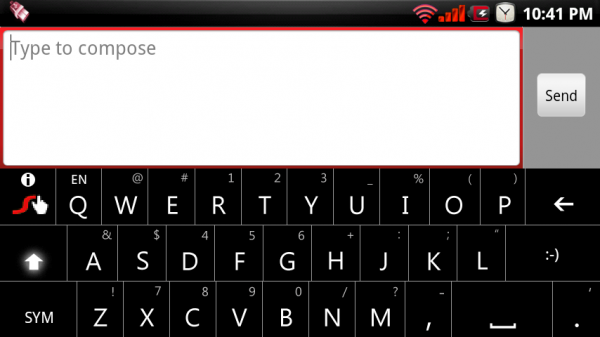
Sorry to go double custom keyboards on you this week, but these just couldn’t wait any longer…
The creator behind the HTC_IME theme for Swype that was posted last week is back for more with a whole lineup of color-themed awesomeness. And while the previous theme we posted was for rooted users only, these new themes are for everyone. That’s right, everyone with a Motorola Droid can install these.
Instructions…
1. Download one of the following themes to your SD card and unzip:
Download: Black with Blue Theme
Download: Black with Green Theme
Download: Black with Red Theme
Download: Black with Gold Theme
2. Uninstall any previous versions of Swype.
3. Open the apk that you just downloaded and install.
4. Go into Settings>Language & keyboard> and make sure Swype is checked.
5. Calibrate if needed.
6. Open a text field, long press, select “input method” and then select Swype.
7. Enjoy!
*Note 1* – For those of you who had previously installed the HTC_IME theme, you will need to remove the Swype apk from your system>app folder before you can complete these instructions.
And remember that the stock Swype is always available through our downloads page.
Pretty cool right? Let us know if you run into any issues!
Cheers Tony (sh0ebox) for putting these together! Amazing work.
Comments
96 responses to “New Swype Custom Themes for All Users”
its saying that its not fitted to your screen size in google nexus s pls help
It says here I need to update Swype… How can I do that, I’m on the Motorola Triumph, I want to be able to keep the modded skin though, and possibly change the blue swype line to red?
I theme swype keyboards for my android themes…. here is my latest… below…
also here is my website… http://www.darkjuggalo2000.weebly.com
Yes I properly installed your apk and when I got swype to show up it was the right color but it seems to be an older version because I got a notification saying my trial period had expired. After this I was unable to input any letters, just the same as what happens in an old version. They just released a beta today with personal dictionaries, someone should tell swype to add custom skins next!
Kinda crappy if you have Swype when it can’t be uninstalled b/c it’s the stock one. Oh well..
I really wanted the instructions of its installation.. That’s right, everyone with a Motorola Droid can install these..thanks a lot for this post..really helpful..
Mindblowing news! new swype custom themes! blue,green,red ,gold! wow!Thanks for the installation steps! keep updating us!
Thanks for giving the installation procedure in the blog..it lets me download it but i cant run it guess im not doin somethin right…
To download the new theme you must have uninstalled the older version or older one…
Well,nice to know that these new themes are for everyone…..everyone with a Motorola Droid can install these.Easily undestandable instructions helped me a lot…through your blog..
i tried installing this. but it says version expired and i can only input like normal keyboard.
possible to get this theme on the newer swype? dun really the stock theme
Please make this compatible with Droid Incredible
When I swype the word it won’t show up.
It’s just a black background with white letters. it looks sharp…but not extremely impressive.It flashes blue and the line is blue…but that’s about it!!
I really want the Batman keyboard with white lettering not the black lettering thanks Droid life…Thanks
Has anyone been able to get any of these custom keyboards to work on the Droid Incredible? I haven’t had any luck with it. I set the Hello Kitty keyboard on my wife’s Moto Droid easily. What am I doing wrong?
It’s just a black background with white letters.it looks sharp..but not extremely impressive..it flashes blue and the line is blue…but that’s about it.
I have ran into is when i use the pop up feature with handset sms and i go to type u cant see the typing area while typing to see if u mess up the only way u can tell is by hitting back..
Still not get it.. The instructions say to install the apk, but the downloaded files are .zip.Thanks
Its a easiest way of downloading.thanks to provide New Swype Custom Themes…
I love all this theme but I want some themes in purple,red and in pink color can you arrange this themes for me…
Well The Droid-Life only posted the Moto Droid version as this is pretty much a blog dedicated to the Droid…Thanks for the information on blog.
Will this work for HTC Legend, or is there one out there for the HTC Legend?
Will this work with Galaxy S?
downoaled with my driod motorola and says cannot download. The content is not supported with this phone.?
Is it possible that you can make these color themes work for the sprint htc.evo? I need color n swype in my life n its killing me that i cannot have both lol
doesnt work
Does this work for Droid X?
Does this work for Droid X?
It’s not working for mines. The biggest problem I’ve been coming across is that swype is already installed and I don’t know how to uninstall it.
i installed and now it tells me my trial period has ended and i need to upgrade. i have the original beta so i dont know what gives
i installed and now it tells me my trial period has ended and i need to upgrade. i have the original beta so i dont know what gives
it lets me download it but i cant run it guess im not doin somethin right
Hey, can you make another theme to match the Incredible's resolution? it shouldn't be too hard for you, but would be immensely appreciated by me!
Awesome! Impressive. Thanks so much 🙂
I dont know if i'm doing it right but i got a error saying “the swype package you installed does not match the screen size of your device. please contact swype about this issue. screen size 480X320”
Does anyone else have trouble posting here with the physical keyboard? Driving me crazy..
this looks amazing on my phone, much better than the boring gray swype i was using. thanks!!
I downloaded the red theme but my question is; can I download all the themes and use them whenever I want? For instance, one day, use red, then change to the blue theme, etc…
so i had a backup of the stock swype and i restored it after changing roms and i see it in my applications as com.swype.androidinputmethod and i click on it but it keeps force closing ONLY WHEN I TRY TO OPEN ON SWYPE… all other apps i can uninstall.. market uninstallers dont even show this eaither. im running latest CM smokes esque theme. So i cant uninstall it to install these whats going on?
go to settings, applications, manage applications and you can do it from there
thats where im trying but keep getting force close every time
one problem i have noticed is when u use pop up on handcent sms and u got to type it doesnt show the text area and u really cant send it enless u hit back for swype to go away and then its fine
one problem i have ran into is when i use the pop up feature with handcent sms and i go to type u cant see the typing area while typing to see if u mess up the only way u can tell is by hitting back
Is it just me or does the HTC swype seem a little laggier then the regular swype beta?
will the regular swype work with any android phone?
I dont get it. The instructions say to install the apk, but the downloaded files are .zip. My apps installer does not see zip files. Do I need to rename the file to .apk? Thanks.
Extract the files from the .zip — I packaged the .apk in there along with a README for people to refer to if they didn't know how to utilize the APK.
I added the Redskins theme! Lovin it! Thank you!
WOW, I have been hesitant to try Swipe, but I have got to say, I just tried it for the 1st time, and I am going to need some more practice. But I love it. I wanted a Droid because of the physical keyboard, but I never use it, especially not now. Great work guys
Awww, I would like the Green theme but I only got a G1 and it is not supported. I could not even install the HTC theme too. 🙁
It works. Red looks great on my phone – which already had JRummy's Red. Thx Kellex
ahhhh… the black, and blue theme look sick with my rooted CM haxzamaic theme!!!!!!!!!!!!!!!!!
I NEED HELP!!!! THE KEYBOARD IS NOT WORKING FOR ME!!!!
Make sure you have android keyboard and swype keyboard checked in settings. Then long press in any text field and choose swype. Hope this helps.
sweet! I've been trying to get swype for a while and it was telling me it was past the beta stage and I couldn't get it. Now I have a matching swype keyboard for my JRummy's Red Rom. Thanks Kellex and sh0ebox!
Hey i have installed it but when i try to swype it just pops up blue and doesnt spell the word. HELP PLEASE!!!!!
reinstall? that worked for me.
I just installed the blue theme. When I swype it doesn't type. and it's just a black background with white letters. it looks sharp…but not extremely impressive. it flashes blue and the line is blue…but that's about it. why won't it type when i swype?
Just reinstalled…it types now. Still looks sharp but I thought there'd be more color with theme. Like the letters would be blue. Anyway…nice themes. Can't wait to get some images on the spacebar! How about a Star Trek Insignia? (geek!)
Alright…who's doing these!?!?! I wanna donate for a particular image to be used in place of the spacebar…where you at? 🙂
Hi! What are you looking for in particular? 😉
I would love a pot leaf pic on the space bar
I have a png file of the Houston Oilers Helmet from the early 90's that I'd like on the space bar with the color scheme being Columbia Blue and Red. gIMpSTa did it for me on the HTC_IME mod keyboard and it looks AWESOME!! Now I suppose I'd like it for the swype keyboard which I love and use more…did you do them?
I looked some more on the comments…you're the guy doing them huh!?!?! if you would…send me an email… jonathan_seymour (at) hotmail.com
Wow…been waiting for this, thanks Kellex!
I get nothing but force close every time!!!! What am I'm doing wrong????
How do you calibrate?
SO great. Good lord I love this site. Many thanks for all that you do!
Thank you Tony and Kellex! Now my keyboard matches my matrix background. 😛
I'm not sure of I installed it properly…I dl from site went into settings,keyboard,swype checked it…i picked green/black it seems to be working…is just the key you select turn green, and then the swype line it's self blue? or should the line be green as well? just wondering! I love this site!! Kellex you rock m/
when i tried downloading it says “the content is not supported on this phone”
Try downloading to your PC then and transfer over.
If using Astro you can always go into Settings>More>Preferences and enable browser downloads.
Hey kellex I have the snes emulator app and when I download some of the custom keyboards they download to my phone as a ROM emulator file? Any ideas why it does that? Your the best man 🙂
All you have to do when the screen comes up is scroll up or down to astro file manager to open the file in and if you don't have astro file manager you should prob. Download it my nes does the same thing
Hey Ray thanks for the help ,but when I click on something to download it doesn't give me a Chance to pick were to put it ,it automatically starts downloading it to snes Rom file instead of automatically putting it in my astro manager. most of the time it downloads correctly to astro , but some files for instance I'm trying to get the second Batman custom keyboard I can download the first one fine and a lot of others on there but for some reason my phone thinks that one is a ROM? But at least I know I'm not the only one having this problem thanks again for trying to help 🙂 If there is anyone out there who knows how I can fix this or maybe there's a setting in astro mngr I don't know about HELP ! I really want the Batman keyboard with white lettering not the black lettering thanks Droid life ERIC 🙂
yea tried that too and then couldn't find it in my phone.. i guess im not “techy” enough to do this lol. back to the regular swype for me
I downloaded it to my phone then tapped the notification when it was done. It took me right to the file in Astro. Bam, black and blue Swype!
Did this and used the red and black one and it is the same color as before? What's the deal? Am I doing something wrong? I uninstalled and pretty much followed the directions.
now we just need these themes with the htc layout. best of both worlds! these are great though. thanks for the post kellex!
I'm still waiting to get into the beta of swype
I got my Droid too late in the game to make it into the free-for-all group 🙁
This site has the link to download it, no need to wait!!! Just go to the downloads section 🙂
lol, would help if I learned how to read wouldn't it 🙂
If I unistall my current version of swype, does the dictionary go with it? I've been using swype for a while, do I have to re-input all the words it doesnt know again?
Does swype keyboard do predictive text for the physical keyboard like Better Keyboard does?
Oh man, since we've got color themes now for Swype I'd really love to see a Cyan one to go with my JRummy rom!
I agree!
Oh that is so awesome! Now my keyboard matches the JRummy Cyan rom! Thanks
so much!
I made a Cyan one but it wasn't included with this blog post… just made it today 🙂
You can find it here: http://forum.cyanogenmod.com/index.php?/topic/2…
sh0ebox, you rock man! Running the Cyan Mod keyboard w/ jrummy's cyan. Looks solid. Thanks for the awesome job!
So for these themes I uninstall Swype I have on my phone now and just DL one of these from the phone? Should I open in Astro or just from the web DL page to install? Thanks for the help!
Uninstall your current Swype. Download one of these and install.
Thanks Kellex!!
Sweeeeeeeeeet!
Sweeeeeeeeeet!
How'a bout the HTC theme for us non-rooted users.