Category: Apps

The latest selection of Android apps, both free and paid, are found right here. If you were looking for that fresh list of trending Android apps, we have you covered on a daily basis. Want to know the newest Android application releases first? Want to know which Android applications are free for a limited time?

Whether it’s Gmail, Google Calendar, Twitter, YouTube, and Instagram, or lesser known apps like Nova Launcher, Trello, Sling TV, and Philips Hue, you will know the best Android apps at all times.

Got a suggestion for a new app you think we should check out? We are all ears and regularly accept user-submitted applications, so that you won’t pay until you know if we approve.

  • DEAL: Geekbench Pro 4 is Free Right Now, Normally $10

    DEAL: Geekbench Pro 4 is Free Right Now, Normally $10

    I’m not one to care much about mobile smartphone benchmarks, but I know that plenty of you do and that Geekbench is one of the services you trust. If you are at all interested in running benchmarks on your own phone, well, you should run as quickly as you can through the link below.

    Google Play is currently hosting a Geekbench 4 Pro discount that drops the app from $9.99 to…$0. That’s right, if you hurry, you can grab the $10 Geekbench 4 Pro app for free. And look, even if you don’t plan to use it, installing it now at least adds it to your library in case some day, you decide that you may want to run a benchmark.

    Go!

    Google Play Link

  • Pixel and Pixel XL Get More of the Pixel 2 Launcher Experience

    Pixel and Pixel XL Get More of the Pixel 2 Launcher Experience

    With the update to Android 8.1, the Pixel and Pixel XL gained a lot of the Pixel 2’s new experience. The update, for the most part, included everything that had been tweaked about the Pixel 2’s software, without the full Pixel Launcher goodness. That has now changed, likely thanks to a Google App update or a behind-the-scenes server-side flip.

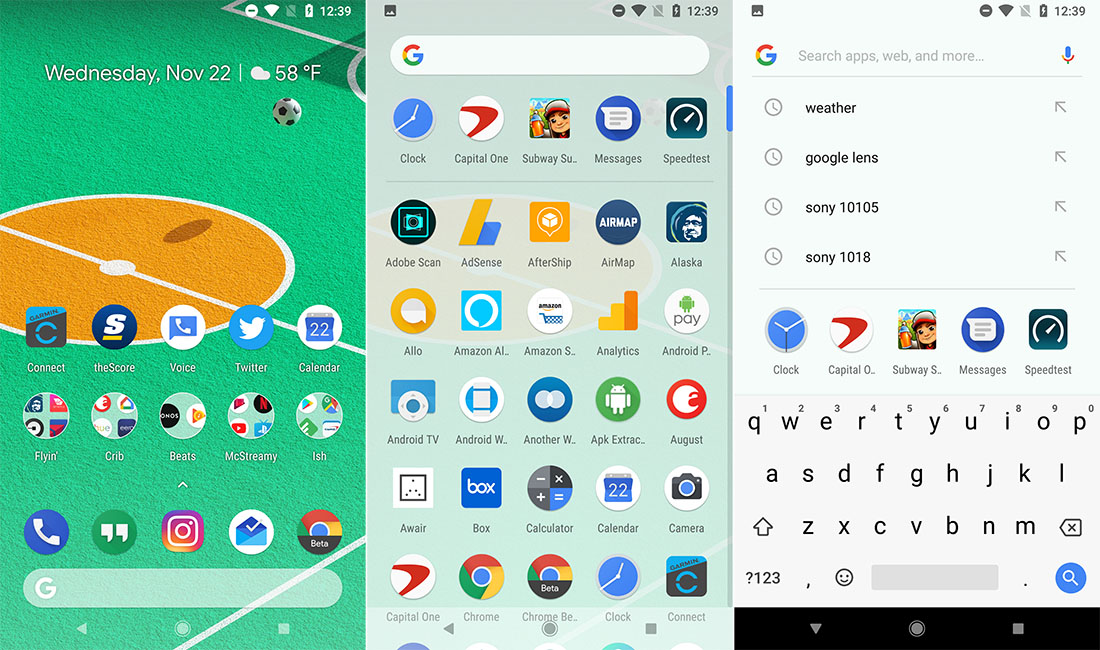
    Either way, the new tweaks that are arriving on the original Pixel and XL are somewhat minor, but do add some polish. For one, the Google Search bubble that hangs in the dock now sticks with the launcher as you swipe up and into your app drawer. Previously in 8.1, that didn’t happen and you instead had an area that just said, “Search apps.” You can see the change in the image at the top of this post.

    Additionally, as you go to search from within the app drawer, you won’t just see apps as results. Instead, you’ll get search history from Google Searches, as well as app suggestions.

    And I believe that’s pretty much it. As long as you are running 8.1 on your Pixel or Pixel XL, you should start seeing these changes today. You can update to Android 8.1 right here.

    // reddit

  • Google Play Black Friday Deals are Up: 80% Off Select Games, Free Play Music Subscription, More

    Google Play Black Friday Deals are Up: 80% Off Select Games, Free Play Music Subscription, More

    This morning, Google opened up its Black Friday Deals for the Google Play store and they cover just about any category of media you might be interested in. From games and apps and subscriptions, to books and movies and music, Google likely has something discounted that’ll catch your eye.

    For the gamers in the building, Google has dropped many of their “premium” games by 80%. You can get into games like LEGO Jurassic World, Mini Metro, and Shadow Fight 2 for $0.99 (normally $5). Even Call of Duty: Black Ops Zombies has been dropped from $6.99 to $2.99.

    Google also said that “hundreds” of apps on the Play store have been discounted, including those that have subscription fees. I’d point you to a list, but if there are hundreds, your best bet is to just browse your Wishlist or some of the top lists.

    If you don’t care about Android games or apps, maybe a Google Play Music subscription sounds good? If so, you can get four months of service for free. I’d imagine you have to be a new subscriber.

    For book lovers, you’ll find $5 credits towards any book over $5, plus discounts on top titles. Some of those deals won’t start until November 23, so be patient.

    And finally, for movie and TV freaks, Google Play is currently offering 50% off any one movie to own and 25% off a TV season of your choice. Those deals may also not start until November 23. Google is also handing out movie rentals for $0.99 on November 25. Feel free to browse through Google’s list of new releases that have all been slashed to under $10 too.

    Google Play Black Friday Deals:

    // Google


    Other Black Friday 2017 Deals

  • Google Lens Now Officially Rolling Out to All Pixel Phones in Google Assistant

    Google Lens Now Officially Rolling Out to All Pixel Phones in Google Assistant

    In recent days, we have seen the Google Lens icon pop-up at random in Google Assistant on a handful of Pixel phones, leading us to assume that/wonder if the rollout of its full feature set had begun. Google confirmed that to be the case this afternoon, saying in a blog post that all Pixel phones (including Pixel 2 and 2 XL) will gain access to the full Lens over the “coming weeks” in the US, UK, Australia, Canada, India, and Singapore.

    First introduced back at Google I/O, Google Lens uses your phone’s camera, along with computer vision and machine learning, to bring you information. That could be through text, by taking an image or a sign and grabbing the text from it to head to a URL, call a phone number, navigate to an address, or fill out a contact from a business card. It could also help you find information out about a landmark and its history, just by pointing your camera at it. It’ll scan barcodes and things like that too, plus you could quickly find out information about books, movies, and art.

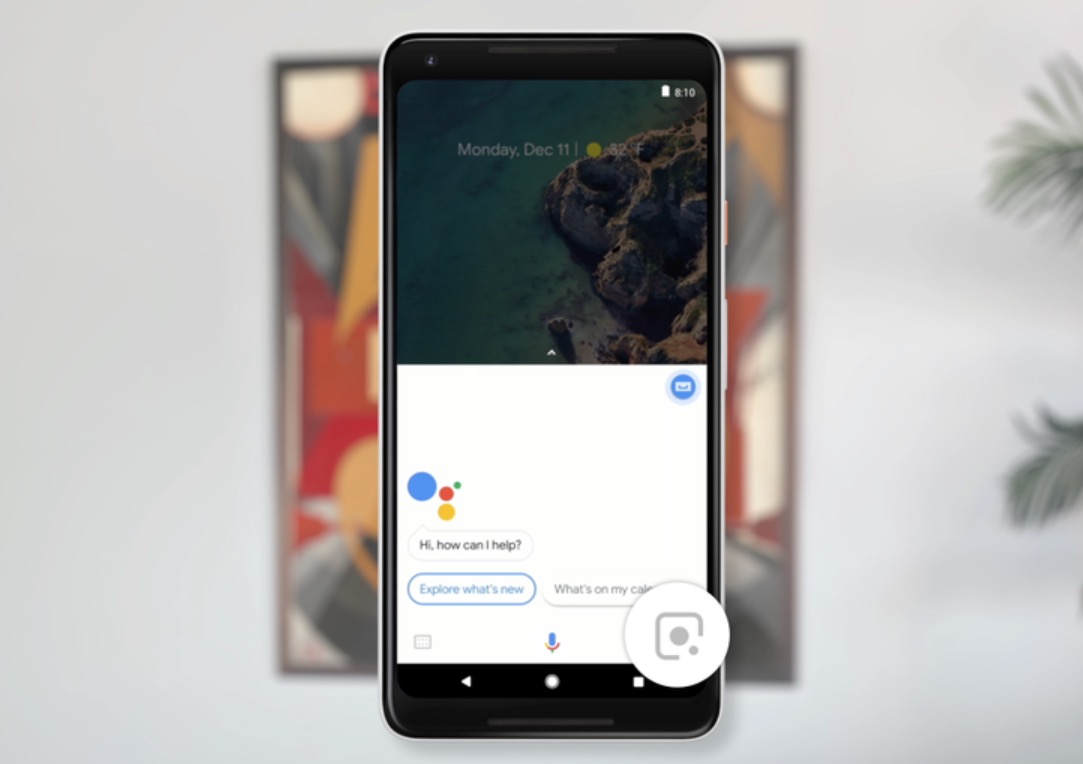
    To access Google Lens on your Pixel or Pixel 2, you’ll simply open up the Google Assistant and look for the Lens icon in the bottom right corner. If it’s there, feel free to tap on it to open up the Lens UI.

    Let us know as you see Lens pop-up, so we can let everyone know if a bigger portion of Pixel owners are finally seeing it.

    // Google
  • YouTube TV Update Adds Picture-in-Picture on Oreo

    YouTube TV Update Adds Picture-in-Picture on Oreo

    YouTube TV is receiving an update today to v1.11.6 that introduces picture-in-picture support for devices running Android 8.0 Oreo. The update may not add anything else, though, so if you aren’t on Oreo, feel free to move along.

    Once updated, PIP should be live for you automatically. All you’ll need to do to use it is open up a show and then press the home button. You’ll then see it shrink into a small floating box on your screen that can be repositioned almost anywhere. It’s really that easy. It works just like YouTube or Google Maps navigation.

    If you want to turn it off, tap on your account icon in the top right corner, then Settings, and then scroll to the bottom until you see “Picture in Picture.”

    Google Play Link

  • NVIDIA Hosting Black Friday Deals on 15 Games for Up to 75% Off, Starts This Wednesday

    NVIDIA Hosting Black Friday Deals on 15 Games for Up to 75% Off, Starts This Wednesday

    NVIDIA is getting in on the Black Friday action this year, but you won’t have to wait till then to get the savings. The deals will go live this upcoming Wednesday on Google Play, and inside, there’s a lot of great titles up to 75% off.

    Overlooking the list, I’ll name a few of the bigger titles. There will be DOOM 3: BFG Edition for just $2.49, Parallax for $1.25, Super Meat Boy for $3.75, as well as Tomb Raider 2013 for $3.75. That’s just the start, too!

    Here’s the full list of what’ll be on sale starting this Wednesday.

    Apps on Sale Starting Wednesday

    • Tomb Raider 2013 – Original $14.99, Sale $3.75
    • Cluster Truck – Original $14.99 , Sale $3.75
    • Contrast – Original $9.99, Sale $4.99
    • Doom 3: BFG Edition – Original $9.99, Sale $2.49
    • GoNNer – Original $9.99, Sale $2.99
    • Q*bert Rebooted Original $5.99, Sale $1.49
    • Q.U.B.E. – Original $5.99, Sale $1.49
    • Parallax – Original $4.99, Sale $1.25
    • Pavilion – Original $9.99, Sale $2.49
    • Pix the Cat – Original $4.99, Sale $1.25
    • Stikbold! – Original $9.99, Sale $2.49
    • Super Meat Boy – Original $14.99 , Sale $3.75
    • Super Slam Dunk Touchdown – Original $15.00, Sale $5.15
    • The Final Station – Original $14.99, Sale $3.75
    • Ultimate Chicken Horse – Original $11.99, Sale $5.99

    The savings are real this year, people!

    // NVIDIA (Goes Live on Wednesday)

  • YouTube TV App Makes Its Way to Select LG, Samsung Smart TVs

    YouTube TV App Makes Its Way to Select LG, Samsung Smart TVs

    Announced today, the official YouTube TV app is available for owners of a Smart TV from LG and Samsung. While specific models aren’t stated on YouTube TV’s support page, it does list years, being 2016 and 2017 models.

    If you own a Samsung Smart TV and would like to download YouTube TV, simply open up Apps, then search for YouTube TV. For LG TVs, head into the LG Content Store, search for YouTube TV, then download.

    Here’s the current list of supported devices for YouTube TV.

    • Android TV (excluding Xiaomi Mi Box)
    • Xbox One, Xbox One S, and the upcoming Xbox One X
    • Samsung & LG smart TVs (2016 & 2017)

    Looking to the ever-so-bright future, the YouTube TV teams also claims, “The app will be available soon on 2014 and 2015 Samsung and LG TVs, Sony Linux TVs, and Apple TV.”

    // YouTube TV

  • You Can Now Create Stories Directly From Instagram’s Mobile Website

    You Can Now Create Stories Directly From Instagram’s Mobile Website

    For quite some time, Instagram’s mobile website has been pretty barebones. You could look at photos and like them, but when compared to the actual app on your phone, the experiences don’t quite stack up. Thanks to a change, which includes the ability to create Stories straight from the mobile web, things are looking better.

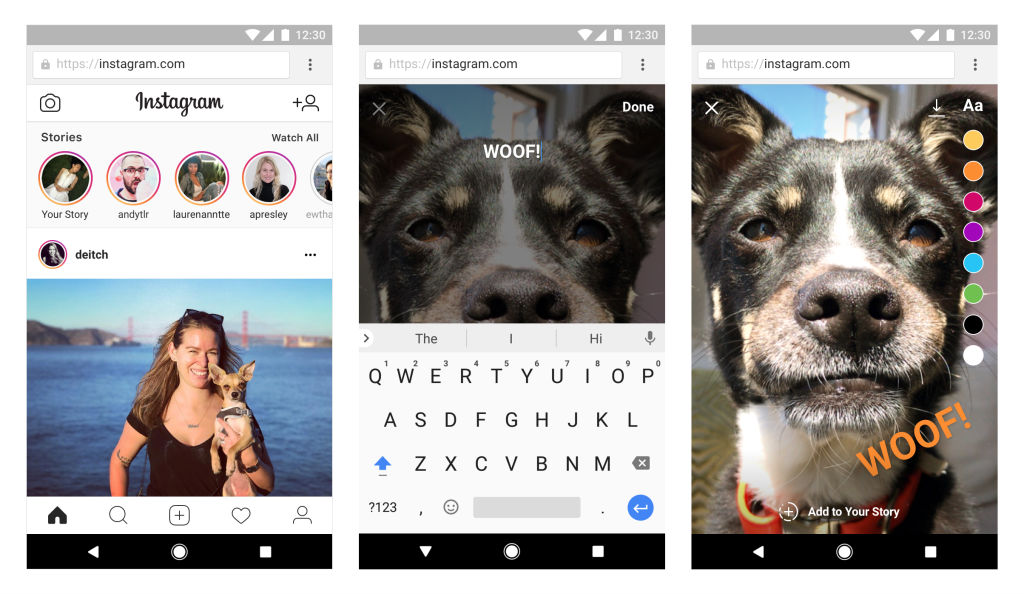
    Announced this morning, with availability said to rollout widely over the coming weeks, users who are logged into their account on www.instagram.com will see a new “Camera” icon in the top left corner of their feed. By clicking that, your browser will request access to your phone’s camera, allowing you to snap photos, draw on them, then share them to your Stories.

    Additionally, you can now save posts you’d like to revisit later. You can access all of your saved posts by tapping the “Bookmark” icon in the top right corner of the page.

    If for some reason you can’t access your IG app, this could come in handy.

    // Instagram