Blog

  • New Verizon Device Unlock Policy is Live and Surprisingly Automatic

    New Verizon Device Unlock Policy is Live and Surprisingly Automatic

    Verizon began updating device unlock policies for its various prepaid brands shortly after the FCC gave it a waiver that allowed it to do so. We assumed the main device unlock policy for Verizon itself would follow shortly and it now has. The new Verizon Device Unlocking Policies for postpaid are here.

    Previously, the FCC had forced Verizon to automatically unlock devices on their network after 60 days of being there. This was a requirement initially put on Verizon because they had purchased a bunch of spectrum, but it was then extended after they also acquired Tracfone. It was not unreasonable and was very pro-consumer. However, the FCC is currently an anti-consumer agency of the government, so when Verizon asked them to clear them of this automatic device unlock after 60 days, the FCC didn’t hesitate in doing so.

    What is Verizon’s new device unlock policy?

    There are two parts to this – one for postpaid and one for prepaid. Postpaid is the type of wireless plan/contract you are likely under, as it includes things like Verizon myPlan and promotions that would give you free phones that are really just 3-year contracts with monthly bill credits. Prepaid, on the other hand, is a pay-up-front wireless plan with no contracts and (usually) no device contracts.

    The new Verizon postpaid device unlock policy is super straight forward. Verizon states that they will still do automatic device unlocks as long as your device is paid in full. That’s it. Whether you are paying full retail at the time of purchase or you fulfill your device payment contract, they will automatically unlock it.

    Postpay Device Unlocking Policy

    Devices purchased directly from Verizon are locked to our network. Devices will be unlocked automatically when purchased at full retail price or if the device financing agreement balance is paid in full. Note: Devices previously reported as lost or stolen will not be unlocked until they are cleared from the lost or stolen report. Once a device is unlocked, Verizon will never re-lock it.

    According to that, there is no time restriction. T-Mobile and AT&T, on the other hand, both have time requirements on theirs. T-Mobile requires 40 days of use on their network, while AT&T is at 60 days.

    As for prepaid, Verizon’s new policy is matching the policy from their value brands, which are also prepaid. That policy states that if you purchase a device from Verizon and use it on prepaid, it would need to have had 365 days of paid and active service. Once that happens, Verizon will automatically remove the device lock.

    Prepaid Device Unlocking Policy

    Devices purchased from us will remain locked to the network until the completion of 365 days of paid and active service. After 365 days of paid and active service, we will automatically remove the lock unless the device is deemed stolen or purchased fraudulently.

    So there you have it. Verizon’s new device unlock policy is here and all it asks is that you pay off your phone to trigger an automatic unlock.

    For more on US carrier device unlock policies, check out this post.

  • Galaxy Z TriFold US Sales Open January 30, Priced at $2,899

    Galaxy Z TriFold US Sales Open January 30, Priced at $2,899

    Samsung has confirmed Galaxy Z TriFold availability for the US. The trifold will go on sale starting January 30, priced at $2,899.

    The device features two hinges, allowing for users to unfold the device into a massive 10-inch display. At just 3.9mm thick at its thinnest point, it’s quite a step forward for Samsung’s hardware team. Inside you’ll find a Snapdragon 8 Elite chipset, 200-megapixel rear-facing camera system, and plenty of AI goods baked into the software.

    Buyers can find the device at Samsung Experience Stores across the US, as well as on Samsung’s website.

    Should we attempt to get our hands on one? We’ll let you all decide.

  • Google Play Services Update Includes CTAP2 Security Key Support, More

    Google Play Services Update Includes CTAP2 Security Key Support, More

    There’s a fresh Google Play Services rolling out to Android devices, including a change for the Google Play app.

    Labeled as Play Services v26.03, there is a total of five changes. For Android Automotive, “Google Accounts for users under 18 that were unable to sign in to Automotive devices before can now sign in when specific conditions are met.” For Google Wallet, users can now create digital IDs when needed, as well as bug fixes (no specifics). Google also lists the allowing of account authentication through NFC security keys that support CTAP2. This is for the whole ecosystem (Phone, TV, WearOS, etc.), not just specifically phones.

    Here’s the complete changelog.


    Google Play services v26.03 (2026-01-26)

    Account Management

    • [Auto] With this update, Google Accounts for users under 18 that were unable to sign in to Automotive devices before can now sign in when specific conditions are met.

    Security & Privacy

    • [Auto, PC, Phone, TV, Wear] This update allows account authentication through NFC security keys that support CTAP2.

    Utilities

    • [Phone] You’ll get an improved compatibility when you move your data across devices.

    Wallet

    • [Phone] You can now create digital IDs when needed.
    • [Phone] Bug fixes for Wallet related services.

    Google Play Store v49.9 (2026-01-26)

    • [Phone] This update collapses subtasks in Organized by AI section in search results.

    // Google

  • Nothing Phone (4a) Goes Through Certification Ahead of Launch

    Nothing Phone (4a) Goes Through Certification Ahead of Launch

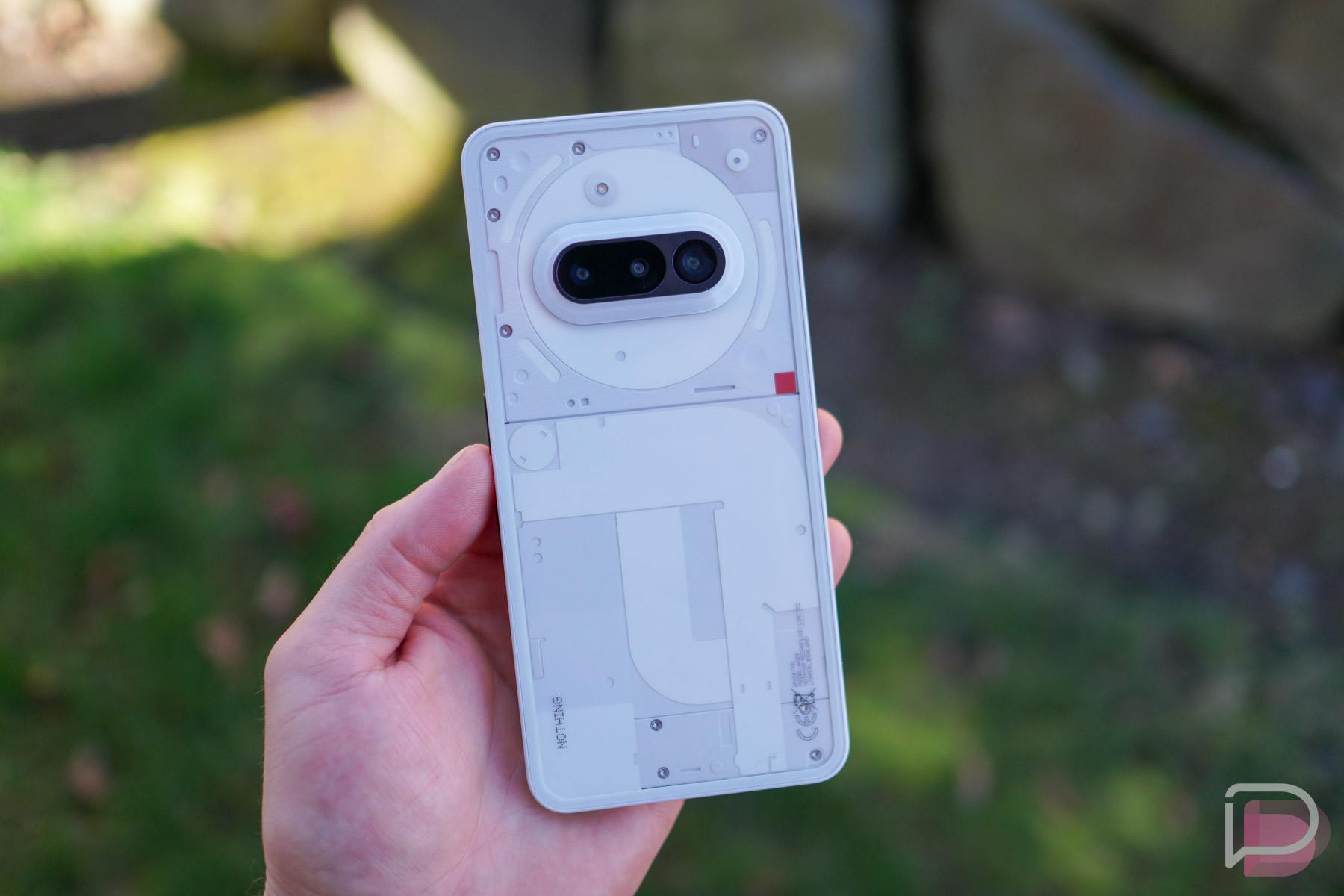
    We have heard essentially nothing about the supposedly upcoming Nothing Phone (4a). Last year’s Phone (3a) launched in March, so realistically, we should be nearing the launch timeframe for a followup. Fittingly, recent certification for a market outside of the US points to that launch being just around the corner.

    While we await information for the US market, the UAE has certified the device with model number A069 (Nothing Phone 3a was A059). No specs or juicy tidbits are provided, just that it’s now certified to work there. That’s how it usually works when a device stops off at the FCC, so no surprises here.

    If launch is indeed coming soon, we’re sure to hear from Nothing at any time. The company has always enjoy hyping their devices ahead of launch.

    Does this phone interest anybody?

    // @ZionsAnvin | GSMArena

  • Verizon Back on Top in Latest State of the Mobile Union Report

    Verizon Back on Top in Latest State of the Mobile Union Report

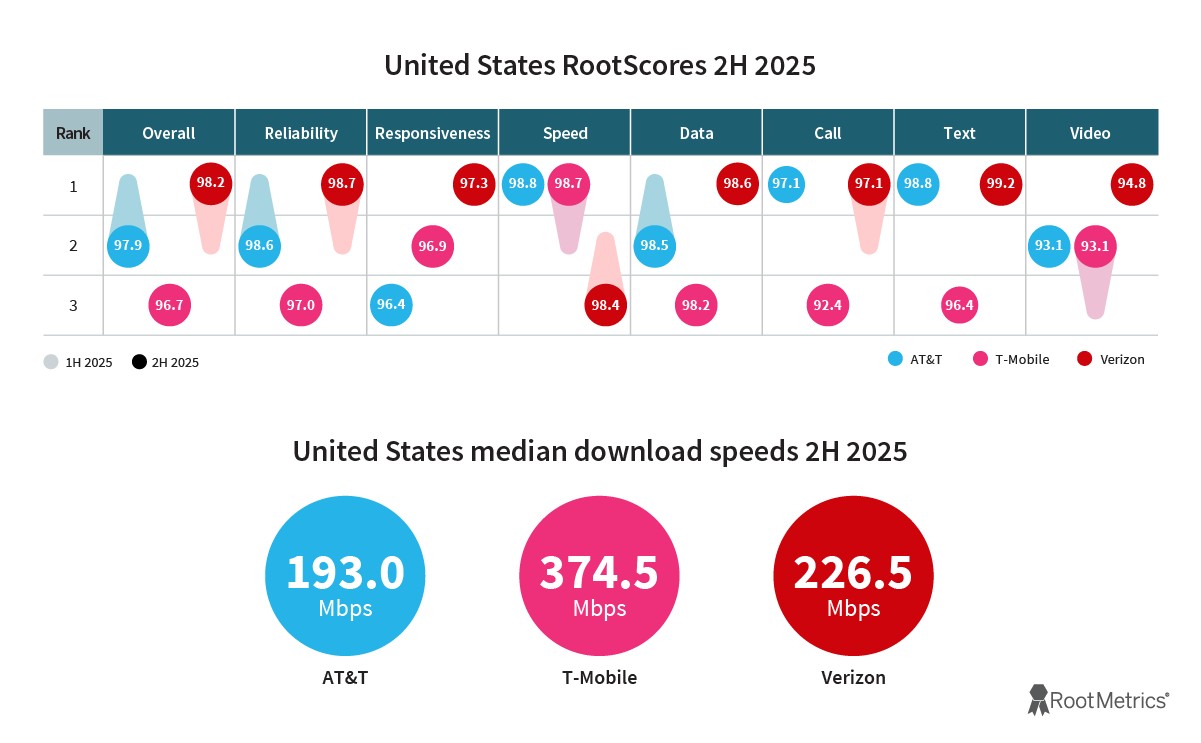
    The latest State of the Mobile Union report from RootMetrics is now live, providing analysis on which of the mobile carriers performed best in the second half of 2025. Performance is broken down into many different categories, as well as markets, which allows each carrier to get their fair share of awards for marketing purposes.

    The big awards are for 5G performance, network reliability, and network speed. There are also awards for things like call and text performance, but if you wanted to drop a Super Bowl commercial and tell potential customers you have the best network, you better have one of the top 3 categories under your belt. In Verizon’s case, they essentially swept the major categories, with T-Mobile tying for one, and AT&T tying for three. You can view those awards based on national performance below.


    Awards by Carrier

    Verizon

    • Overall Performance
    • Network Reliability
    • Network Responsiveness
    • Data Performance
    • Call Performance (Tie)
    • Text Performance (Tie)
    • Video Performance

    T-Mobile

    • Network Speed (Tie)

    AT&T

    • Network Speed (Tie)
    • Call Performance (Tie)
    • Text Performance (Tie)

    Once you dig a little deeper into the data, you’ll see that these carriers aren’t actually separated by a whole lot. With exception to median download speeds (where T-Mobile dominates), the big three are essentially neck and neck when scored out of 100 points.

    Viewing the trends is also helpful. Verizon’s number grew or stayed consistent in 7 out of 8 categories. Meanwhile, AT&T either dropped or stayed at the same score in all 8 categories. T-Mobile grew in two, speed and video performance, while the score went unchanged in the remaining. You can view the scores below.

    You can view the entire report by following the link below. There is helpful information in there, such as specific market data if you want to see who is performing the best in your area. It can be helpful if you’re shopping around.

    // Ookla

  • What OS is Best for Boomers and Beyond? Apparently Not Android

    What OS is Best for Boomers and Beyond? Apparently Not Android

    When I first got into Android, my mother also made the switch. Over time, the majority of my family (siblings, aunt, uncle, cousins, etc.) followed suit. While great, due to the nature of my work, I became the go-to “IT guy” for many of their problems. Then, one day, my mom decided to get an iPhone. Since then, she has hit me up maybe one time regarding an issue with her phone. How could this be? Is Android really that much more complicated? Convoluted? Buggy?

    Over on reddit, a user who goes by Not_Now_Cow (that’s awesome) posted the following: Do not get your grandparents Androids. As an Android fan, but someone who also uses an iPhone from time to time to keep things fresh and in perspective, I was curious how this person’s story might align with my own. I also hold the belief that a certain demographic among us would be better off with an iOS device or at least a Pixel phone.

    They wrote, “An elderly person comes in and their phone is riddled with ads that corrupt their phone into an unusable piece of technology. They only play one game and click an ad on accident and eventually run into an unstoppable onslaught of ads.” They finish up the post with, “Get them an iPhone first. I don’t care your allegiance. They all do the same thing but at least it will save them from the pain of an unusable phone.”

    I’m not sure which ads could be turning an Android phone into an “unusable piece of technology,” maybe because I know how to operate the device properly, but the existence of such ads don’t surprise me. I grew up using LimeWire and Kazaa. I know firsthand the evil nature of some software. RIP, my dad’s crappy Gateway computer.

    Is simply buying an iOS device the cure to these problems? I would argue that users should be educated when it comes to using apps and how to spot bad ads, but that process is probably a bit more hands on than simply opting for an iPhone at time of purchase. I believe there are plenty of mature buyers out there that can use an Android phone with zero issues. However, there are plenty out there that also seem completely lost. That’s just how it is sometimes.

    To my point earlier, Pixel phones seem to have that close-to-vanilla UI that the elderly can manage quite well. It’s simple and straightforward, while Samsung’s One UI can feel a bit overwhelming even to me at times.

    What’s your take in the great Android vs. iPhone for grandparents debate?

  • Pixel Weather App Called Out for Being Super Inaccurate

    Pixel Weather App Called Out for Being Super Inaccurate

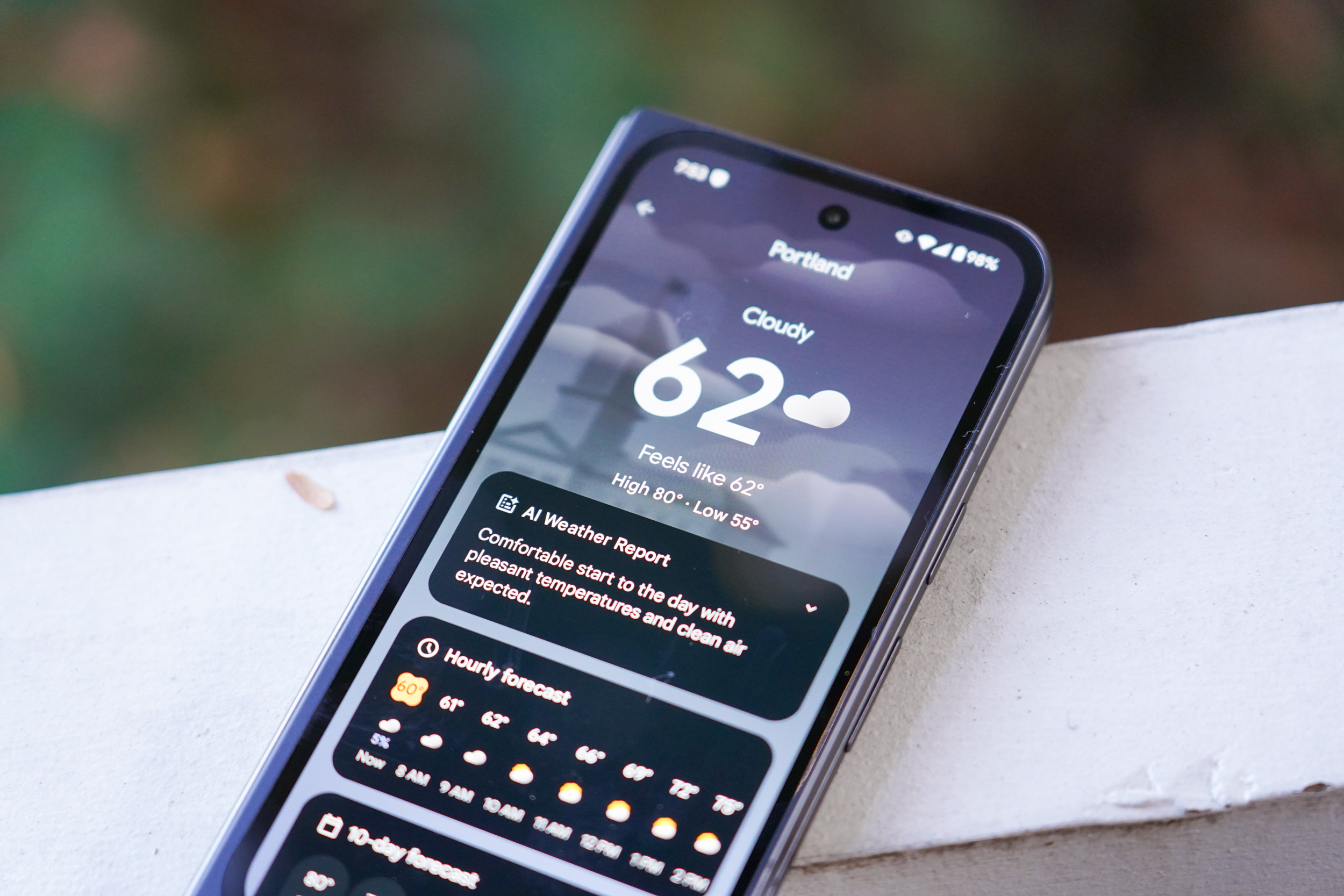
    Users are taking to the web, drawing attention to inaccuracies provided by the Pixel Weather app found on Google Pixel devices. Especially now, when parts of the US are bracing for a serious winter storm, the weather information we receive from our devices is more important than ever. It’s critical that the information be accurate. As one user puts it, “Google broke a working system.”

    To break down this issue, here’s how Google says the weather data and forecasting is designed to operate. As detailed in a Support page, “Google Weather forecast is created from an internal forecasting system that utilizes weather models and observations from global weather agencies.” There is also Google Nowcast, which are short-term precipitation forecasts. Google says, “Our nowcast uses radar and numerical weather prediction data, published by various data sources.”

    In summary, Google is collecting data from various sources (NWS, NOAA, Environment Canada, etc.) and running it through an internal forecasting system. This, when combined with artificial intelligence (now extremely prevalent inside Pixel Weather), seems to be where people are running into issues.

    The original post on reddit from user BurlyShlurb mostly describes an issue with AI and the “guessing” it appears to do when filling gaps in weather data. In the post they write, “Instead of just reporting what a thermometer says, the phone is now ‘simulating’ the weather using AI to fill in the gaps. It’s effectively ‘smoothing’ the data so much that it ignores local microclimates. It feels like the AI sees cold air in a nearby valley and just assumes my whole city is a freezer, rather than actually checking the physical sensor data at the airport.”

    What we take from the whole post is, instead of Google taking the data and providing it directly, it’s being ran through an AI model which is somehow either misinterpreting the data or simply showing it incorrectly. One example used was a current temperature at the user’s location. “I’m currently in Cranbrook, BC. Right now, my Pixel 10 is insistently telling me it’s -15°C. Meanwhile, the Environment Canada station down the street (and every other reliable source) has us at -7°C. That’s an 8-degree discrepancy.”

    And they aren’t the only one. The thread is full of users claiming that the Weather app has become highly inaccurate, gotten worse since the introduction of AI, and discussion concerning the cost between training an AI model to forecast weather versus reading and displaying weather data straight from a source without the need for AI interpretation.

    Our question to you all is, how’s that Pixel/Google Weather been treating you? Any issue with weather forecasting I have would typically be aimed at government budget cuts, but this particular user is located in Canada. What gives?

    Tell us about your Pixel Weather experience. Is it still accurate ever since AI started running the show?

  • Samsung January Updates Available for Download on These Galaxy Devices

    Samsung January Updates Available for Download on These Galaxy Devices

    The new year has brought out another month of fresh updates for Samsung devices. The Galaxy S25 line, as well as the two most recent foldables from Samsung, are all seeing new builds and security patches.

    Samsung 2026 January updates are available for the Galaxy S25 Ultra (and all other Galaxy S25 devices), Galaxy Z Fold 7 and Fold 6, and Galaxy Z Flip 7 and Flip 6. This is likely only the beginning, though, as so many other Samsung devices, like the Galaxy S24 and Galaxy S23 series are still very much within their window of support. The foldable side of things looks the same, with so many Fold and Flip devices scheduled to continue to receive updates for years to come.

    This new round of updates that you can download on your Samsung phone is really nothing more than a January security patch. Verizon details that it “provides the most up to date Android security patches” and nothing more. No mention of new camera or software features can be found this time around. But that’s not surprising, since we know One UI 8.5 is right around the corner with a revamped Bixby that is powered by Perplexity AI.

    Samsung January Updates (2026)

    • Galaxy S25 Ultra: S938USQS7BYLR
    • Galaxy S25 Edge: S937USQS4BYLR
    • Galaxy S25+: S936USQS7BYLR
    • Galaxy S25: S931USQS7BYLR
    • Galaxy Z Fold 7: F966USQS7AZA1
    • Galaxy Z Fold 6: F956USQS2CYL5
    • Galaxy Z Flip 7: F766USQS7AZA1
    • Galaxy Z Flip 6: F741USQS2CYL5

    UPDATE 1/22: The Galaxy S24 series is up next, all of which are just getting security patches.

    • Galaxy S24: S921USQS4CZA1
    • Galaxy S24+: S926USQS4CZA1
    • Galaxy S24 Ultra: S928USQS4CZA1

    Those are all of the new builds you’ll find for your devices, at least here in the US.

    To check for Samsung updates, head into Settings>Software update>Download and install.