Blog

  • Pixel 10a Hitting Online Retailers With February Launch Date

    Pixel 10a Hitting Online Retailers With February Launch Date

    The Pixel 10a could launch very soon in some new colors.

    After surprising us a bit with a March launch of the Pixel 9a last year, Google could be ready to bring us its successor even earlier. The Pixel 10a has started popping up on international retailers with colors, storage options, and a date we can all mark on the calendar for a potential arrival.

    First spotted by Roland Quandt, we think we’ve seen similar info now that matches the post he made. In his post to Bluesky, Quandt suggests the Pixel 10a will launch in 128GB and 256GB storage variants with color options of Obsidian, Berry, Fog, and Lavender. He mentions an arrival around mid February.

    Doing some digging following that note, we found at least one online retailer already posting similar details. This retailer lists those same colors and storage options, with a very specific February 17, 2026 launch date. They also list cases in each of those colors (Obsidian, Berry, Fog, and Lavender), which Google typically does with official cases as a way to match phone-to-case.

    For those not familiar with Google launches and early info, just know that through supply chain or distributor info, model numbers, color variants, and storage options almost always post early to the most random of online retailers. We followed the Pixel 10 series this way and many others for the past 7 or so years. This info then floods from one retailer to another with pricing info that is often not correct. However, the model numbers typically let us track these devices up until launch and help provide further info before Google can. This is the first time we’re seeing Pixel 10a make its way into that world.

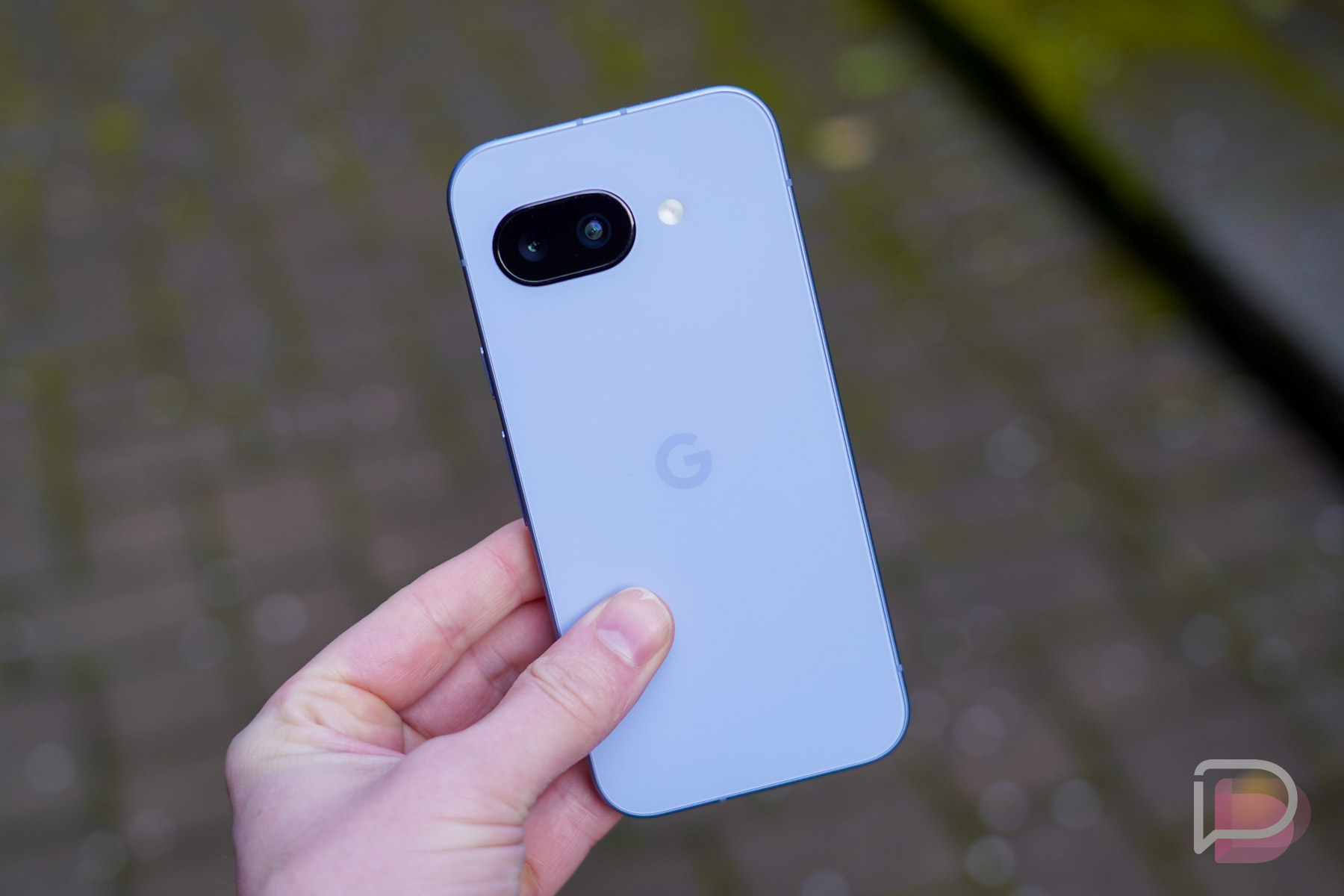
    As for the Pixel 10a, we believe it looks like this and that it might not be much of an upgrade over the Pixel 9a.

  • Google Play Services Updated With New Features

    Google Play Services Updated With New Features

    There’s a fresh Google Play Services update headed to devices, with a few new features inbound for the Android ecosystem, as well as a new Google Play store feature.

    Google notes new developer features for Google and third-party app developers to support Location and Context processes, updates to system management services, ability to view Google Wallet transactions from other devices and online purchases that use virtual card numbers, and more.

    Below, you’ll find the full changelog.

    Google Play services v26.01


    Developer Services

    • [Phone] New developer features for Google and third party app developers to support Location & Context related processes in their apps.

    System Management

    • [Auto, PC, Phone, TV, Wear] Updates to system management services that improve Stability.

    Wallet

    • [Phone, Wear] You can now view transactions from other devices and online purchases that use virtual card numbers.

    Google Play Store v49.7 (2026-01-12)

    • [Phone] Allow users to select from multiple prizes instead of receiving a single one.

    Have at it.

    // Google

  • Not Many, But Important Bug Fixes for Pixels in January Patch

    Not Many, But Important Bug Fixes for Pixels in January Patch

    Google has posted the changelog for January’s Pixel update. Unlike other months, there may not be countless fixes, but we still a few important ones.

    For example, there’s a fix for a battery drain issue that affected select models, a fix for an AOD flicker, as well as a fix for the touchscreens that would just stop working. These are all annoying bugs, so we’re happy to see they’re getting fixed this month.

    For the full changelog, look below, along with with devices the fixes apply to.

    The January 2026 update includes bug fixes and improvements for Pixel users – see below for details
    Audio

    Fix for noisy ringback tones experienced during Webex calls under certain conditions*[1]

    Battery & Charging

    • Fix for issue with battery draining in certain conditions*[2]

    Display & Graphics

    • Fix for issue with AOD flickering under certain conditions*[3]
    • Fix for noisy lines flashing on the screen when editing HDR photos in the Adobe Lightroom app under certain conditions*[3]
    • General improvements for GPU performance in certain conditions*[3]

    Touch

    • Fix for issue with touchscreen randomly stops working in certain conditions*[3]

    User Interface

    • Fix for an issue where deleting a Live Universe wallpaper could occasionally cause the Wallpaper and style app to become unusable until the device is rebooted*[1]

    ————————————————————————–

    Device Applicability

    Fixes are available for all supported Pixel devices unless otherwise indicated below. Some fixes may be carrier/region specific.

    • *[1]  Pixel 7a, Pixel 8, Pixel 8 Pro, Pixel 8a, Pixel Fold, Pixel Tablet, Pixel 9, Pixel 9 Pro, Pixel 9 Pro XL, Pixel 9 Pro Fold, Pixel 9a, Pixel 10, Pixel 10 Pro, Pixel 10 Pro XL, Pixel 10 Pro Fold
    • *[2]  Pixel 8, Pixel 8 Pro, Pixel 8a, Pixel Fold, Pixel Tablet, Pixel 9, Pixel 9 Pro, Pixel 9 Pro XL, Pixel 9 Pro Fold, Pixel 9a, Pixel 10, Pixel 10 Pro, Pixel 10 Pro XL, Pixel 10 Pro Fold
    • *[3] Pixel 10, Pixel 10 Pro, Pixel 10 Pro XL, Pixel 10 Pro Fold

    // Google

  • 2026 January Pixel Update Available for Your Pixel Phone

    2026 January Pixel Update Available for Your Pixel Phone

    We’ve entered 2026 and the first Google Pixel update of the year is here. For those with a still-supported Pixel phone or tablet or foldable, it’s time to grab the January Pixel update. For this January Pixel update, Google is pushing new builds to Pixel 7a up through the new Pixel 10 series. All Pixel 6 devices, as well as the Pixel 7 and Pixel 7 Pro do not yet have a January update.

    Since December brought us a major quarterly update (QPR2), this January update is going to be minor and should just take care of a handful of bugs while providing the latest in security patches. Specifically, Google has addressed 7 different bugs. Of course, if you want to play with the newest of the new, you could join the QPR3 beta program and test out the latest in Pixel features early.

    For those wondering where a Pixel 6 or 6 Pro, Pixel 7a, or Pixel 7 or Pixel 7 Pro update might be, we’ve documented their recent history. It sure looks at this point as if Google has demoted them to a quarterly schedule. They haven’t said that publicly, but they’ve missed enough updates recently to suggest as much.

    2026 January Pixel Update

    Global
      • Pixel 7a:                BP4A.260105.004.E1
      • Pixel Tablet:         BP4A.260105.004.E1
      • Pixel Fold:            BP4A.260105.004.E1
      • Pixel 8:                  BP4A.260105.004.E1
      • Pixel 8 Pro:           BP4A.260105.004.E1
      • Pixel 8a:                BP4A.260105.004.E1
      • Pixel 9:                  BP4A.260105.004.E1
      • Pixel 9 Pro:           BP4A.260105.004.E1
      • Pixel 9 Pro XL:      BP4A.260105.004.E1
      • Pixel 9 Pro Fold:   BP4A.260105.004.E1
      • Pixel 9a:                BP4A.260105.004.E1
      • Pixel 10:                BP4A.260105.004.E1
      • Pixel 10 Pro:         BP4A.260105.004.E1
      • Pixel 10 Pro XL:    BP4A.260105.004.E1
      • Pixel 10 Pro Fold: BP4A.260105.004.E1
    EMEA
      • Pixel 9:                    BP4A.260105.004.A2
      • Pixel 9 Pro:             BP4A.260105.004.A2
      • Pixel 9 Pro XL:       BP4A.260105.004.A2
      • Pixel 9 Pro Fold:    BP4A.260105.004.A2
      • Pixel 10:                  BP4A.260105.004.A2
      • Pixel 10 Pro:           BP4A.260105.004.A2
      • Pixel 10 Pro XL:     BP4A.260105.004.A2
      • Pixel 10 Pro Fold:  BP4A.260105.004.A2
    Japan
      • Pixel 9a:                  BP4A.260105.004.C2
      • Pixel 10:                  BP4A.260105.004.C2
      • Pixel 10 Pro:           BP4A.260105.004.C2
      • Pixel 10 Pro XL:     BP4A.260105.004.C2
      • Pixel 10 Pro Fold:  BP4A.260105.004.C2
    Verizon
      • Pixel 9a:                  BP4A.260105.004.B2

    Again, Google (and its carrier partners like Verizon, T-Mobile, and AT&T) will begin pushing these updates over-the-air shortly (Settings>System>Software updates>System update), but if you don’t want to wait for Google and prefer to update manually, you will soon find each factory image or OTA file at the links below. For instructions on how to flash a factory image, here you go. For instructions on how to flash an OTA .zip file, here you go.

  • Google Home Gets Fresh Set of Conditions and Actions for Improved Automation

    Google Home Gets Fresh Set of Conditions and Actions for Improved Automation

    Google Home is getting a fresh set of starters/conditions and actions this week. These additions should make the idea of automation a bit easier for users. For example, you can now turn on your coffee machine, arm a security system, and control your robot vacuum.

    Naturally, you’ll need devices that support these actions and starters/conditions, but with CES 2026 having ended and plenty of new smart home devices announced/launched, those options are ever growing.

    Below is the entire changelog for Google Home.

    Added features for home automations

    We are constantly improving our automation editors and abilities. Today we are releasing the below additional starters, conditions and actions.

    Starters/Conditions:

    • Control volume on your media device: e.g. “When the volume is 50…”
    • Control playback on your media device (playing, not playing, paused, buffering): e.g. “When the speaker is paused…” or “If the TV is playing…”
    • Set the brightness to a specific level: e.g. “When the brightness is above 80%”
    • Check the state of smart appliances* (stopped, running, paused, error): e.g. “When the washer is running…” or “If there is an error…”

    Actions:

    • Turn specific device on or off: e.g. “…turn off the coffee machine”
    • Arm a security system (no disarm yet): e.g. “…arm the security system”
    • Open and close a blind: e.g. “…open the living room blinds”
    • Set robot vacuum to pause, resume, or dock: e.g. “…pause the vacuum” or “…dock the vacuum”
    • Start, stop, resume, or pause smart appliances*: e.g. “…start the coffee machine ”, “…stop the washer” or “…pause the dryer”
    • Control light effects on smart bulbs (stop light only): e.g. “…stop the light effect”

    *Supported on select devices such as washers, dryers, and coffee machines. This is currently unsupported on smart ovens, robot vacuums, and robot mops.

    We are continuing to expand support for home automation capabilities so make sure to check back for updates to our release notes and Supported automation starters, conditions & actions.

    Easier feedback flow for AI descriptions

    Our AI description feature is currently in Early Access, and we’re so grateful to have you on this journey with us. To help us get it just right, we’ve made it easier than ever to share your thoughts.

    You can provide quick feedback with our feedback button in the event detail page now. You can also give a quick thumbs up or down or report a missing familiar face directly from the Familiar Face banner.

    Google Play Link

    // Google

  • Apple to Use Gemini to Power New Features on iPhone

    Apple to Use Gemini to Power New Features on iPhone

    Google and Apple released a joint statement today, announcing a multi-year collab which will bring Gemini to Apple’s ecosystem.

    The collaboration will have Gemini models and cloud technology be the base of the next-gen Apple Foundation Models. That means Gemini will power “future Apple Intelligence features,” including a more personalized Siri coming this year. If you’re an iPhone user, this is great news, because Gemini has only been getting better and more powerful since launch. And Apple Intelligence? Well, it leaves much to be desired.

    After careful evaluation, Apple determined that Google’s Al technology provides the most capable foundation for Apple Foundation Models and is excited about the innovative new experiences it will unlock for Apple users. Apple Intelligence will continue to run on Apple devices and Private Cloud Compute, while maintaining Apple’s industry-leading privacy standards.

    The first thing that comes to mind is Circle to Search. When using an iPhone, it’s the thing I miss most, so if Google can get it cooking on iPhone, I’d be a happy little user. No specific features were mentioned in the joint statement, but it should get both groups of users (iPhone and iOS) excited.

    This is big news for Google, Apple, and AI lovers.

    // Google

  • Galaxy S25 Sales Going Up When It Should Be Going Down

    Galaxy S25 Sales Going Up When It Should Be Going Down

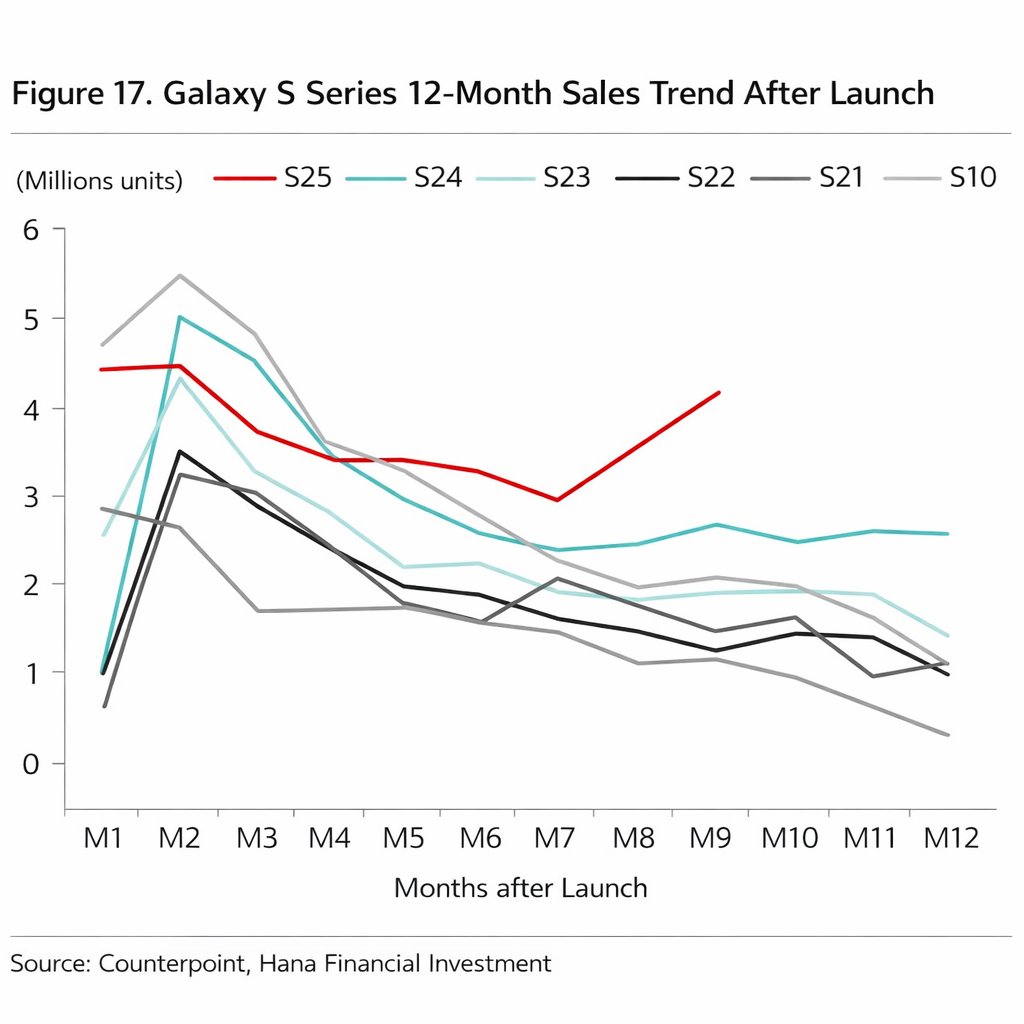
    There’s something funky going on with Samsung’s Galaxy S25 series sales numbers. As one might imagine, after the first few months of availability, demand tends to always tick in a downward line as we approach the launch of a new series. This has been the case dating back to at least the Galaxy S10 series. The story as we begin this new year — Galaxy S25 is defying this trend.

    What the numbers show: Thanks to Counterpoint, we have a 12-month sales chart dating back to the Galaxy S10 series. Sticking out is the fact that no series of phone ever reached near launch-level sales numbers a full nine months after launch. Galaxy S25 did just that, with a huge uptick in sales beginning in month seven. As all other series show, sales usually always dwindle significantly, but somehow Samsung stays selling the Galaxy S25.

    The only bummer is we don’t know what we can attribute this growth to, but we can speculate. There is a possibility that enterprise sales are assisting this figure, as well as the fact that Samsung has been pushing deals on the Galaxy 25 towards consumers like no one’s business. Whenever you look, Samsung has enhanced trade-in values, free storage upgrades, and plenty of additional incentives to help get people to buy. Whatever Samsung is doing, it seems to be working and maybe we’ll see it more often down the line.

    At a time when a lot of data would suggest people are holding onto their phones for longer periods, I would argue that thanks to carriers and yearly upgrade promotions (which keeps people on contract), some consumers are more comfortable upgrading year over year. That also helps drive units. After all, who doesn’t love getting a new phone every year?

    What’s your take on this data? Is the Galaxy S25 series simply that good or is there another factor we aren’t accounting for?

    // @UniverseIce

  • Screenshots Confirm Rebirth of Bixby, Powered by Perplexity AI

    Screenshots Confirm Rebirth of Bixby, Powered by Perplexity AI

    You thought Bixby was on its last breath? Think again, with new screenshots and intel suggesting that Bixby is about to have a serious AI glow up.

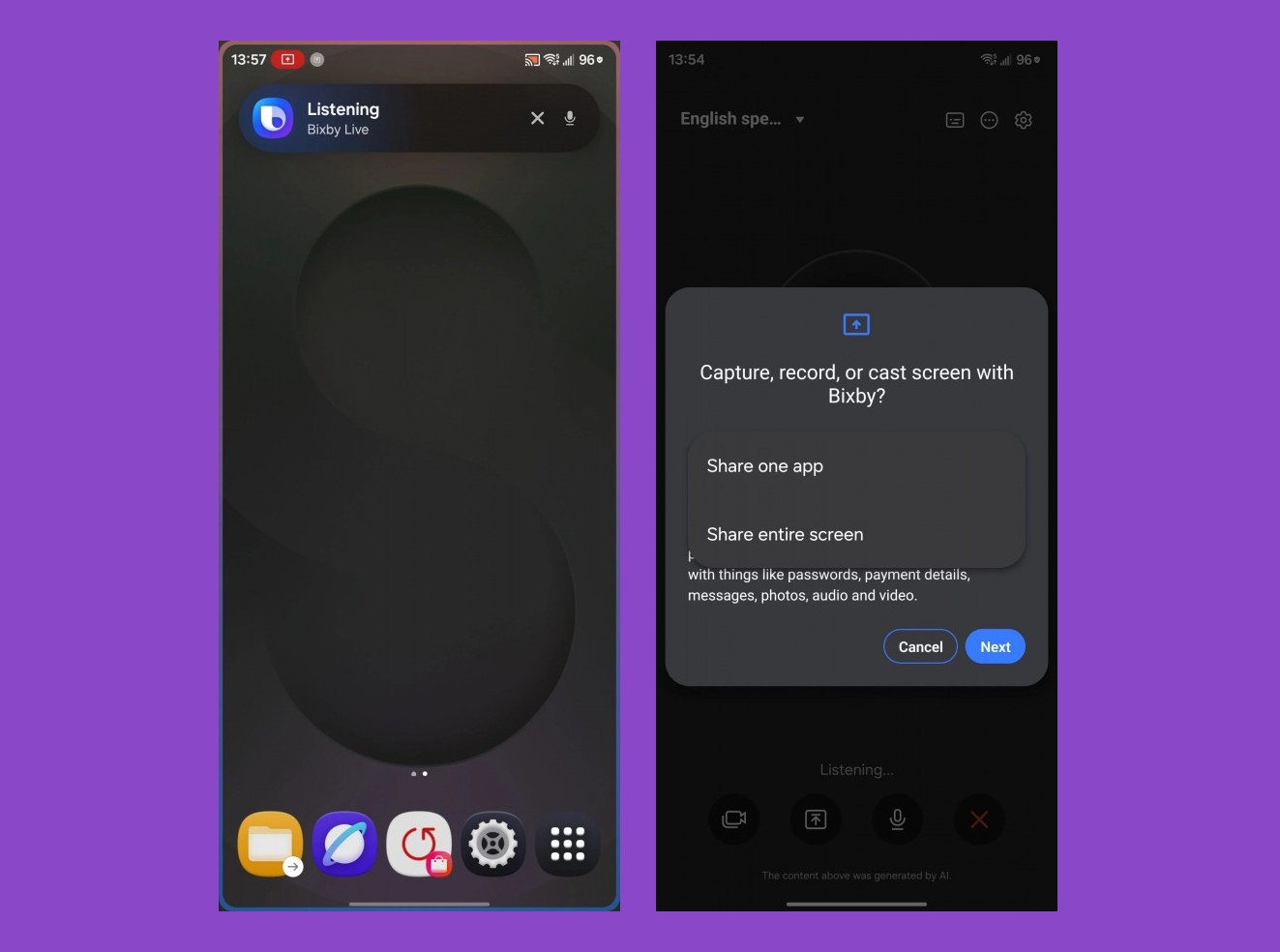
    Screenshots from One UI 8.5 suggest a bunch of new AI-powered features for Bixby, bringing many of the things we use Gemini for to Galaxy devices. While Gemini/Google has Circle to Search, Samsung is cooking up a Circle to Ask feature, as well as a Bixby Live feature that basically duplicates what people use Gemini Live for. For example, with Bixby Live, you can share your screen with the AI and discuss topics or show it your camera and talk about your surroundings. This all sounds super useful, but again, these are things Gemini does and it’s interesting to see Samsung want to move away from that.

    Powering this is Perplexity AI, which comes as no shock as there has been a lot of rumblings surrounding Samsung and its potential ditching of Google AI in favor of something else. While basic tasks, such as enabling/disabling system toggles can be handled by Bixby, anything that requires thinking will be handled by Perplexity. This is similar to how Apple uses AI, with simple things getting managed by Siri and more complex AI things (like generation) getting handed off to ChatGPT.

    Given the timing for all of this, we’re expecting Samsung to make an announcement at its Unpacked event for the Galaxy S26 lineup. Even if it’s a beta or something along those lines, it seems that much work has already gone into this.

    Welcome back, Bixby!

    // GSMArena | reddit